- Key Specs
- Form Factor: Tenkeyless (TKL) (The size, arrangement, and physical configuration of the product.)
- General
- Brand: Insignia™
- Model Number: NS-PNK6811
- Product Name: Wireless Keyboard with Touchpad
- Color: Black
- Features
- Numeric Keypad: false
- Touchpad: true
- Palm Rest: false
- Functions
- Form Factor: Tenkeyless (TKL) (The size, arrangement, and physical configuration of the product.)
- Number Of Keys: 87
- Connectivity
- Maximum Wireless Range: 32.8 feet
- Compatibility
- Operating System Compatibility: Chrome, Linux, Mac, Windows
- Plug and Play Operation: true
- System Requirements: PC: Windows Vista, 7, 8. 8.1 or 10; Mac: OS 10.X or later; Chrome or Linux operating system (The software that a product must have for it to be able to integrate with another product.)
- Power
- Battery Size: AA (The battery size required for operation.)
- Number of Batteries Required: 2
- Batteries Included: true (Indicates whether the product comes with the required batteries for its operation.)
- Dimensions
- Product Height: 0.7 inches (The out of box height of the item. Height is measured as the vertical distance from the bottom of the item to the top as it would be primarily used or placed.)
- Product Width: 5.7 inches (The out of box width of the item. Width is measured as the horizontal distance from one side of the item to the other as it would be primarily used or placed.)
- Product Weight: 19.2 ounces (The out of box weight of the item.)
- Other
- UPC: 600603186264
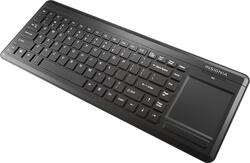
Browse the Web with this Insignia™ NS-PNK6811 keyboard, which features a built-in touchpad with 2 mouse buttons for simple navigation. The included USB dongle offers a wireless range up to 32.8' for flexible placement options.
- 87 keys: Offer a comfortable typing experience.
- Integrated touchpad with 2 mouse buttons: Enables simple navigation through Web sites and documents.
- Plug-and-play design: Offers simple setup.
- Wireless range up to 32.8': Allows you to work in a comfortable location.
- USB dongle: For a simple connection to your computer.
Whats Included
- 2 AA batteries
- Owner's manual
- Wireless Keyboard with Touchpad
- Wireless USB dongle
Q: Measurements in inches? Also, does it have "feet" in back to raise it up? Tx.
A: It's about 16" x 6" and yes, it has "feet" on the back to raise it up.
Q: Will the ns-pnk6811 work with a samsung un55j6200afxza tv?
A: Yes, this keyboard can be used through a USB slot.
Q: how to connect operator instructions
A: I hope you mean "connecting and operating instruction". If so, it's very easy, connecting goes as follow: 1. Put the batteries properly correctly in the keyboard and it's automatically turned on. 2. Insert the USB transceiver to its port. 3. Wait awhile the first time you put it in, as the software is probably being installed. 4. After maybe a minute or 2, test the touch pad, if it works, that's it. Operating is like most keyboard/touchpad: Use a finger to move the pointer. Use two fingers to scroll up/down or left/right. Two finger pinch/spread to zoom in/out. Etc...
Q: does this keypad come with cap off light?
A: No. It doesn't have any light for caps button.
A: No, this product does not have multimedia shortcuts.
Q: are the keys on this keyboard full size?
A: Yes, the keys on the keyboard are full size.
Q: Does it work with mac pro computer? Thanks
A: This product works with Windows Vista, 7, 8. 8.1 or 10, OS 10.X or later; Chrome or Linux operating system.