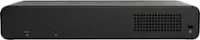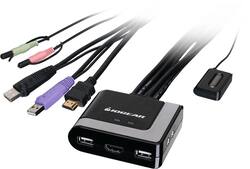
IOGEAR - 2-Port KVM/HDMI/Audio/USB Switch - Black
- Key Specs
- Form Factor: Desktop
- Number of LAN Ports: 2 (Number of devices able to be connected to the Local Area Network (LAN). LAN ports allow wired connections to other networking devices (wireless access points, range extenders, etc.) in order to share the internet connection received through a WAN port.)
- General
- Brand: IOGEAR
- Model Number: GCS2HU
- Product Name: 2-Port KVM/HDMI/Audio/USB Switch
- Color: Black
- Dimensions
- Product Height: 1 inches (The out of box height of the item. Height is measured as the vertical distance from the bottom of the item to the top as it would be primarily used or placed.)
- Product Length: 2.5 inches (The out of box length of the item. Length is measured as the longest dimension of the item.)
- Product Width: 3 inches (The out of box width of the item. Width is measured as the horizontal distance from one side of the item to the other as it would be primarily used or placed.)
- Other
- UPC: 881317517661
Customize your computer setup with this IOGEAR two-port HD cable KVM switch. Plug-and-play operation allows for easy setup, so you can quickly connect up to two external devices to your computer. Support for up to 4K UHD makes this switch ideal for gaming and video editing, while the USB port provides additional connection options. This IOGEAR two-port HD cable KVM switch brings big bass and dynamic audio to your computer for an immersive listening experience.
- 2-port KVM/audio/USB switch: Provides a wired network connection for up to 2 devices.
- Supports video resolutions up to 4K UHD (3840 x 2160 @30Hz) with HDMI connections: To ensure high-quality image display.
- Complies with a variety of standards: Including FCC Part 15 and EDID compatible.
- DisplayPort compatible: Use Insignia DisplayPort-to-HDMI adapters for DisplayPort sources. (Sold separately)
- Plug-and-play installation: For easy setup.
- 2-port KVM/audio/USB switch: Provides a wired network connection for up to 2 devices.
- Supports video resolutions up to 4K UHD (3840 x 2160 @30Hz) with HDMI connections: To ensure high-quality image display.
- Complies with a variety of standards: Including FCC Part 15 and EDID compatible.
- DisplayPort compatible: Use Insignia DisplayPort-to-HDMI adapters for DisplayPort sources. (Sold separately)
- Plug-and-play installation: For easy setup.
Whats Included
- 1 x Manual
- 1 x Warranty Card
- IOGEAR 2-Port KVM/HDMI/Audio/USB Switch
- 1 x Manual
- 1 x Warranty Card
- IOGEAR 2-Port KVM/HDMI/Audio/USB Switch
Q: Is there a similar product to use with two monitors instead of one?
A: Not that I know of.
A: I am connected to one monitor and two laptops and switch between the two. So I suppose if the LCD projector is used instead of a monitor (HDMI), then that could work.
A: Check your power setting, it seems your Dell is going into hibernation. Usually need to a wakeup command ( power switch) to wake it up.
A: Probably not. It is HDMI out only unless you purchase aVGA to HDMA adapter.
Q: How to do connect Bose speakers to this, i attached a pic of the spwakers
A: If the speakers have a single cable (usually green end) just plug into speaker port. If not, it may need an adapter
A: This is a KVM (keyboard/video/mouse) - no network connections. Each system must be connected on its own line/wireless.
A: I used it on the exact keyboard and mouse combo. It takes a second or two to register to the active pc, but it does work. Fast switching between PCs will cause a lag issue and may freeze the device for a minute or two.
Q: I have a laptop with a display port a desktop with hdmi and an hdmi monitor--will this switch work?
A: If you have a Display port to hdmi adapter it should work fine