iVANKY - 20-in-1 FusionDock Dual Thunderbolt 4 Chips Docking Station with Thunderbolt 5 Cable for MacBooks M1 to M5 - Midnight Blue
About this product
Take your creative media workflow to a new level with the FusionDock Max 1 with Thunderbolt 5 Cable bundle from iVANKY. Designed specifically for MacBooks and Mac Minis equipped with M1 to M5 chips, this docking station enhances your productivity by simultaneously supporting up to four high-resolution displays in addition to providing a variety of high-speed USB ports. This bundle includes a 240W Thunderbolt 5 cable from iVANKY that delivers up to 80 Gbs bi.directional data and up to 120 Gbs bandwidth.
Dual Thunderbolt 4
Equipped with two Thunderbolt 4 chips, the FusionDock Max 1 provides smooth performance across up to four displays and all its data ports. The two Thunderbolt 4 upstream ports connect to your MacBook through the included dual USB-C cable and support up to 100W power delivery.
Import and Backup In a Snap
Spend less time waiting for files to transfer with four 40 Gb/s Thunderbolt 4 ports, which are available alongside two 10 Gb/s USB-C and six USB-A ports.
2.5G Ethernet
Take full advantage of multi-gig internet services and compatible network devices such as NAS systems with the 2.5 Gb/s Ethernet port.
Dock Security
Safeguard your FusionDock Max 1 in co-working spaces, offices, or classrooms with the iVANKY security slot.
Floating Design
The iVANKY FusionDock Max 1 features a floating design that lifts the bottom from the desktop surface to provide efficient airflow and optimal performance. Connect the dock to your compatible Mac using the dual USB-C cable to get started.
- Maximum Number of Displays Supported4Maximum Supported Resolution8K (4320p), 4K (2160p)Number of DisplayPort Outputs (Total)4Number of Thunderbolt Ports (Total)2
Reviews
Rating 5 out of 5 stars with 1 review
The vast majority of our reviews come from verified purchases. Reviews from customers may include My Best Buy members, employees, and Tech Insider Network members (as tagged). Select reviewers may receive discounted products, promotional considerations or entries into drawings for honest, helpful reviews.
Compare similar products

Take your creative media workflow to a new level with the FusionDock Max 1 with Thunderbolt 5 Cable bundle from iVANKY. Designed specifically for MacBooks and Mac Minis equipped with M1 to M5 chips, this docking station enhances your productivity by simultaneously supporting up to four high-resolution displays in addition to providing a variety of high-speed USB ports. This bundle includes a 240W Thunderbolt 5 cable from iVANKY that delivers up to 80 Gbs bi.directional data and up to 120 Gbs bandwidth.

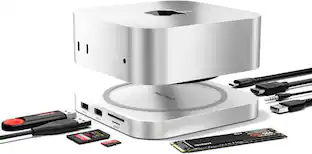
FusionDock 3 combines 13-in-1 expandability and NVMe SSD storage into a single, compact solution purpose-built for the Mac mini M4. From ultra-fast data transfer to crisp 4K@120Hz display output, it’s the ultimate desktop upgrade for creatives, developers, and power users.

23-in 1 TS5 FusionDock Max 2 is the only Thunderbolt 5 dock that enables native triple-display on MacBook — with next-gen 120 Gbps transfer speeds, 140W fast charging, and 23 high-performance ports.
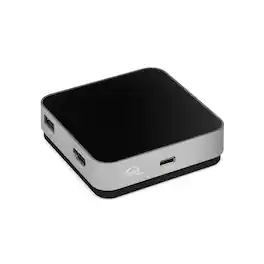
With 5 essential ports, up to 100W of pass-through charging, and just one cable, the USB-C Travel Dock is ready to display, charge, connect, and import while you're on the move. Palm-sized and lightweight, it slips easily into your bag and stays neat and tidy with built-in cable storage. Catch your inspiration The USB-C Travel Dock helps lighten your load of adapters and dongles while expanding your connectivity options – USB-C, USB-A, SD Card, and HDMI ports. With minimal gear, you can find inspiration anywhere, download your SD card quickly, and keep covering the moment. In addition to USB Type-C connectivity, the OWC USB-C Travel Dock is also fully compatible with Thunderbolt 3 equipped Macs and PCs as well as iOS, Android, and Chrome OS devices, and may be connected directly through a Thunderbolt 3 port on a computer or Thunderbolt 3 device. Powerful options When you're on the go, having power and charging options can help keep your work flowing. The USB-C Travel Dock can be used via bus power when you don't have access to a power outlet. Or use your notebook's USB-C adapter to deliver up to 100W of pass-through power and use the open port on your computer to connect another device.
Specs
Be the first to ask a question.
We’ll try to get your question answered within 24 hours by a Best Buy customer or brand representative.
Find more like this



Explore tech essentials Sponsored
 $111.00The price was $139.00



Discover related products
 $49.99The price was $59.99
 $591.99The price was $659.99
 $12.99The price was $13.99
 $504.68The price was $535.66
 $249.00The price was $275.00










Keep exploring
 $38.99The price was $45.99