Main Content
product image

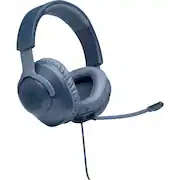
JBL - Quantum 100 Surround Sound Gaming Headset for PC, PS4, Xbox One, Nintendo Switch, and Mobile Devices - Blue

Model: JBLQUANTUM100BLUAM
SKU: 6408550
This item is no longer available in new condition. See similar items below
  • Key Specs
    • Sound Mode: Stereo, Surround
    • Connection Type: Wired
    • Built-In Microphone: true
    • Microphone Features: Detachable
    • Headphone Fit: Over-the-Ear
    • Adjustable Headband: true
    • Compatible Platform(s): Mac, Nintendo Switch, PlayStation 4, Windows, Xbox One
  • General
    • Brand: JBL
    • Model Number: JBLQUANTUM100BLUAM
    • Product Name: Quantum 100 Surround Sound Gaming Headset for PC, PS4, Xbox One, Nintendo Switch, and Mobile Devices
    • Color: Blue
  • Audio
    • Sound Isolating: true
    • Minimum Frequency Response: 20 hertz (Describes the maximum range of frequencies or musical tones a product can reproduce, from very low tones to very high treble tones. The minimum frequency or musical tone the speaker can reproduce. High treble tones have higher frequencies while low tones and deep bass have lower frequencies.)
    • Maximum Frequency Response: 20 kilohertz (Describes the maximum range of frequencies or musical tones a product can reproduce, from very low tones to very high treble tones. The maximum frequency or musical tone the speaker can reproduce. High treble tones have higher frequencies while low tones and deep bass have lower frequencies.)
    • Impedance: 32 ohms (Describes the resistance of an electric signal throughout the system. Devices with low impedance require less power to deliver optimal signals but are more at risk for damage from overloading. Higher impedance requires more power but is more protected from overload damage.)
    • Sensitivity: 96 decibels adjusted
    • Sound Mode: Stereo, Surround
    • Driver Size: 40 millimeters
  • Connectivity
    • Connection Type: Wired
    • Connector Size: 1/8 in. (3.5mm)
  • Features
    • Built-In Microphone: true
    • Microphone Features: Detachable
    • Controls: Mute, Volume
  • Design
    • Headphone Fit: Over-the-Ear
    • Style: Gaming
    • Adjustable Headband: true
  • Compatibility
    • Compatible Platform(s): Mac, Nintendo Switch, PlayStation 4, Windows, Xbox One
  • Dimensions
    • Product Weight: 0.49 pounds (The out of box weight of the item.)
    • Cord Length: 3.94 feet
  • Other
    • UPC: 050036369671

Enjoy the powerful sound of these blue JBL Quantum 100 gaming headphones. The lightweight headband and memory foam ear cushions offer comfort, allowing extended gaming hours, while the QuantumSOUND Signature feature delivers a realistic soundscape. These JBL Quantum 100 gaming headphones have a detachable voice focus directional microphone, letting you communicate clearly with teammates.

Video Game Hardware and Accessory Buying Guide

  • JBL Quantum Sound Signature: Delivers a realistic soundscape for a competitive advantage in any battle.
  • Works with Windows Sonic spatial sound: Immerse yourself in gameplay with the native surround sound system built into Windows 10 PCs and Xbox™ One consoles.
  • Compatible with wide range of gaming devices: Intended for use with PC, Xbox™, PlayStation™, Nintendo Switch™, Mac, VR, and mobile devices.
  • Detachable microphone: Lets you rally troops and opponents with clarity.
  • Lightweight headband and memory foam ear cushions: You can play longer with maximum comfort.
  • Built-in controls: Simply adjust the volume, or mute the microphone.
Whats Included
  • JBL Quantum 100 Surround Sound Gaming Headset for PC, PS4, Xbox One, Nintendo Switch, and Mobile Devices
  • Windshield foam for microphone
  • Owner's manual

Q: is jbl made in china?

A: Our products are designed in the USA and are manufactured and assembled in China.

Q: The mic on the headset stopped working for some reason in a middle of the game I've tried everything is there a way to fix it I didnt break it just stopped working randomly Can you help?

A: We're sorry to hear about what happened. Here are some troubleshooting steps for us to check your JBL Quantum 100. Please try to unplug and plug the mic and makes sure it's plugged all the way to the mic port. Try using a different source ex. (phone, tablet, PC, laptop) for us to check if the mic works using a different device. If you need more assistance, please contact our customer support for assistance: https://support.jbl.com/us/en/#call

Q: Is there a mute button?

A: Yes there is a Mute button on the left ear. In for Mute, Out for Unmute.

Ask BlueBETA
Ask a question