
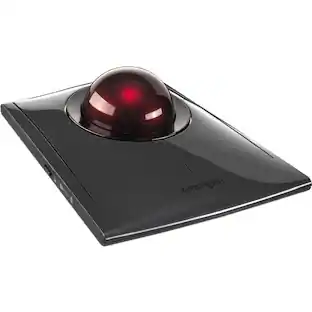
Kensington - Expert Wireless Trackball Ambidextrous Mouse - Black
- General
- Brand: Kensington
- Model Number: K72359WW
- Product Name: Expert Wireless Trackball Ambidextrous Mouse
- Color: Black
- Features
- Mouse Type: Standard
- Performance
- Mouse Operation: Button(s)
- Mouse Grip Style: Ergonomic (In comparison to many palm and claw grips, ergonomic grip mice are designed for a specific handedness and put the hand and wrist in a position to promote comfort. Customizable grips feature buttons/keys that can be configured to perform specific actions and may also have customizable calibration and sensitivity settings.)
- Handedness: Ambidextrous
- Tracking Method: Trackball (There are several types of computer mice, optical and laser being among the most common. Optical mice detect less detail and provide more precise and accurate movement. Laser mice detect more detail and can be used on a wider variety of surfaces, but are more sensitive to small movements.)
- Connectivity
- Wireless Connectivity: Bluetooth (The manner in which a device sends data to another device over a short distance without the use of wires or cables.)
- Operating System Compatibility: Apple iOS, Windows
- Power
- Mouse Power Source: Battery-powered
- Rechargeable Battery (Mouse): false
- Dimensions
- Product Height: 10.25 inches (The out of box height of the item. Height is measured as the vertical distance from the bottom of the item to the top as it would be primarily used or placed.)
- Product Width: 7 inches (The out of box width of the item. Width is measured as the horizontal distance from one side of the item to the other as it would be primarily used or placed.)
- Product Weight: 39.69 grams (The out of box weight of the item.)
- Other
- UPC: 085896723592
Navigate your desktop with precision and speed with this Kensington wireless trackball mouse. Scan through documents in seconds with the unique scroll ring, and customize your trackball to suit your needs with the free TrackballWorks software. When paired through Bluetooth, this Kensington wireless trackball mouse saves valuable USB port space.
- Wireless connection: Via Bluetooth® 4.0 LE or USB nano receiver.
- TrackballWorks™ software: Lets you customize all 4 buttons, adjust cursor speed.
- DiamondEye™ optical tracking technology: For premium cursor control and accuracy.
- Award-winning Scroll Ring: Lets you quickly scan up and down web pages or long documents.
- Large ball: Designed as a perfect sphere to provide exceptional precision.
- Detachable wrist rest: Supports hand and wrist for ergonomic comfort.
- Ambidextrous design: Works equally well for both right-handed and left-handed users.
- Auto-sleep: Helps conserve AA battery life.
- Compatibility: Chrome OS 44 and above, Mac OS 10.8, Mac OS 10.9, Mac OS X 10.10, Mac OS X 10.11, Windows 10, Windows 7, Windows 8, Windows 8.1.
Whats Included
- Expert Mouse Wireless Trackball
- Owner's manual
Q: Is this compatible with Windows 10?
A: Yes. That is what I am using.
Q: Does the nano receiver come with the trackball?
A: Yes, it does.
Q: How do you scroll with this if there is no wheel?
A: There is a nurled ring around the actual trackball that controls the scrolling function. Additionally the speed of scrolling can be adjusted using the Trackworks utility that can be downloaded from the Kensington website. It took some to get time to get used to it but I find that I am beginning to get comfortable with it.
Q: Does this help with carpal tunnel or with pain for long days at the desk?
A: I don't know about carpal tunnel. But it helped me stop the recurring trigger finger problem that I had.
Q: What diamiter is the track ball?
A: 2 inches
A: undefined
A: Is too big to hold in your hand.
Q: Does it come with the mouse rest pictured?
A: Yes. Wrist wrest attaches securely to the bottom of the ExpertMouse Trackball.
People also viewed
 $49.99The price was $59.99
 $166.49The price was $179.99

Today's top picks
 $449.99The price was $829.99
 $2,449.99The price was $3,199.99
 $199.99The price was $249.99
 $999.98The price was $1,639.98










