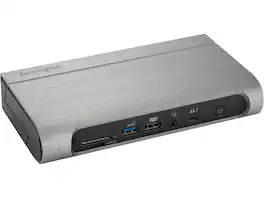
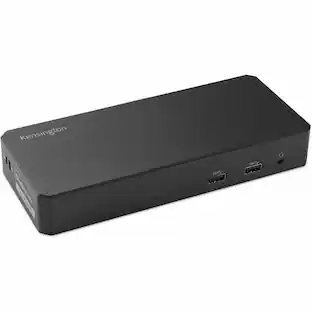
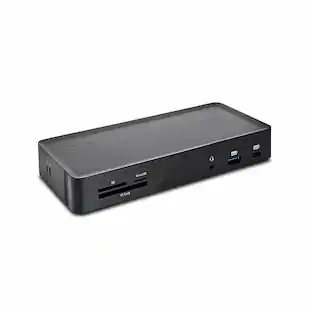
Kensington - SD5900T Docking Station - for Notebook, Smartphone, Memory Card Reader, Monitor, AirPods, Solid State Drive - Blue
Reviews coming soon
About this product
More screens, more speed, and more power for MacBook setups. A typical Thunderbolt 4 dock only supports a single display for MacBook M1/M2/M3 base chipset models. For busy professionals juggling multiple tasks and projects, this means minimizing and toggling between windows to meet workflow demands, hampering productivity and focus. The SD5900T EQ Thunderbolt 4 Quad 4K 40Gbps Dock leverages the power of Thunderbolt 4 and DisplayLink® technology to expand your visual workspace, boost productivity, and future-proof your setup - unlocking the full potential of your MacBook to support unrivaled connectivity and seamless multi-tasking. Up to Quad 4K Video via HDMI®, DP, and Thunderbolt Supports MacBooks with M1, M2, and M3 chipsets running macOS (11 or later) Data transfer speeds up to 40Gbps Daisy chain support Intel VT-d DMA protection Up to 100W charging (96W certified) Productive 16-in-1 design Composed of 100% post-consumer recycled (PCR) aluminum KonstantCharge ensures your devices remain charged even when the host cable is unplugged from your laptop. Zero-footprint mounting option Security cable lock slots 3-Year limited warranty
Features
Kensington SD5900T Docking Station - for Notebook
More screens, more speed, and more power for MacBook setups. A typical Thunderbolt 4 dock only supports a single display for MacBook M1/M2/M3 base chipset models. For busy professionals juggling multiple tasks and projects, this means minimizing and toggling between windows to meet workflow demands, hampering productivity and focus. The SD5900T EQ Thunderbolt 4 Quad 4K 40Gbps Dock leverages the power of Thunderbolt 4 and
Thunderbolt™ 4 & DisplayLink® Integration
Combines Thunderbolt™ 4’s 40Gbps bandwidth with DisplayLink® technology to deliver seamless video, data, and power connectivity across multiple devices.
Comprehensive Port Selection
Includes 3 x DisplayPort 1.2, 2 x HDMI, 2 x USB-C, 3 x USB-A, 1 x RJ-45 Ethernet, and audio combo jack for versatile peripheral and network connections.
Universal Compatibility
Works with Windows and macOS systems, including MacBook M1/M2/M3/M4 base chipsets, enabling full multi-display functionality across platforms.
Sleek, Professional Design
Finished in Midnight Blue, the compact form factor fits neatly into any workspace while offering robust connectivity and high-end performance.
Specifications
- Maximum Number of Displays Supported4Number of DisplayPort Outputs (Total)3
Reviews
This product doesn't have any reviews yet.





Compare similar products

More screens, more speed, and more power for MacBook setups. A typical Thunderbolt 4 dock only supports a single display for MacBook M1/M2/M3 base chipset models. For busy professionals juggling multiple tasks and projects, this means minimizing and toggling between windows to meet workflow demands, hampering productivity and focus. The SD5900T EQ Thunderbolt 4 Quad 4K 40Gbps Dock leverages the power of Thunderbolt 4 and DisplayLink® technology to expand your visual workspace, boost productivity, and future-proof your setup - unlocking the full potential of your MacBook to support unrivaled connectivity and seamless multi-tasking. Up to Quad 4K Video via HDMI®, DP, and Thunderbolt Supports MacBooks with M1, M2, and M3 chipsets running macOS (11 or later) Data transfer speeds up to 40Gbps Daisy chain support Intel VT-d DMA protection Up to 100W charging (96W certified) Productive 16-in-1 design Composed of 100% post-consumer recycled (PCR) aluminum KonstantCharge ensures your devices remain charged even when the host cable is unplugged from your laptop. Zero-footprint mounting option Security cable lock slots 3-Year limited warranty

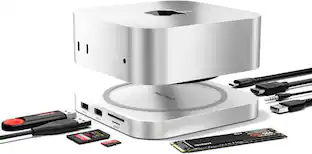
Transform your desk with the Thunderbolt 5 CubeDock, a compact precision-milled aluminum dock that powers your laptop, drives multi-displays up to 8K, and expands your entire setup through a single Thunderbolt 5 connection. With up to 120Gbps bandwidth (USB4 v2 compatible), built-in NVMe SSD enclosure supporting up to 8TB at 6000MB/s, 140W laptop charging, 30W USB-C PD, UHS-II SD/microSD (312 MB/s), USB-C/A 10Gbps, 2.5Gb Ethernet, and smart active cooling, it delivers workstation-level performance in a refined, desk-friendly form. Compatible with: Downwards compatible with Thunderbolt 4, USB 4 devices | MacBook Pro 14/16-inch (2026 M5/M4/M3/M2/M1), MacBook Air 13/15-inch (2026 M5/M4/M3/M2/M1), iPad Pro 11/13-inch (2025 M5/M4), Mac Mini (2026 M6, M5 Pro, M4 Pro, M4), iMac (2024 M4/M3/M1), Mac Studio (2026 M5 Max/Ultra, M4 Max, M3 Ultra M2, M1), Thinkpad X1, X13, Surface Studio 2/1, Surface Pro 11/10/9, Windows laptop, Thunderbolt devices.
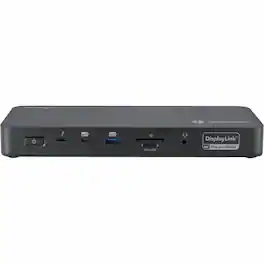
More screens, more speed, and more power for more setups. IT professionals working in mixed technology environments often struggle to find docking solutions that maximize the capabilities of different laptops and operating systems. For those seeking a high-speed dock that can support up to four external displays, the SD5910T EQ Thunderbolt 4 Quad 4K Hybrid Dock with DisplayLink® Technology is a versatile docking station that can unlock the full potential of premium laptops. Ideal for Thunderbolt 4, Thunderbolt 3, USB4®, and USB-C® devices running Windows and ChromeOS, the SD5910T EQ Thunderbolt 4 Quad 4K Hybrid Dock with DisplayLink® Technology delivers more screens, more speed, and more power for more setups-so everyone can be more productive and focused. Up to Quad 4K Video via HDMI®, DP, and ThunderboltThunderbolt 4, Thunderbolt 3, USB4®, and USB-C® devicesWindows (10 or later) and ChromeOS (114 or later)Data transfer speeds up to 40GbpsDaisy chain supportIntel VT-d DMA protectionUp to 100W charging (96W certified)Productive 16-in-1 designComposed of 100% post-consumer recycled (PCR) aluminum*Zero-footprint mounting optionSecurity cable lock slots3-Year limited warranty
Kensington SD5800T Thunderbolt 4 and USB4 Quad 4K Display Docking Station, 100W Charging, 2 x HDMI, 2 x DP, 2.5G Ethernet, Card Readers, for Windows/MacOS (K32856NA)
Specs
Be the first to ask a question.
We’ll try to get your question answered within 24 hours by a Best Buy customer or brand representative.
Customers often buy these together
Intel Core Ultra 5 225 - 10-Core (6P+4E) 3.3GHz/2.7GHz LGA 1851 65W Desktop CPU
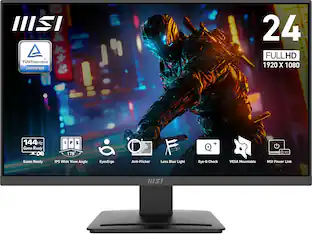
$169.99The price was $209.99MSI PRO MP243L E14 24" FHD IPS 144Hz 1ms Adaptive-Sync HDR Ready (HDMI,VGA)
$79.99The price was $109.99CORSAIR DARK CORE RGB PRO Wireless FPS/MOBA/MMO Optical Gaming Mouse with Slipstream Technology
Holiday Deal$73.99The price was $99.99










More to consider



Explore tech essentials Sponsored
SANDISK 500GB Portable SSD speeds up to 1000 MB/s, up to 2-meter drop protection
$99.99The price was $119.99


Keep exploring
Plugable USB 3.0 and USB-C Universal Laptop Docking Station for Windows, Mac, ChromeOS | Dual HDMI
$99.84The price was $143.99Dockztorm 11-in-1 RGB Docking Station for ROG Xbox Ally, ROG Ally X, ROG Ally, Steam Deck (OLED), Legion Go, MSI Claw
Holiday Deal$49.99The price was $85.99