Rating 4.4 out of 5 stars with 543 reviews
4.4- Screen Size (137)
- Speed (73)
- Ease of use (63)
- Performance (38)
- Design (29)
- USB Ports (10)
- Camera Quality (8)
- Mouse (8)
- Sleep Mode (6)
- Fan Noise (3)
Customer Images
The vast majority of our reviews come from verified purchases. Reviews from customers may include My Best Buy members, employees, and Tech Insider Network members (as tagged). Select reviewers may receive discounted products, promotional considerations or entries into drawings for honest, helpful reviews.
- Rated 4 out of 5 stars
Great Computer Despite its Structural Design
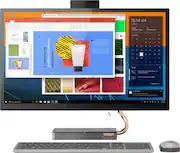
The all-in-one computer works well in my office space. The 27” screen really makes viewing items easy. A second monitor is easy to add. The 12GB allows the computer to run multiple programs at a time. The flat cell phone charger is a nice add. Now, the reason for 4 stars, instead of five. The need to charge the wireless keyboard, rather than having it battery operated is a hassle with the cord. There aren’t enough USB ports or HDMI ports for people who have to connect/attach additional items. The location of the existing ports, located in the back of the monitor, is not convenient and requires the user to walk around the computer to access it. The pop-up camera ‘feels’ a bit flimsy in its construction.
Posted by JourneyGal70
- Rated 5 out of 5 stars
Our family loves this desktop!
Our family needed a "home base" computer and we have all loved and enjoyed this Lenovo IdeaCentre 27" Touch-Screen All-In-One. Not only does this desktop look beautiful and sleek, it offers a charging pad and a powerful JBL speaker with great sound quality. The accessories are lightweight and hold a charge for quite some time have held up very well to daily use by multiple family members. We have been very happy to have this desktop in our home!
Posted by EmilyB
- Rated 4 out of 5 stars
Great big illuminated screen!
An ideal desktop computer for daily tasks, general visualization of tasks, movies, videos... at a great price for everything you have. And the best thing about an all-in-one is that it doesn't have many cables. wireless mouse and keyboard. wireless devices charging. Amazing!
Posted by Pefebar
- Rated 5 out of 5 stars
Great package for the price!!
This all in one has better specs for a better price than any of its competitors. The screen itself is worth the price. Great touchscreen response and quality rechargeable keyboard and mouse included. The charging pad on the base works but you have to place the item just right to get it to charge. The color palette is elegant and hip at the same time. Not a fan of the pop up camera but what are you gonna do...Not a lot adjustability in the screen hinge. We use this for Adobe illustrator and other graphics heavy apps.
Posted by Jack1305
- Rated 5 out of 5 stars
All in 1 computer
I absolutely love this computer. We tried to get a chrome book but was limited on what you can do with it. Returned and purchased this computer. Keeping it forever
Posted by Liizziiemarie27