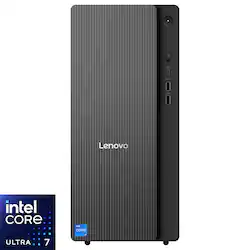
Lenovo - IdeaCentre Tower 17 Desktop - Intel Core Ultra 7 265F - NVIDIA GeForce RTX 4060 - 32GB DDR5 Memory - 1TB SSD - Luna Grey
- Key Specs
- Processor Model: Intel Core Ultra 7 Series 2 (Your computer's processor is like its brain. Working in combination with system memory, the power of the processor determines the complexity of software you can run, how many programs you can have open at the same time, and how fast those programs will run. Most computers feature an AMD, Intel or Snapdragon processor.)
- Storage Type: SSD
- Total Storage Capacity: 1000 gigabytes
- System Memory (RAM): 32 gigabytes (Random-access memory (RAM) is a computing device's short-term data storage, which allows active information to be accessed quickly. The size and type of RAM determines how efficiently the device can handle large amounts of information at one time. For example, gaming or video editing requires more RAM for optimal performance.)
- Graphics Type: Dedicated (Dedicated graphics uses a separate graphics card for processing video images. Because it does not use memory from the system's RAM, there is no extra burden on the CPU and graphics are processed more efficiently. Integrated graphics shares system RAM to process video images.)
- Graphics: NVIDIA GeForce RTX 4060 (Often referred to as a "graphics processing unit" (GPU), this device is responsible for displaying image content and decoding/encoding video content in programs and games.)
- General
- Brand: Lenovo
- Model Number: 91B1000QUS
- Product Name: IdeaCentre Tower 17 Desktop - Intel Core Ultra 7 265F - NVIDIA GeForce RTX 4060 - 32GB DDR5 Memory - 1TB SSD
- Color: Luna Grey
- Year of Release: 2025
- Processor
- Processor Brand: Intel
- Processor Model: Intel Core Ultra 7 Series 2 (Your computer's processor is like its brain. Working in combination with system memory, the power of the processor determines the complexity of software you can run, how many programs you can have open at the same time, and how fast those programs will run. Most computers feature an AMD, Intel or Snapdragon processor.)
- Processor Model Number: 265F
- CPU Base Clock Frequency: 2.4 gigahertz (Actual central processing unit (CPU) speed may vary by device configuration and design. The average rate at which the processor is able to execute tasks under normal operating conditions as asserted by the manufacturer.)
- CPU Boost Clock Frequency: 5.3 gigahertz (Actual central processing unit (CPU) speed may vary by device configuration and design. The maximum rate at which the processor is able to execute tasks, typically only used for a short period of time as needed. This rate may temporarily boost the processor's performance, but may result in overheating, shutdown, or damage to equipment if sustained.)
- Number of CPU Cores: 20-core (A core, or "brain" of a CPU, allows it to receive and execute instructions. Each core can work independently or together to perform parallel operations.)
- Number of CPU Threads: 20 (Generally, the more threads, the faster and more responsive the operating system.)
- Storage
- Storage Type: SSD
- Total Storage Capacity: 1000 gigabytes
- Solid State Drive Capacity: 1000 gigabytes (The amount of data that can be stored on the device's solid state drive (SSD). SSD is a flash-based storage with faster speeds than a hard disk drive (HDD).)
- Memory
- System Memory (RAM): 32 gigabytes (Random-access memory (RAM) is a computing device's short-term data storage, which allows active information to be accessed quickly. The size and type of RAM determines how efficiently the device can handle large amounts of information at one time. For example, gaming or video editing requires more RAM for optimal performance.)
- Type of Memory (RAM): DDR5 (Each type of RAM delivers a different level of speed, bandwidth, energy efficiency and performance.)
- System Memory RAM Speed: 5600 megahertz (How fast the information-storing hardware operates. The faster the RAM, the faster memory can be transferred to other system components. Ultimately, faster RAM improves operational efficiency.)
- Number Of Memory Slots: 2
- Graphics
- Graphics Type: Dedicated (Dedicated graphics uses a separate graphics card for processing video images. Because it does not use memory from the system's RAM, there is no extra burden on the CPU and graphics are processed more efficiently. Integrated graphics shares system RAM to process video images.)
- GPU Brand: NVIDIA
- Graphics: NVIDIA GeForce RTX 4060 (Often referred to as a "graphics processing unit" (GPU), this device is responsible for displaying image content and decoding/encoding video content in programs and games.)
- Compatibility
- Operating System: Windows 11 Home (The operating system manages all software and hardware, including files, memory and connected devices. Most importantly, it lets you interact with your device and your programs in a visual way; otherwise, you'd be typing computer code to get anything done.)
- Connectivity
- Display Connector(s): 1 x HDMI, 3 x DisplayPort, 1 x HDMI 2.1 (The number and type of connectors used to connect to an external display.)
- Number of HDMI Outputs (Total): 2
- Number of DisplayPort Outputs (Total): 3
- Number of VGA Ports: 1 (VGA (Video Graphics Adapter or Video Graphics Array) is a display standard that transmits via analog signals. This type of interface is typically used to connect a computer to a display device such as a monitor, projector, or TV.)
- Number Of DVI Ports: 0
- USB Ports: 4 x USB-A 2.0, 2 x USB-A 3.2, 1 x USB-C 3.2 (The number and type of USB ports the product has.)
- Number of USB Ports (Total): 7
- Wireless Connectivity: Wi-Fi (The manner in which a device sends data to another device over a short distance without the use of wires or cables.)
- Wireless Standard: AX (The wireless networking protocol used by the device. Each iteration of the protocol is based on the 802.11 standard developed by the Institute of Electrical and Electronics Engineers (IEEE) Standards Association. Denoted by letters following 802.11 (802.11a, 802.11ac, etc.), each version, published in alphabetical order, encompasses all previous versions.)
- Wireless Networking Standard: Wi-Fi 6E (The wireless networking standard used by the device. Each iteration of the standard developed by the Wi-Fi Alliance corresponds to an existing IEEE 802.11 protocol; for example, standard 802.11ac (or AC) is termed Wi-Fi 5. Refers specifically to the standard the device is designed to use, but ultimately determines product interoperability and backward compatibility including previous versions.)
- Number Of Ethernet Ports: 1
- Power
- Power Supply Maximum Wattage: 400 watts
- Expansion
- Number Of Internal 3.5" Bays: 1
- Number Of PCI-E x1 Slots: 1
- Number Of PCI-E x16 Slots: 1
- Features
- Media Card Reader: false (A hardware device that allows for access to data on a memory card and enables the transfer of its files to a computer. These devices may have one or multiple slots for various types of memory cards, and may be integrated into the computer or available as an external device.)
- Size: Standard
- Dimensions
- Product Height: 11.01 inches (The out of box height of the item. Height is measured as the vertical distance from the bottom of the item to the top as it would be primarily used or placed.)
- Product Width: 6.69 inches (The out of box width of the item. Width is measured as the horizontal distance from one side of the item to the other as it would be primarily used or placed.)
- Product Depth: 14.57 inches (The out of box depth of the item. Depth is measured as the distance from the front of the item to the back as it would be primarily used or placed.)
- Product Weight: 12.16 pounds (The out of box weight of the item.)
- Certifications Listings & Approvals
- ENERGY STAR Certified: true (Devices carrying the ENERGY STAR service mark, such as computer products and peripherals, kitchen appliances, and other products, generally use 20% to 30% less energy than required by federal standards.)
- EPEAT Qualified: true (The Electronic Product Environmental Assessment Tool (EPEAT) was designed to provide an environmental assessment tool for purchasers. In order to qualify for EPEAT, a product must meet all 23 required criteria.)
- EPEAT Level: Gold (The Electronic Product Environmental Assessment Tool (EPEAT) was designed to provide an environmental assessment tool for purchasers. In order to qualify for EPEAT, a product must meet all 23 required criteria. Products are rated Bronze, Silver or Gold based on how many of 28 optional criteria they meet (below 50%, 50%, 75%).)
- Included
- Optical Drive Type: None (An optical disk drive (ODD) uses a laser light to read data from or write data to an optical disc. These discs include CDs, DVDs, and Blu-ray Discs. This allows you to play music or watch movies using prerecorded discs.)
- Keyboard Included: true
- Mouse Included: true
- Wireless Keyboard: true
- Wireless Mouse: true
- Warranty
- Warranty - Parts: 1 year limited
- Warranty - Labor: 1 year limited
- Other
- UPC: 198156715302
Feel the unstoppable force of AI-driven desktop performance. The IdeaCentre Tower’s Intel Core Ultra 7 and NVIDIA RTX4060 graphics deliver ultra-smooth gameplay, lightning-fast edits, and smart multitasking. Designed for demanding projects, intense gaming, and future-ready performance, it’s the AI PC powerhouse engineered to take you further.
- Windows 11 operating system: Windows 11 brings back the Start Menu from Windows 7 and introduces new features, like the Edge Web browser that lets you markup Web pages on your screen.
- Copilot in Windows 11 - Get answers, inspiration, and summaries: Find the relevant information and ideas you need to power your own ingenuity. Copilot in Windows 11 can deliver answers that are more relevant to you.
- Intel Core Ultra 7 Series 2 Processor: Powerful 20-core, 20-way processing performance. The Intel Turbo Boost technology delivers dynamic extra power when you need it, while increasing energy efficiency when you don't.
- 32GB system memory for intense multitasking and gaming: Reams of high-bandwidth DDR5 RAM to smoothly run your graphics-heavy PC games and video-editing applications, as well as numerous programs and browser tabs all at once.
- NVIDIA GeForce RTX 4060 graphics: Backed by 8GB GDDR6 dedicated video memory for a fast, advanced GPU to fuel your games. NVIDIA Optimus technology optimizes the laptop for both graphics performance and battery life conservation.
- 1TB solid state drive (SSD): While offering less storage space than a hard drive, a flash-based SSD has no moving parts, resulting in faster start-up times and data access, no noise, and reduced heat production.
- Versatile Ports for Limitless Connectivity: Connect it all: 4 front-access USB-A, Type-C, LAN, HDMI, VGA—speed, flexibility, and future-ready power.
- Stay Synced, Stay Secure Everywhere: Unify your digital life: Smart Connect syncs tasks, Smart Storage syncs files across all devices.
- Additional ports: Microphone and headphone jacks.
Whats Included
- Desktop, Wired Keyboard, Wired Mouse, Power Cord, Quick Start User Manual
Product Manuals
Q: Does this computer have bluetooth? I kinda thought it was a standard thing, but do not see it listed
A: Hi there, Yes, this IdeaCentre Tower 17 features Bluetooth 5.2 connectivity. Please feel free to reach out to us with any other questions!
Q: What monitor do you recommend pairing with this? Not into gaming, just work related stuff
A: Hey BLACKBIRD22, Since there are no current core Lenovo monitor offerings on Best Buy's site, there are no specific recommendations we can make there, but we would say a good place to start is finding out what features you may want your monitor to have. Would you like a certain screen size and resolution? While not used for gaming, does having a higher refresh rate for more fluid on-screen productivity sound nice? Do you prefer a flat panel or cured panel monitor? These are things we recommend you keep in mind, and if you have answer to these questions, they can help you narrow down what could be a good fit for you. These points can be used as filters in the search results on Best Buy's site to help with your search as well. Please feel free to reach out to us with any other questions!
A: Hi aknarkg1955, The IdeaCentre Tower 17's documented max memory is based on the test results with current Lenovo memory offerings, which is 32GB, DDR5-5600. Although based on the CPU and chipset, the system may support 64GB, this has not been tested by Lenovo. Please feel free to reach out to us with any other questions!
A: Hi Viewer1, Both the HDMI port on the systemboard and graphics card are HDMI 2.1. Also, we are sorry to hear that you're having trouble with connecting the external monitor via the systemboard's HDMI output. To try to resolve this, we recommend starting by beginning to check video cable connections and ensuring they are properly connected and support the monitor's video output type and specifications. If the connections are secure, check if the computer is turned on and functioning correctly. Restart the computer and see if the monitor detects the signal. If the problem persists, there might be an issue with the graphics card, the video cable, or the monitor itself. Next, try to update system drivers via the Lenovo Vantage app on your IdeaCentre Tower. Start by opening the Vantage app, then selecting the Check for updates button on the homepage of the application. Apply all available updates and ensure that they are all installed successfully, restarting your system after updates are applied if the system doesn't reboot itself. Please let us know if there's anything else we can do to help!
Q: What is the video resolution and the aspect ratio for the video output/
A: Hi Speedy, This will depend on the video port that you use on this IdeaCentre Tower 17, along with the settings you choose and supported formats for the connected monitors. The RTX 4060 features 1x HDMI 2.1a FRL, 3x DP 1.4a (HBR3, DSC) video connectors with the card supporting a max resolution of 7680x4320@60Hz(HDMI), 7680x4320@60Hz(DP). Please feel free to reach out to us with any other questions!
Q: How many sticks of RAM does it come with ?
A: Hey, This IdeaCentre Tower 17 features 2x 16GB UDIMMDDR5-5600 memory modules. Please feel free to reach out to us with any other questions!
A: Hi LizanneW, The systemboard features Realtek Audio components that should be sufficient for your online conferencing needs. Please feel free to reach out to us with any other questions!
Q: Are thre expansion slots to add another SSD drive?
A: Hi there, Yes, this IdeaCentre Tower 17 features another M.2 2280 PCIe® 4.0x4 NVMe®, along with a space to add a 3.5" HDD. Please feel free to reach out to us with any other questions!
People also viewed
 $1,699.99The price was $1,759.99
 $729.99The price was $859.99
 $2,599.99The price was $2,999.99
 $2,999.99The price was $3,199.99
 $999.00The price was $1,429.00
- $2,049.99The price was $2,209.99
 $1,599.00The price was $1,639.99
 $929.99The price was $1,219.99

Today's top picks
 $1,279.00The price was $1,319.99
 $659.99The price was $849.99
- $359.99The price was $399.99
- $929.99The price was $1,219.99
- $1,699.99The price was $1,759.99
 $859.99The price was $989.99
 $819.99The price was $1,009.99
- $1,599.00The price was $1,639.99
- $729.99The price was $859.99