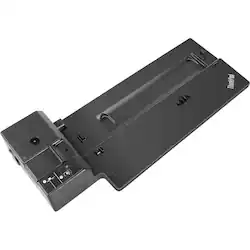
Lenovo - ThinkPad Basic Docking Station
- Key Specs
- Number of DisplayPort Outputs (Total): 1
- General
- Brand: Lenovo
- Model Number: 40AG0090US
- Product Name: ThinkPad Basic Docking Station
- Ports
- Number of DisplayPort Outputs (Total): 1
- Number of VGA Ports: 1 (VGA (Video Graphics Adapter or Video Graphics Array) is a display standard that transmits via analog signals. This type of interface is typically used to connect a computer to a display device such as a monitor, projector, or TV.)
- Number Of Ethernet Ports: 1
- Number of USB Ports (Total): 4
- Headphone Jack: true (The device features an interface that allows for the connection of headphones.)
- Microphone Input: true (The device features an input for connecting an external microphone.)
- Memory Card Slot: false
- Compatibility
- Brand Compatibility: Lenovo
- Model Compatibility: Lenovo P52s, L580, L480, T580, P580p, T480s, T480, X1 Carbon Gen 6, X280
- Features
- Cable Lock Slot: Kensington Security Slot (K-Slot)
- Dimensions
- Product Height: 2.19 inches (The out of box height of the item. Height is measured as the vertical distance from the bottom of the item to the top as it would be primarily used or placed.)
- Product Length: 14.9 inches (The out of box length of the item. Length is measured as the longest dimension of the item.)
- Product Width: 6.26 inches (The out of box width of the item. Width is measured as the horizontal distance from one side of the item to the other as it would be primarily used or placed.)
- Product Weight: 26.1 ounces (The out of box weight of the item.)
- Other
- UPC: 192076019885
Run your enterprise-class laptop and peripherals with this Lenovo ThinkPad Basic dock. Four USB-A ports support multiple components and include an always-on USB 3.0 Gen 1 interface for device charging, and PXE boot, wake-on-LAN and MAC address pass-through enable simplified IT management. Connect a projector and monitor to this Lenovo ThinkPad Basic dock via the DisplayPort and VGA outputs.
- Compatible with select Lenovo laptops: Including P52s, L580, L480, T580, P580p, T480s, T480, X1 Carbon Gen 6, X280 models.
- Side docking connector: You can connect your ThinkPad laptop via the side connector.
- 4K support: This dock supports up to 4K (4096 x 2160) at 60Hz via DisplayPort port.
- DisplayPort 1.4 and VGA ports: Let you connect several monitors.
- Multiple USB ports: The docking station features two USB 3.0 Gen 1 (5 Gbps) and two USB 2.0 ports, one that supports always-on USB charging, so you can connect a large number of peripherals.
- Gigabit Ethernet port: Ensures fast wired connection.
- Designed for large enterprise environments: Lenovo helps simplify asset management for IT managers.
- Mirrored power button and mechanical unlock: Make it easy to unlock and go.
- Security lock: Conveniently fixes both your laptop and your dock on your desk with a single key.
Whats Included
- Lenovo ThinkPad Basic Docking Station
- ThinkPad slim tip 90W AC adapter
- Owner's manual
Product Manuals
Q: Will this dock allow you to run 2 separate external monitors?
A: Hi, Yes this dock will support 2 monitors. it has 1x Display Port 1.4 and 1x VGA outputs.
Q: Is this docking station compatible with the Lenovo T470? If not, what docking station is?
A: undefined
Q: Is this docking station compatible with a thinkpad x1 carbon gen 7?
A: The X1 Carbon 7th Gen - (Type 20QD, 20QE) Laptop (ThinkPad) model is compatible with this dock. Confirm your model number. Here is a link to more information about compatibility of this docking station: https://support.lenovo.com/us/en/solutions/pd500172-thinkpad-basic-docking-station-overview-and-service-parts
Q: What Docking station do I need for a Lenovo T480s Thinkpad?
A: The Lenovo ThinkPad T480s Laptop is listed on this dock's compatibility list.
Q: Does this docking station work with ThinkPad X390
A: No. The Lenovo X390 Yoga (20NN,20NQ) model is compatible with the 135W dock: https://www.bestbuy.com/site/lenovo-thinkpad-ultra-docking-station/6213240.p?skuId=6213240 Make sure you have the correct model number for each specific docking station.
Q: Is this docking station compatible with an HDMI Cable or do I need a VGA cable?
A: This dock has DisplayPort 1.4 and VGA ports connections for video.
Q: Will this doc work with Lenovo thinkpad E490?
A: No. The Lenovo ThinkPad E490 is not on the compatibility list for this dock. You can use a universal USB-c dock with the ThinkPad E490 like this one, there are many varieties, this is just one example: https://www.bestbuy.com/site/iogear-usb-c-docking-station/6269000.p?skuId=6269000
People also viewed
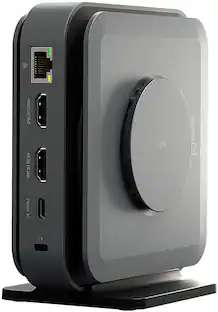 $119.99The price was $129.99
 $173.95The price was $199.99







Today's top picks
 $499.99The price was $749.99
 $199.99The price was $249.99
 $789.99The price was $1,049.99










