Lexmark - MX310, MX410, MX51x Fuser Maintenance Kit, 110-120V
Reviews coming soon
About this product
Ensure optimal performance and longevity for your valuable Lexmark printer with the genuine Lexmark Maintenance Kit. Designed specifically for 110/120 volt systems and with a 200,000-page yield, this kit offers exceptional value and peace of mind.
Recommended
Kit installation is recommended every 200,000 pages.
Included
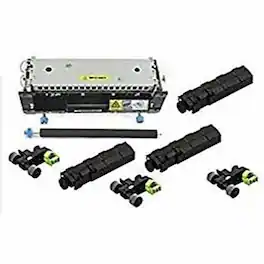
Fuser (110V), Redrive assembly, ACM tires/hubs, Transfer roll, Tray separator bracket & MPF pick roll and separator pad
- BrandLexmarkProduct NameLexmark MX310, MX410, MX51x Fuser Maintenance Kit, 110-120VProduct Width13 inchesProduct Height10 inchesProduct Weight7.1 ouncesProduct Length20 inches
Reviews
This product doesn't have any reviews yet.
Compare similar products
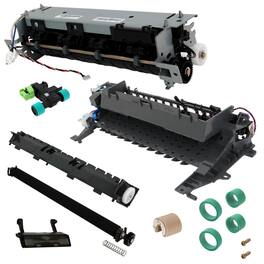
Ensure optimal performance and longevity for your valuable Lexmark printer with the genuine Lexmark Maintenance Kit. Designed specifically for 110/120 volt systems and with a 200,000-page yield, this kit offers exceptional value and peace of mind.

Lexmark MS610dn Fuser Maintenance Kit, 110-120V
The operator panel displays the message 80 "Replace maintenance kit" at required maintenance intervals. You must replace the fuser, transfer roller, pick roller, and separation roller at this interval to maintain the print quality and reliability of the printer. Check the 2 digit type code on the fuser, or check Device Information using the embedded web server or the menus page for a replacement part number. There are multiple warnings to indicate that the fuser is nearing end of life and that a maintenance kit is required, including error codes 80.0x, 80.1x, and 80.2x. If you receive error code 80.3x, the fuser has reached its rated life and the printer stops until a maintenance kit is installed. You must install the correct Fuser Maintenance Kit for the type of fuser that is installed in the printer.

Maintenance Kit for MS82x covered under warranty at no additional cost
Specs
Be the first to ask a question.
We’ll try to get your question answered within 24 hours by a Best Buy customer or brand representative.
More to consider



Explore tech essentials Sponsored
 Top Deal$349.99The price was $479.99



Keep exploring
 $42.21The price was $58.99
 $230.85The price was $242.18
 $185.85The price was $195.14