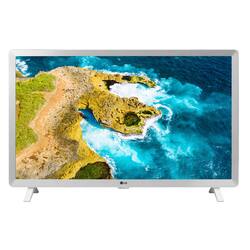
LG - 24” Class LED HD Smart TV with webOS
- Key Specs
- Display Type: LED
- Resolution: HD (720p) (Refers to the number of pixels, both horizontally and vertically, used to capture video/images. The higher the resolution the finer the detail that can be seen.)
- Screen Size Class: 24 inches (The group size measurement of a screen. This differs from a screen size measured diagonally from corner to corner.)
- High Dynamic Range (HDR): false (An HDR-compatible 4K TV or other HDR-compatible product displays HDR video content when it's available from sources like 4K Ultra HD Blu-ray Discs and 4K streaming services.)
- LED Panel Type: Standard LED
- Backlight Type: Edge Lit (Edge-lit: lights are on the edges of the display with ~10 zones of vertical LEDs. Direct-lit: lights are on the edges and behind the screen for more light uniformity than Edge-lit. Full array: direct-lit with local dimming for greater contrast with up to 100 zones of LEDs.)
- Refresh Rate: 60Hz (The number of frames per second the device can produce natively without enhancement. Higher rates help produce smooth, seamless pictures.)
- Motion Enhancement Technology: None (Proprietary technologies produced in addition to the Refresh Rate that smooth out faster moving pictures to reduce blur and pixelation.)
- Specific Manufacturer Technologies: webOS 22, AI Sound (This is technology that's specific to a TV brand (sometimes called proprietary technology). Here you'll see terms related to picture quality, brightness, processors and more.)
- Smart Platform: None, None, None, None, None (Just like a computer, a smart TV needs an operating system (also called a smart platform) in order to access the Internet, connect with entertainment apps, and play streaming content. Some common TV smart platforms are; Roku TV, Android TV, and Chromecast.)
- Featured Streaming Services: Netflix, YouTube (Streaming services and other programs are available on this device. Keep in mind, there may be more services supported than just those shown here.)
- Number of HDMI Inputs (Total): 2
- Voice Assistant Built-in: Other, Other (A digital assistant built into the device that uses voice commands to answer questions and control smart devices.)
- General
- Brand: LG
- Model Number: 24LQ520S-WU
- Product Name: 24” Class LED HD Smart TV with webOS
- Color: White
- Model Year: 2022
- Dimensions
- Product Height With Stand: 14.4 inches
- Product Width: 22.2 inches (The out of box width of the item. Width is measured as the horizontal distance from one side of the item to the other as it would be primarily used or placed.)
- Product Depth With Stand: 5.9 inches
- Product Height Without Stand: 13.4 inches
- Product Depth Without Stand: 5 inches
- Product Weight Without Stand: 7.2 pounds
- Adjustable Stand Width: false (Whether the stand can adjust to have more than one measurement either between the legs or the base itself.)
- Display
- Display Type: LED
- Resolution: HD (720p) (Refers to the number of pixels, both horizontally and vertically, used to capture video/images. The higher the resolution the finer the detail that can be seen.)
- Screen Size: 23.6 inches (Size of the screen, measured diagonally from corner to corner.)
- Screen Size Class: 24 inches (The group size measurement of a screen. This differs from a screen size measured diagonally from corner to corner.)
- High Dynamic Range (HDR): false (An HDR-compatible 4K TV or other HDR-compatible product displays HDR video content when it's available from sources like 4K Ultra HD Blu-ray Discs and 4K streaming services.)
- LED Panel Type: Standard LED
- Backlight Type: Edge Lit (Edge-lit: lights are on the edges of the display with ~10 zones of vertical LEDs. Direct-lit: lights are on the edges and behind the screen for more light uniformity than Edge-lit. Full array: direct-lit with local dimming for greater contrast with up to 100 zones of LEDs.)
- Curved Screen: false
- Refresh Rate: 60Hz (The number of frames per second the device can produce natively without enhancement. Higher rates help produce smooth, seamless pictures.)
- Motion Enhancement Technology: None (Proprietary technologies produced in addition to the Refresh Rate that smooth out faster moving pictures to reduce blur and pixelation.)
- Features
- Specific Manufacturer Technologies: webOS 22, AI Sound (This is technology that's specific to a TV brand (sometimes called proprietary technology). Here you'll see terms related to picture quality, brightness, processors and more.)
- Smart Capable: true (Smart, or smart-capable devices are able to connect directly to your home network in order to stream content from the Internet, run Internet-based apps, or connect to other smart devices.)
- Smart Platform: None, None, None, None, None (Just like a computer, a smart TV needs an operating system (also called a smart platform) in order to access the Internet, connect with entertainment apps, and play streaming content. Some common TV smart platforms are; Roku TV, Android TV, and Chromecast.)
- Featured Streaming Services: Netflix, YouTube (Streaming services and other programs are available on this device. Keep in mind, there may be more services supported than just those shown here.)
- Text-To-Speech: true (A system that converts language text into speech.)
- Video Description: true (Indicates whether the device features descriptive video service (DVS). This service provides narration of key elements in the program, such as actions, costumes, and scene changes, to help engage visually-impaired audiences.)
- V-Chip: false (Feature that blocks television programming if it has a content rating outside of the acceptable rating(s) configured by the user.)
- TV Tuner: Digital (The ATSC TV Tuner is a component built into conventional TV sets or other devices for receiving over-the-air broadcast TV without a cable/satellite box. Digital tuners may be purchased separately and connected to a device if it does not have one built in.)
- Connectivity
- Number of HDMI Inputs (Total): 2
- HDMI Audio Return Channel (ARC): true
- HDBaseT Receiver: false (An input that receives uncompressed HDMI signals over a category cable point-to-point, up to 100 meters, from a transmitter.)
- RF Antenna Input: false (This input is used to connect devices such as antennas or cable boxes to a TV via a coaxial cable.)
- Number Of USB Port(s) (Total): 1 (The total number of USB ports including all generations and versions.)
- Compatibility
- VESA Wall Mount Standard: 75mm x 75mm (VESA wall mount standards refer to the spacing of screw holes built into a TV in order to fit with standard TV wall mounts. These standards are implemented into most TVs and monitors.)
- Voice Assistant Built-in: Other, Other (A digital assistant built into the device that uses voice commands to answer questions and control smart devices.)
- Audio
- Built-In Speakers: true
- Power
- ENERGY STAR Certified: false (Devices carrying the ENERGY STAR service mark, such as computer products and peripherals, kitchen appliances, and other products, generally use 20% to 30% less energy than required by federal standards.)
- EPEAT Qualified: false (The Electronic Product Environmental Assessment Tool (EPEAT) was designed to provide an environmental assessment tool for purchasers. In order to qualify for EPEAT, a product must meet all 23 required criteria.)
- Estimated Annual Operating Cost: 6 United States dollars (Predicted cost of operating the product under average conditions for one year.)
- Estimated Annual Electricity Use: 48 kilowatt hours (Predicted amount of electricity needed to operate the product under average conditions for one year.)
- Rechargeable Battery (Remote Control): false
- Voltage: 240 volts (Amount of power needed to support an electrical current.)
- Included
- Stand Included: true
- Box Dimension
- Height: 16.2 inches
- Width: 25 inches
- Depth: 4.9 inches
- CubicDimension: 1984.5 inches
- Other
- UPC: 195174033883
One 24" HD display to rule them all! Connect your laptop, media player, or gaming console to a display that’s smart enough that it can be used as a TV and monitor.
- 24” HD (1366 x 768) Display: Connect your laptop, media player, or gaming console to a display that’s smart enough that it can be used as a TV and monitor.
- Wide Viewing Angle: This LG TV monitor delivers vibrant colors at wide vertical and horizontal viewing angles for a vivid picture while watching seated or standing.
- Cinema Mode: Cinema Mode is a preset picture setting option that displays optimal levels of contrast, picture sharpness, and color ideal for watching in darker rooms.
- webOS Smart TV: The Smart Way to Access Content. Customize your viewing experience with separate accounts and personalized recommendations for every member of your family
Whats Included
- 24” Class LED HD Smart TV with webOS
- Power Cord
- Remote
Product Manuals
Documents
- Energy_Guide_PDF
Q: What is the difference from a regular tv and a smart tv?
A: A Smart TV has built-in WiFi capabilities and usually pre-installed apps such as Netflix, Disney+, etc. There is no need for an external device to stream content, like a Roku or Amazon FireStick
Q: Does this TV have built-in bluetooth for use with wireless headphones?
A: Hello, yes it does.^Venette
Q: Can the legs/stand be removed and can you hang on a wall with a TV bracket?
A: Rich Yes to both questions.
Q: Can I attach just an antenna for regular channels?
A: The LG 24” HD Smart TV with webOS, Model # 24LQ520S-WUhas an F-Type,75-Ohm coaxial connector on the back labeled 'Antenna/Cable In' that you can connect an in-door or an out-door antenna to and with its built-in ATSC and NTSC tuners, you can get Over-the-Air (OTA) TV programming from television broadcast stations in your area in the U.S...^Ivan
Q: What are the dimensions of this tv?
A: 22" x 13" x1.5"
Q: Can I hook up an antenna to this tv?
A: It says there is no RF antenna input?
Q: What apps can you download onto this tv? Netflix, HBO, Hulu, Prime, Disney? Thanks
A: Try downloading the app from the LG Content Store (App Store). Press the Home button on the Remote control. Select the LG Content Store from the home page. Then choose the app you want to download to go to its dedicated screen. For a complete listing of available apps, please visit: https://us.lgappstv.com/main/tvapp. For further assistance, please reach out to our support team via private message on Facebook @LGUSSupport and use #VOC in your first message to our social media support team or call at 800-243-0000. ^Venette
A: Hi, you can set the sleep mode off. ^Vanessa
People also viewed
 $1,399.99The price was $2,499.99




Today's top picks
 $499.99The price was $749.99
 $199.99The price was $249.99
 $789.99The price was $1,049.99








