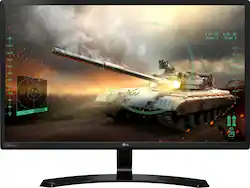
LG - 24" IPS LED FHD FreeSync Monitor - Black
- Key Specs
- Refresh Rate: 75Hz (The number of frames per second the device can produce natively without enhancement. Higher rates help produce smooth, seamless pictures.)
- Maximum Resolution: 1920 x 1080 (Maximum resolution refers to the highest number of pixels that a screen can process and display. Higher resolution signals produce more detailed images.)
- Response Time: 5 milliseconds (The speed at which pixels can change colors is called response time. It is measured in milliseconds (ms).)
- Panel Type: IPS (Technology that affects response time and image quality.)
- Synchronization Technology: FreeSync (AMD Adaptive Sync) (Generally, these technologies allow syncing between a computer/console game's frame rate and the device's refresh rate for a smoother display without tearing.)
- Screen Size: 23.8 inches (Size of the screen, measured diagonally from corner to corner.)
- Display Connector(s): 1 x VGA (The number and type of connectors used to connect to an external display.)
- General
- Brand: LG
- Model Number: 24MP59HT-P
- Product Name: 24" IPS LED FHD FreeSync Monitor
- Color: Black
- Operating System Compatibility: Windows
- Display
- Refresh Rate: 75Hz (The number of frames per second the device can produce natively without enhancement. Higher rates help produce smooth, seamless pictures.)
- Maximum Resolution: 1920 x 1080 (Maximum resolution refers to the highest number of pixels that a screen can process and display. Higher resolution signals produce more detailed images.)
- Native Resolution: 1920 x 1080 (Native resolution of a screen refers to its single, fixed resolution. Sometimes screens must scale an image up or down in order to fit the native resolution. This can cause a loss of resolution or detail.)
- Contrast Ratio: 100:1 (Measured difference between a displayed image's brightest whites and darkest blacks. The larger the first number, the more detail and color that can be displayed.)
- Response Time: 5 milliseconds (The speed at which pixels can change colors is called response time. It is measured in milliseconds (ms).)
- Display Type: LED
- Panel Type: IPS (Technology that affects response time and image quality.)
- Synchronization Technology: FreeSync (AMD Adaptive Sync) (Generally, these technologies allow syncing between a computer/console game's frame rate and the device's refresh rate for a smoother display without tearing.)
- Aspect Ratio: 16:9 (The measurement of the width of a screen compared to the height of a screen, expressed as a ratio.)
- Curved Screen: false
- Brightness: 250 candela per square meter (A measure of the total light output.)
- Screen Size: 23.8 inches (Size of the screen, measured diagonally from corner to corner.)
- High Dynamic Range (HDR): false (An HDR-compatible 4K TV or other HDR-compatible product displays HDR video content when it's available from sources like 4K Ultra HD Blu-ray Discs and 4K streaming services.)
- Horizontal Frequency: 135 kilohertz (Also known as "horizontal scan rate," this measurement describes the number of horizontal lines displayed per second and is used to calculate a screen's refresh rate.)
- Horizontal Viewing Angle: 178 degrees (The maximum angle at which the display can be viewed with acceptable visual performance from either side.)
- Vertical Viewing Angle: 178 degrees (The maximum angle at which the display can be viewed with acceptable visual performance from above or below.)
- Touch Screen: false (Touch-screen devices make navigating more intuitive. Using a touch-screen display, you can do things such as tap to select, hold and drag to move items, swipe to scroll, and pinch to zoom.)
- Connectivity
- Number of HDMI Inputs (Total): 2
- Display Connector(s): 1 x VGA (The number and type of connectors used to connect to an external display.)
- Compatibility
- Wall Mountable: false (The product is able to be secured to a wall. Some products are designed ready to mount, while others may require additional hardware/accessories for installation.)
- Features
- Tiltable: true
- Adjustable Stand Height: false
- Anti-Glare: true (Product has features, such as a matte finish, that reduce the likelihood for screen glare.)
- Built-In Webcam: false
- Integrated Speaker(s): false
- Dimensions
- Product Width: 21.7 inches (The out of box width of the item. Width is measured as the horizontal distance from one side of the item to the other as it would be primarily used or placed.)
- Product Depth (With Stand): 7.4 inches
- Product Weight: 6.17 pounds (The out of box weight of the item.)
- Stand Included: true
- Power
- Power Consumption: 17.1 watts
- Power Saving/Off Mode: 0.3 watts (This mode will turn the display and/or the device off, or into a standby mode, after a preset length of time with no activity to conserve power.)
- Certifications Listings & Approvals
- ENERGY STAR Certified: true (Devices carrying the ENERGY STAR service mark, such as computer products and peripherals, kitchen appliances, and other products, generally use 20% to 30% less energy than required by federal standards.)
- EPEAT Qualified: true (The Electronic Product Environmental Assessment Tool (EPEAT) was designed to provide an environmental assessment tool for purchasers. In order to qualify for EPEAT, a product must meet all 23 required criteria.)
- EPEAT Level: Gold (The Electronic Product Environmental Assessment Tool (EPEAT) was designed to provide an environmental assessment tool for purchasers. In order to qualify for EPEAT, a product must meet all 23 required criteria. Products are rated Bronze, Silver or Gold based on how many of 28 optional criteria they meet (below 50%, 50%, 75%).)
- Warranty
- Warranty - Parts: 1 year
- Warranty - Labor: 1 year
- Other
- UPC: 719192613591
Enjoy working with this LG 24-inch monitor. It uses IPS technology so that it produces vivid colors and impressive contrasts, yet it also keeps power use low so that your workflows don't use too much energy. Full HD resolutions ensure this LG 24-inch monitor produces plenty of detail from images and videos.

- Full HD 1920 x 1080 resolution with 16:9 aspect ratio: Delivers crystal clear picture quality with stunning detail.
- 5ms response time: Allows pixels to change colors quickly to avoid streaking, blurring and ghosting in fast-moving scenes and video games.
- Watch crisp images: The 75Hz refresh rate is a good choice for gaming and other fast-moving media.
- 24" antiglare widescreen flat-panel IPS LED monitor: Provides a large viewing area and clear images.
- FreeSync technology for fluid gameplay: Synchronizes the refresh rate between the GPU and display to eliminate image tears and choppiness.
- One VGA and two HDMI inputs: Enable you to connect both digital and analog devices.
- 178° horizontal and vertical viewing angles: Ensure a clear view of the monitor from multiple vantage points.
- 250 cd/m² brightness: For a highly visible display and crisp on-screen images.
- On-Screen Control: Makes it easy to adjust many monitor settings via an on-screen window with a few easy clicks of your mouse.
- Black Stabilizer: Keeps visibility even in dark scenes. LG's Black Stabilizer senses dark scenes and helps make them brighter so that you can find the enemies hiding and waiting to attack your player in the dark.
- Game Mode: Set your game mode optimal gaming conditions. There are three gamer modes, two First-Person-Shooter modes and even an RTS preset mode, so you can choose the best mode for you.
- Reader Mode: Reducing blue light to help lessen eye fatigue, Reader Mode provides optimal condition for reading. With just a click of a mouse you can more comfortably read your monitor screen.
- ENERGY STAR certified: Designed to use less energy and meets strict energy efficiency guidelines set by the Environmental Protection Agency and U.S. Department of Energy.
Whats Included
- LG 24" IPS LED FHD FreeSync Monitor
- HDMI cable
- Power cord
Product Manuals
A: There are 2 HDMI ports and one 3.5mm audio jack.
Q: Is the monitor stand removable? (for wall/dual-monitor stand mounting)
A: It is not wall/dual-monitor stand mountable.
A: Hello, this unit does not have speakers and if using HDMI, your laptop is probably routing the volume to the monitor. You will need to change the settings in your laptop or connect speakers to the 3.5mm jack on the back of the monitor. ^AC
Q: Can you play Xbox one on this
A: The LG 24MP59HT is a (1920x1080p) Full HD IPS (In-Plane Switching) Free Sync monitor. Though I haven't used mine for an Xbox One or any other gaming console, this monitor has a Black Stabilizer feature designed for gaming, and FPS Game 1, FPS Game 2, RTS Game, and Custom (Game), Game Mode features. Other features include 5 ms Response Time (Virtual 1 ms with MBR), 75 Hz Refresh Rate, and Cross Hair. The X Box One is a 4K UHD HDR gaming console but it is compatible with 1080p resolution TVs, yet a 4K monitor is more suitable and will display the Xbox One's stunning resolution in 4K. This LG 1080p monitor performs well for my applications and with the HDMI input connection, along with all the gaming features, I believe you can flawlessly play Xbox One on the LG 24MP59HT monitor. The power/menu toggle switch is located in the center of the monitor, under the LG emblem on the bottom of the display screen. I chose this monitor because it also has a 3.5 mm external audio jack for computer speakers connection. Hope I was helpful.
Q: does this unit have internal speakers?
A: No it does not
Q: How many gigabytes of storage are on this?
A: You should probably just stick to crayons and paper, Brenda.
Q: Is this monitor Capable with using a Ps4?
A: Yes, i'm using it in a PS4 and XBOX ONE (it has two hdmi ports), looks sharper and faster than my TV.
A: The monitor is defaulted to 60hz/60fps, but you can up it to 75hz/75fps in the settings (Menu -> Picutre -> Game Adjust -> FreeSync ON). Your eyes WILL notice the difference if you go back from 75 to 60. Of course, this is only useful if your PC can run 60+ fps.
People also viewed
 $99.99The price was $114.99
 $1,049.95The price was $1,399.99
 $119.99The price was $159.99
 $299.99The price was $369.99
 $96.97The price was $134.99


Today's top picks
 $479.99The price was $729.99
 $1,199.99The price was $1,399.99
 $199.99The price was $249.99
 $69.99The price was $129.99
 $799.99The price was $1,199.99
 $789.99The price was $1,049.99