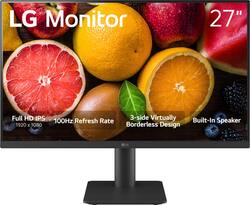
LG - 27" LED FHD 100Hz Monitor - Black
- Key Specs
- Refresh Rate: 100Hz (The number of frames per second the device can produce natively without enhancement. Higher rates help produce smooth, seamless pictures.)
- Maximum Resolution: 1920 x 1080 (Maximum resolution refers to the highest number of pixels that a screen can process and display. Higher resolution signals produce more detailed images.)
- Response Time: 5 milliseconds (The speed at which pixels can change colors is called response time. It is measured in milliseconds (ms).)
- Panel Type: IPS (Technology that affects response time and image quality.)
- Synchronization Technology: Not Applicable, Not Applicable (Generally, these technologies allow syncing between a computer/console game's frame rate and the device's refresh rate for a smoother display without tearing.)
- Screen Size: 27 inches (Size of the screen, measured diagonally from corner to corner.)
- Display Connector(s): 2 x HDMI (The number and type of connectors used to connect to an external display.)
- General
- Brand: LG
- Model Number: 27MS550-B.AUS
- Product Name: 27" LED FHD 100Hz Monitor
- Color: Black
- Operating System Compatibility: Not Applicable
- Display
- Refresh Rate: 100Hz (The number of frames per second the device can produce natively without enhancement. Higher rates help produce smooth, seamless pictures.)
- Maximum Resolution: 1920 x 1080 (Maximum resolution refers to the highest number of pixels that a screen can process and display. Higher resolution signals produce more detailed images.)
- Contrast Ratio: 1000:1 (Measured difference between a displayed image's brightest whites and darkest blacks. The larger the first number, the more detail and color that can be displayed.)
- Response Time: 5 milliseconds (The speed at which pixels can change colors is called response time. It is measured in milliseconds (ms).)
- Display Type: LED
- Panel Type: IPS (Technology that affects response time and image quality.)
- Synchronization Technology: Not Applicable, Not Applicable (Generally, these technologies allow syncing between a computer/console game's frame rate and the device's refresh rate for a smoother display without tearing.)
- Aspect Ratio: 16:9 (The measurement of the width of a screen compared to the height of a screen, expressed as a ratio.)
- Curved Screen: false
- Brightness: 250 candela per square meter (A measure of the total light output.)
- Screen Size: 27 inches (Size of the screen, measured diagonally from corner to corner.)
- High Dynamic Range (HDR): false (An HDR-compatible 4K TV or other HDR-compatible product displays HDR video content when it's available from sources like 4K Ultra HD Blu-ray Discs and 4K streaming services.)
- Touch Screen: false (Touch-screen devices make navigating more intuitive. Using a touch-screen display, you can do things such as tap to select, hold and drag to move items, swipe to scroll, and pinch to zoom.)
- On-Screen Display Languages: English (The available language options for displayed text.)
- Display Surface: Standard glass
- Color Gamut (NTSC): 72 percent
- Connectivity
- Number of HDMI Inputs (Total): 2
- Number of Mini DisplayPort Inputs: 0
- Number of Thunderbolt Ports (Total): 0
- Display Connector(s): 2 x HDMI (The number and type of connectors used to connect to an external display.)
- Headphone Jack: false (The device features an interface that allows for the connection of headphones.)
- Compatibility
- Wall Mountable: true (The product is able to be secured to a wall. Some products are designed ready to mount, while others may require additional hardware/accessories for installation.)
- Voice Assistant Built-in: No (A digital assistant built into the device that uses voice commands to answer questions and control smart devices.)
- Features
- Adjustable Stand Height: true
- Built-In Webcam: false
- Integrated Speaker(s): true
- Smart Capable: false (Smart, or smart-capable devices are able to connect directly to your home network in order to stream content from the Internet, run Internet-based apps, or connect to other smart devices.)
- Dimensions
- Product Width: 24.1 inches (The out of box width of the item. Width is measured as the horizontal distance from one side of the item to the other as it would be primarily used or placed.)
- Product Weight: 8.6 pounds (The out of box weight of the item.)
- Stand Included: true
- Certifications Listings & Approvals
- ENERGY STAR Certified: false (Devices carrying the ENERGY STAR service mark, such as computer products and peripherals, kitchen appliances, and other products, generally use 20% to 30% less energy than required by federal standards.)
- EPEAT Qualified: false (The Electronic Product Environmental Assessment Tool (EPEAT) was designed to provide an environmental assessment tool for purchasers. In order to qualify for EPEAT, a product must meet all 23 required criteria.)
- Warranty
- Warranty - Parts: 1 year
- Warranty - Labor: 1 year
- Other
- UPC: 195174079539
A Full HD (1920 x 1080) monitor is a great screen for work, home or dorm desktop setup. The Full IPS display produces vibrant color and visual clarity even at wide viewing angles. Work through your projects or watch your favorite content all on one screen with great picture quality.
- Full HD Resolution on an IPS Display: At 1920x1080 resolution, LG's Full HD IPS monitors feature vibrant color and visual clarity even at wide viewing angles. Work through your projects with ease and efficiency.
- Smoother, Seamless Visuals: With a 100Hz refresh rate and 5ms(GTG) response time, on screen visuals are rendered clearly for ultra-smooth motion and fluidity.
- Easier User Interface: With On-Screen Control, customize the workspace by splitting the display into multile windows or adjusting basic monitor settings with just a few mouse clicks.¹
- Action As It Happens: Get a pro-level experience with the closest thing to real-time gaming. Dynamic Action Sync elevates your gameplay so you can respond every moment of the action with reduced input tag and unbelievable performance.
- Never In The Dark: Light up your gameplay with enhanced vision. Black Stabilizer brightens dark scenes to give you an advantage over the competition—even when they’re hiding in the shadows.
- Advantage of Accuracy: Crosshair offers an accuracy advantage with center-display crosshairs that provide enhanced vision and precision for increased accuracy in first-person shooter games.
- Easy Viewing, Comfortable Reading: This monitor comes with Reader Mode which can reduce blue light emission to help provide a reduction in eye fatigue.
- Height & Tilt Adustable: The ergonomic stand makes it easy to adjust the height and tilt of the screen to the optimal position for you.
- Virtually Boderless Design: This monitor has a virtually borderless screen on three sides. The narrow-bezel design not only keeps your focused on the screen, but is made to look great on the deskptop.
- Built in Speakers: With two built-in speakers, your movies, shows, music and video conference calls will all sound as good as they look.
Whats Included
- 27" LED FHD 100Hz Monitor
- Stand
- Power and HDMI Cable
Product Manuals
Disclaimers
- ¹OnScreen Control software installation required. Visit Support on LG.com to download.
Q: What is the response time of this LG monitor?
A: This monitor has a response time of 5ms.
Q: Does this monitor have built-in speakers?
A: Yes, this monitor comes with two built-in speakers.
Q: What is included in the box with this LG monitor?
A: The monitor includes the stand body, stand base, power cord and adapter, HDMI cable, and screws.
Q: What is the refresh rate of this LG monitor?
A: This monitor has a refresh rate of 100Hz.
Q: Can I mount this monitor on the wall?
A: Yes, this LG monitor is wall mountable.
Q: How many HDMI ports does this monitor have?
A: This monitor has 2 HDMI ports.
Q: can the screen go vertical like a phone for stream chat and stuff like that
A: If you go to the display settings and rotate the display from landscape to portrait then the monitor will show properly when rotated 90 degrees to vertical from horizontal. My monitor mounting allows the monitor to rotate and it works great either way.
Q: Is this a rotatable monitor?
A: Hello there, Aaden. Thank you for reaching out about your LG 27MS550-B.AUS 27″ LED FHD 100 Hz Monitor. We understand your inquiry regarding whether the monitor can rotate (pivot) into portrait mode. This model’s factory-included stand offers height adjustment and tilt, but it does not support built-in pivot/rotation. However, the monitor is VESA wall-mountable (100 × 100 mm), so you can install it on a compatible VESA arm or mount that provides full swivel and pivot functionality. https://www.bestbuy.com/site/lg-27-led-fhd-100hz-monitor-black/6577079.p?skuId=6577079 If you’d like recommendations on VESA mounts or further assistance, please send us a private message on social media @LGUSSupport and our team will be more than happy to help. We appreciate your feedback and look forward to ensuring you have the ideal setup with your LG monitor. —Renzo
People also viewed
 $109.00The price was $129.99
 $110.99The price was $138.92
 $299.99The price was $399.99
 $229.99The price was $289.99
 $159.99The price was $199.99

Today's top picks
 $299.99The price was $369.99
- $159.99The price was $199.99
 $249.99The price was $329.99
 $299.99The price was $379.99