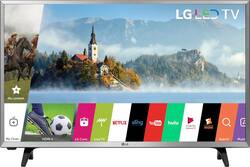
LG - 32" Class - LED - LJ550M Series - 720p - Smart - HDTV
- Key Specs
- Display Type: LED
- Screen Size Class: 32 inches (The group size measurement of a screen. This differs from a screen size measured diagonally from corner to corner.)
- High Dynamic Range (HDR): false (An HDR-compatible 4K TV or other HDR-compatible product displays HDR video content when it's available from sources like 4K Ultra HD Blu-ray Discs and 4K streaming services.)
- Refresh Rate: 60Hz (The number of frames per second the device can produce natively without enhancement. Higher rates help produce smooth, seamless pictures.)
- Smart Platform: webOS (Just like a computer, a smart TV needs an operating system (also called a smart platform) in order to access the Internet, connect with entertainment apps, and play streaming content. Some common TV smart platforms are; Roku TV, Android TV, and Chromecast.)
- General
- Brand: LG
- Model Number: 32LJ550M
- Product Name: 32" Class - LED - LJ550M Series - 720p - Smart - HDTV
- Color: Silver/Black
- Model Year: 2017
- Dimensions
- Product Height With Stand: 18.7 inches
- Product Width: 28.7 inches (The out of box width of the item. Width is measured as the horizontal distance from one side of the item to the other as it would be primarily used or placed.)
- Product Depth With Stand: 7.1 inches
- Product Height Without Stand: 17.2 inches
- Product Depth Without Stand: 3.1 inches
- Product Weight With Stand: 11 pounds
- Product Weight Without Stand: 10.8 pounds
- Stand Width: 28.7 inches (The horizontal measurement of the stand/base, or the distance from the outside of one leg to the outside of the opposite leg, as it is attached to the product.)
- Stand Depth: 7.1 inches
- Display
- Display Type: LED
- Screen Size: 31.5 inches (Size of the screen, measured diagonally from corner to corner.)
- Screen Size Class: 32 inches (The group size measurement of a screen. This differs from a screen size measured diagonally from corner to corner.)
- High Dynamic Range (HDR): false (An HDR-compatible 4K TV or other HDR-compatible product displays HDR video content when it's available from sources like 4K Ultra HD Blu-ray Discs and 4K streaming services.)
- Curved Screen: false
- Refresh Rate: 60Hz (The number of frames per second the device can produce natively without enhancement. Higher rates help produce smooth, seamless pictures.)
- Language(s) Displayed: English (The available language options for displayed text or captions.)
- Features
- Remote Control Type: Standard
- Smart Capable: true (Smart, or smart-capable devices are able to connect directly to your home network in order to stream content from the Internet, run Internet-based apps, or connect to other smart devices.)
- Smart Platform: webOS (Just like a computer, a smart TV needs an operating system (also called a smart platform) in order to access the Internet, connect with entertainment apps, and play streaming content. Some common TV smart platforms are; Roku TV, Android TV, and Chromecast.)
- TV Tuner: Digital (The ATSC TV Tuner is a component built into conventional TV sets or other devices for receiving over-the-air broadcast TV without a cable/satellite box. Digital tuners may be purchased separately and connected to a device if it does not have one built in.)
- Connectivity
- HDMI Audio Return Channel (ARC): true
- RF Antenna Input: true (This input is used to connect devices such as antennas or cable boxes to a TV via a coaxial cable.)
- Number Of USB Port(s) (Total): 1 (The total number of USB ports including all generations and versions.)
- Compatibility
- VESA Wall Mount Standard: 100mm x 100mm (VESA wall mount standards refer to the spacing of screw holes built into a TV in order to fit with standard TV wall mounts. These standards are implemented into most TVs and monitors.)
- Audio
- Built-In Speakers: true
- Surround Sound Supported: DTS-HD, ULTRA Surround (Surround sound systems use multiple audio channels and speakers to create an immersive sound experience for the listener. There are also various proprietary technologies that imitate this kind of sound via a device's built-in speakers or soundbar.)
- Speaker Output: 10 watts
- Power
- ENERGY STAR Certified: false (Devices carrying the ENERGY STAR service mark, such as computer products and peripherals, kitchen appliances, and other products, generally use 20% to 30% less energy than required by federal standards.)
- EPEAT Qualified: false (The Electronic Product Environmental Assessment Tool (EPEAT) was designed to provide an environmental assessment tool for purchasers. In order to qualify for EPEAT, a product must meet all 23 required criteria.)
- Estimated Annual Operating Cost: 10 United States dollars (Predicted cost of operating the product under average conditions for one year.)
- Estimated Annual Electricity Use: 85 kilowatt hours (Predicted amount of electricity needed to operate the product under average conditions for one year.)
- Rechargeable Battery (Remote Control): false
- Battery Size (Remote Control): AAA (The battery size required for operation.)
- Number of Batteries Included (Remote Control): 2
- Included
- Stand Included: true
- Box Dimension
- Height: 20 inches
- Width: 31.7 inches
- Depth: 5.4 inches
- CubicDimension: 3424 inches
- Other
- UPC: 719192613423
Watch movies and TV come alive with this 32-inch LG Smart TV. It has Full HD resolution and enhanced colors for crisp, vibrant visuals, and it has two HDMI outputs for connecting A/V devices easily. This LG Smart TV includes an intuitive interface for streaming media and other content with the touch of a button.
- 31.5" screen (measured diagonally from corner to corner): A good size for a small living room, bedroom or dorm room.
- 720p resolution for quality HD images: Watch broadcast TV and DVDs in high definition.
- Smart TV with access to streaming services for countless entertainment options: Stream shows, movies, games and more with the TV's built-in Wi-Fi and integrated apps.
- LED TVs perform well in all lighting conditions: They also deliver plasma-like deep blacks and rich colors.
- 2 HDMI inputs for the best home theater connection: High-speed HDMI delivers up to 720p picture and digital surround sound in one convenient cable. HDMI cable not included.
- 1 USB input: Easily connect your digital camera, camcorder or other USB device.
Whats Included
- LG 32" Class - LED - LJ550M Series - 720p - Smart - HDTV
- Remote control
- Stand
Product Manuals
A: I bought. Samsung last year for the bedroom. Hated the sound quality. It had to be turned way up before I could hear it well and I have great hearing! So I bought the LG a couple months ago and I love it. The sound quality is great and it’s picture is very clear. It’s also easy to use!
A: The apps include Netflix, YouTube, Hulu™, Amazon Video, VUDU® and more.
Q: Does this tv have a full web browser?
A: The LG HD 720p Smart LED TV - 32" Class (31.5" Diag), Model # 32LJ550M features a Full Web Browser...^IFV
A: To connect your DVD player you will connect the red and white audio with the red and white cables and the yellow cable will go into the green port. ^CP
A: The tv is wall mountable.
Q: Does anyone find the silver frame distracting?
A: No, but I don't like the stand that is part of the television. We had to rig another way to put the television on our stand because the legs on this television are too wide.
A: Yes. It uses a wifi connection.
Q: Can I watch movies from my android phone?
A: You can share your phone’s screen with the LG smart TV screen. 1) Press the topmost right corner button on your remote. 2) After pressing this button, there are 3 options. The second option is “Screen Share”. 3)Select the Screen Share option. 4) This will show you the Connection Guide 5) Click the Connection Guide option 6) There are about 3-4 simple steps. Follow the steps carefully and you should be able to share your Android device screen with the LG TV screen. Note: There are options to share screen for Windows and Android devices, but I didn’t see one for a iOS operating system. Disclaimer: Since I am neither using a Windows nor an Android device, I couldn’t share my device’s screen with my LG TV’s screen. I had to stop at the point where it displayed the Connection Guide for Windows and Android.
People also viewed
 $549.99The price was $899.99
 $749.99The price was $1,199.99
 $399.99The price was $499.99



Today's top picks
 $499.99The price was $749.99
 $199.99The price was $249.99
 $789.99The price was $1,049.99