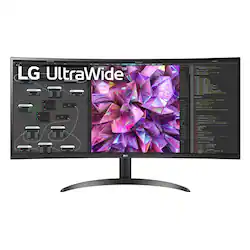
LG - 34" IPS LED Curved QHD with HDR (HDMI, DisplayPort)
- Key Specs
- Refresh Rate: 60Hz (The number of frames per second the device can produce natively without enhancement. Higher rates help produce smooth, seamless pictures.)
- Maximum Resolution: 3440 x 1440 (Maximum resolution refers to the highest number of pixels that a screen can process and display. Higher resolution signals produce more detailed images.)
- Panel Type: IPS (Technology that affects response time and image quality.)
- Synchronization Technology: Not Applicable (Generally, these technologies allow syncing between a computer/console game's frame rate and the device's refresh rate for a smoother display without tearing.)
- Screen Size: 34 inches (Size of the screen, measured diagonally from corner to corner.)
- Display Connector(s): 2 x HDMI (The number and type of connectors used to connect to an external display.)
- General
- Brand: LG
- Model Number: 34WQ60C-B
- Product Name: 34" IPS LED Curved QHD with HDR (HDMI, DisplayPort)
- Operating System Compatibility: Not Applicable
- Display
- Refresh Rate: 60Hz (The number of frames per second the device can produce natively without enhancement. Higher rates help produce smooth, seamless pictures.)
- Maximum Resolution: 3440 x 1440 (Maximum resolution refers to the highest number of pixels that a screen can process and display. Higher resolution signals produce more detailed images.)
- Contrast Ratio: 1000:1 (Measured difference between a displayed image's brightest whites and darkest blacks. The larger the first number, the more detail and color that can be displayed.)
- Display Type: LED
- Panel Type: IPS (Technology that affects response time and image quality.)
- Synchronization Technology: Not Applicable (Generally, these technologies allow syncing between a computer/console game's frame rate and the device's refresh rate for a smoother display without tearing.)
- Aspect Ratio: 21:9 (The measurement of the width of a screen compared to the height of a screen, expressed as a ratio.)
- Curved Screen: true
- Brightness: 300 candela per square meter (A measure of the total light output.)
- Screen Size: 34 inches (Size of the screen, measured diagonally from corner to corner.)
- High Dynamic Range (HDR): true (An HDR-compatible 4K TV or other HDR-compatible product displays HDR video content when it's available from sources like 4K Ultra HD Blu-ray Discs and 4K streaming services.)
- Connectivity
- Number of HDMI Inputs (Total): 2
- Display Connector(s): 2 x HDMI (The number and type of connectors used to connect to an external display.)
- Compatibility
- Wall Mountable: true (The product is able to be secured to a wall. Some products are designed ready to mount, while others may require additional hardware/accessories for installation.)
- Features
- Adjustable Stand Height: false
- Built-In Webcam: false
- Integrated Speaker(s): false
- Dimensions
- Product Height With Stand: 19.1 inches
- Product Height Without Stand: 14.4 inches
- Product Width: 32.2 inches (The out of box width of the item. Width is measured as the horizontal distance from one side of the item to the other as it would be primarily used or placed.)
- Product Weight: 15.2 pounds (The out of box weight of the item.)
- Stand Included: true
- Certifications Listings & Approvals
- ENERGY STAR Certified: false (Devices carrying the ENERGY STAR service mark, such as computer products and peripherals, kitchen appliances, and other products, generally use 20% to 30% less energy than required by federal standards.)
- EPEAT Qualified: false (The Electronic Product Environmental Assessment Tool (EPEAT) was designed to provide an environmental assessment tool for purchasers. In order to qualify for EPEAT, a product must meet all 23 required criteria.)
- Other
- UPC: 195174035184
A wider workspace for productivity and play. At 34 inches and 21:9 screen ratio, this curved, QHD (3440 x 1440) IPS Display features realistic, vibrant sRGB 99% (Typ.)¹ & HDR 10 color, contrast, clarity and detail at wide angles. Content creation. Gaming. Designing. Video editing. Whatever the task (or multi-task), LG UltraWide Monitors unveil panoramic views and high-performance features to push productivity to new levels. The 3-Side virtually borderless display looks great on an office or work from home desktop setup.
- 34" 21:9 Curved UltraWide QHD Display: More Space for Multi-Tasking. The curved UltraWide QHD (3440x1440) IPS Display offers vast screen space with aspect ratio of 21:9.
- HDR10: HDR10 elevates picture quality for a more dynamic visual immersion experience and enhanced color of HDR content. HDR10 is the digital HDR standard based on the sRGB 99% (Typ.)¹ color gamut. A true difference in color and brightness.
- OnScreen Control: Control with a Few Clicks. You can customize the workspace by splitting the display or adjusting basic monitor options with just a few mouse clicks.
- Dynamic Action Sync: Action as it Happens. Get the closest thing to real-time gaming. Dynamic Action Sync elevates your gameplay for a pro-level experience. Respond to action, opponents, and every moment with reduced input lag and unbelievable performance.
- Black Stabilizer: Black Stabilizer is your ally to attack or defend against enemies hiding in the shadows. It delivers a pro-level gaming experience by brightening dark scenes for enhanced vision and a jump on the competition.
- 3-Side Virtually Borderless Design: An immersive experience that's all screen. Beautiful and practically bezel-less. Stay in the game with a virtually borderless screen on three sides and curve design that keeps you immersed in every moment.
A: Hi there. Thanks for reaching out. For the LG - 34" IPS LED curved QHD w/HDR Product Height With Stand is 19.1". Product Height Without Stand 14.4". Product Width of 32.2". ^Jai.
Q: Can this monitor be powered by USB C? or do you need the power cord?
A: The LG 34'' Curved UltraWide™ QHD IPS HDR 10 Monitor with Dual Controller & OnScreen Control, Model # 34WQ60C-B does not have a USB-C port...^Ivan
Q: Hello, what are the VESA mount patterns? Guessing either 75x75mm or 100x100mm ?
A: The VESA mount patterns are 100x100mm. ~Tanisha
Q: WHAT IS THE HEIGHT OF THE SCREEN ( WITHOUT STAND ). WIDTH IS MENTIONED BUT HEIGHT IS NOT MENTIONED
A: Hi Danny, the dimensions for monitor model 34WQ60C-B without the stand (WxHxD) are: 32.2" x 14.4" x 3.3". ^Chris
Q: Does this monitor have any sort of anti-glare coating on the screen?
A: Hi, this model does not have Anti glare. ^Vanessa
Q: Can this monitor stand up without using the mount if it is leaned up against a shelf on the desk?
A: You could do that, but not unless you put a stop of some kind in front of it to keep the bottom from slipping forward (unit falls on its back). However, this won't be very practical because the power and mode button on most of the LG widescreens is located in the middle, *underneath* the bottom edge - so won't be able to turn it on/off or adjust its settings. (Which is probably why the LG person said 'no' to your question.) I suppose you could set it up first, then turn it on/off another way, or just let it go into sleep mode. This are excellent monitors - I have almost a dozen of them 8-|
Q: Does this monitor have USB-C connection? Concerned that it won't play nicely with my Surface Book 2.
A: Hi, this model does not have a USB port. ^Vanessa
Q: Can you hook two computers into this monitor and split the screen?
A: Hi, This model has OnScreen Control is an application used to manage a single monitor or a group of monitor with useful features such as Monitor Control, My Display Presets and Screen Split. This software is compatible in Windows and Mac OS. OnScreen Control displays all connected LG monitor information. This has PBP (Picture by Picture). ^Vanessa
People also viewed
 $349.99The price was $399.99
 $209.99The price was $289.99
 $249.99The price was $329.99
 $899.99The price was $1,299.99
 $299.99The price was $399.99
 $199.99The price was $279.99

Today's top picks
 $449.99The price was $829.99
 $2,449.99The price was $3,199.99
 $999.98The price was $1,639.98
 $199.99The price was $249.99
 $1,099.99The price was $1,499.99
 $549.99The price was $749.99








