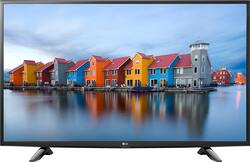
LG - 49" Class (48.7" Diag.) - LED - 1080p - Smart - HDTV
- Key Specs
- Display Type: LED
- Screen Size Class: 49 inches (The group size measurement of a screen. This differs from a screen size measured diagonally from corner to corner.)
- Refresh Rate: 60Hz (The number of frames per second the device can produce natively without enhancement. Higher rates help produce smooth, seamless pictures.)
- Smart Platform: webOS (Just like a computer, a smart TV needs an operating system (also called a smart platform) in order to access the Internet, connect with entertainment apps, and play streaming content. Some common TV smart platforms are; Roku TV, Android TV, and Chromecast.)
- General
- Brand: LG
- Model Number: 49LH570A
- Product Name: 49" Class (48.7" Diag.) - LED - 1080p - Smart - HDTV
- Color: Black
- Dimensions
- Product Height With Stand: 27.4 inches
- Product Width: 43.6 inches (The out of box width of the item. Width is measured as the horizontal distance from one side of the item to the other as it would be primarily used or placed.)
- Product Depth With Stand: 8.2 inches
- Product Height Without Stand: 25.9 inches
- Product Depth Without Stand: 3.2 inches
- Product Weight With Stand: 24.9 pounds
- Product Weight Without Stand: 24.3 pounds
- Display
- Display Type: LED
- Screen Size: 48.7 inches (Size of the screen, measured diagonally from corner to corner.)
- Screen Size Class: 49 inches (The group size measurement of a screen. This differs from a screen size measured diagonally from corner to corner.)
- Refresh Rate: 60Hz (The number of frames per second the device can produce natively without enhancement. Higher rates help produce smooth, seamless pictures.)
- Features
- Smart Capable: true (Smart, or smart-capable devices are able to connect directly to your home network in order to stream content from the Internet, run Internet-based apps, or connect to other smart devices.)
- Smart Platform: webOS (Just like a computer, a smart TV needs an operating system (also called a smart platform) in order to access the Internet, connect with entertainment apps, and play streaming content. Some common TV smart platforms are; Roku TV, Android TV, and Chromecast.)
- TV Tuner: Digital (The ATSC TV Tuner is a component built into conventional TV sets or other devices for receiving over-the-air broadcast TV without a cable/satellite box. Digital tuners may be purchased separately and connected to a device if it does not have one built in.)
- Connectivity
- Number Of USB Port(s) (Total): 1 (The total number of USB ports including all generations and versions.)
- Compatibility
- VESA Wall Mount Standard: 400mm x 400mm (VESA wall mount standards refer to the spacing of screw holes built into a TV in order to fit with standard TV wall mounts. These standards are implemented into most TVs and monitors.)
- Audio
- Speaker Output: 10 watts
- Power
- ENERGY STAR Certified: true (Devices carrying the ENERGY STAR service mark, such as computer products and peripherals, kitchen appliances, and other products, generally use 20% to 30% less energy than required by federal standards.)
- EPEAT Qualified: false (The Electronic Product Environmental Assessment Tool (EPEAT) was designed to provide an environmental assessment tool for purchasers. In order to qualify for EPEAT, a product must meet all 23 required criteria.)
- Estimated Annual Operating Cost: 10 United States dollars (Predicted cost of operating the product under average conditions for one year.)
- Estimated Annual Electricity Use: 87 kilowatt hours (Predicted amount of electricity needed to operate the product under average conditions for one year.)
- Box Dimension
- Height: 29.9 inches
- Width: 47.1 inches
- Depth: 6 inches
- CubicDimension: 8450 inches
- Other
- UPC: 719192605763
LG 49LH570A LED Smart HDTV:Retreat to your favorite shows, movies or streamed media with this LG 48.7-inch HD TV. Impressive contrasts and vivid colors thanks to the LED technology mean unmatched picture quality, and the 10W speakers create impressive audio. Smart TV functionality allows you to connect your Wi-Fi to stream media directly to this LG 48.7-inch HD TV.

- 48.7" screen (measured diagonally from corner to corner): A great size for a living room or mid-sized home theater space.
- Built-in Wi-Fi Smart TV means a huge world of entertainment: Easily access premium content** from providers like Hulu Plus®, Netflix® and YouTube®, plus the exclusive LG App Store, all directly from the TV.
- LED TVs perform well in all lighting conditions: They also deliver plasma-like deep blacks and rich colors.
- 1080p resolution for stunning HD images: Watch Blu-ray movies and 1080p HD content at their highest level of detail.
- Virtual Surround Plus delivers an extended sound field: Widened sound puts you in the middle of the action.
- 2 HDMI inputs for your home theater connection: High-speed HDMI delivers an HD picture and digital surround sound in 1 convenient cable. HDMI cable sold separately.
- 60Hz refresh rate: Images refresh 60 times per second for basic performance during fast-motion scenes.
- 1 USB input: Easily connect your digital camera, camcorder or other USB device. USB cable sold separately.
Whats Included
- 49" Class (48.7" Diag.) - LED - 1080p - Smart - HDTV
Product Manuals
Q: Does it support Amazon Video app for streaming videos, movies, etc.??
A: Supports AMZN. NETFLIX. HULU, etc.
A: The ENERGY STAR® Qualified LG - 49" Class (48.7" Diag.) - LED - 1080p - Smart - HDTV - Black, Model # 49LH570A is for VOD (video on demand) watching, it streams video and some smart functions and web browsing are not supported. The featured Apps on the TV are from our partners: Netflix, Amazon, Hulu, VUDU, Toutube, and Google Play Movies & TV...^IFV
Q: Do this tv have a optical port
A: Yes, the TV does have an optical port.
Q: Can it play videos from a flash drive or external hard drive through the usb port?
A: I have this tv so I know.Yes you can. Ive been playing video files off my 8 year old western digital external hard drive on it.
Q: What is the distance between the supportive legs?
A: Approximately 32". The feet are set at an angle so they are 30" behind the screen, 33" out front of the screen.
Q: Does this TV have EPG (Electronic Program Guide) for Digital Broadcast Television?
A: If your service is through cable service the program guide on the ENERGY STAR® QualifiedLG - 49" Class (48.7" Diag.) - LED - 1080p - Smart - HDTV - Black, Model # 49LH570A is generated through the cable box from the service provider. If you receive Over-The-Air TV Broadcasts via an antenna, there is a guide within the TV that obtains information about programs and airtime and checks the broadcasting time of your desired program and scheduled viewing. The Guide is only available in Digital mode only...^IFV
Q: how many hdmi ports with this tv Lg - 49 Class (48.7 Diag.) - Led - 1080p - Smart - Hdtv - Black?
A: This TV has 2 HDMI ports.
Q: Can I use this screen for my computer????
A: Yes, you can (my son connects his laptop using an HDMI cable, the HDMI port on his laptop and one of the two HDMI inputs on the TV) on a regular basis. But if you are going to use this as regularly a monitor for your computer (and it would be a pretty large monitor in that case) I'm not sure you really need a smart TV. You could save a few bucks by picking up a model that didn't have the internet connection. Just a thought.
People also viewed
 Clearance$189.99The price was $299.99
 $1,399.99The price was $2,499.99





Today's top picks
 $499.99The price was $749.99
 $199.99The price was $249.99
 $789.99The price was $1,049.99








