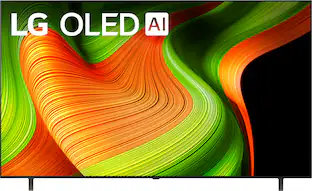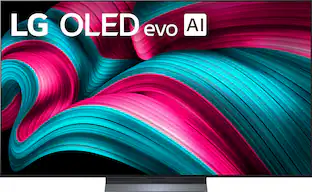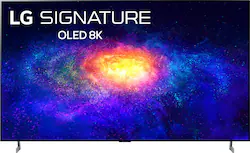
LG - 77" Class ZX Series OLED 8K UHD Smart webOS TV
- Key Specs
- Display Type: OLED
- Resolution: 8K (4320p) (Refers to the number of pixels, both horizontally and vertically, used to capture video/images. The higher the resolution the finer the detail that can be seen.)
- Screen Size Class: 77 inches (The group size measurement of a screen. This differs from a screen size measured diagonally from corner to corner.)
- High Dynamic Range (HDR): true (An HDR-compatible 4K TV or other HDR-compatible product displays HDR video content when it's available from sources like 4K Ultra HD Blu-ray Discs and 4K streaming services.)
- High Dynamic Range Format: Dolby Vision, HDR 10, Hybrid Log-Gamma (HLG) (There are a few HDR formats that tell the TV or other HDR-compatible product how to best utilize its capabilities to display HDR content. HDR technology can support one or multiple formats, each with various benefits to picture quality.)
- OLED Technology: Standard OLED
- Refresh Rate: 120Hz (The number of frames per second the device can produce natively without enhancement. Higher rates help produce smooth, seamless pictures.)
- Motion Enhancement Technology: None (Proprietary technologies produced in addition to the Refresh Rate that smooth out faster moving pictures to reduce blur and pixelation.)
- Specific Manufacturer Technologies: Infinite Contrast, Perfect Black, Pixel Level Dimming, Intense Color, Quad Step Noise Reduction (This is technology that's specific to a TV brand (sometimes called proprietary technology). Here you'll see terms related to picture quality, brightness, processors and more.)
- Smart Platform: webOS (Just like a computer, a smart TV needs an operating system (also called a smart platform) in order to access the Internet, connect with entertainment apps, and play streaming content. Some common TV smart platforms are; Roku TV, Android TV, and Chromecast.)
- Featured Streaming Services: Apple TV+, Paramount+, Crackle, Disney+, Fandango, Google Play Movies & TV, Hulu, Netflix, Pandora, Peacock, Prime Video, Redbox, SHOWTIME, SIRIUS, STARZ, Sling TV, Spotify, Twitch, Vudu, YouTube, YouTube TV, iHeartRadio (Streaming services and other programs are available on this device. Keep in mind, there may be more services supported than just those shown here.)
- Number of HDMI Inputs (Total): 4
- TV Tuner Type: ATSC, Clear QAM
- Works With: Amazon Alexa, Google Assistant, Apple HomeKit (Compatible with or able to be connected to other smart devices or applications.)
- Voice Assistant Built-in: Google Assistant (A digital assistant built into the device that uses voice commands to answer questions and control smart devices.)
- General
- Brand: LG
- Model Number: OLED77ZXPUA
- Product Name: 77" Class ZX Series OLED 8K UHD Smart webOS TV
- Color: Black
- Model Year: 2020
- Dimensions
- Product Height With Stand: 40.9 inches
- Product Width: 67.7 inches (The out of box width of the item. Width is measured as the horizontal distance from one side of the item to the other as it would be primarily used or placed.)
- Product Depth With Stand: 12.7 inches
- Product Height Without Stand: 38.7 inches
- Product Depth Without Stand: 1.3 inches
- Product Weight With Stand: 95.7 pounds
- Product Weight Without Stand: 93.9 pounds
- Adjustable Stand Width: false (Whether the stand can adjust to have more than one measurement either between the legs or the base itself.)
- Display
- Display Type: OLED
- Resolution: 8K (4320p) (Refers to the number of pixels, both horizontally and vertically, used to capture video/images. The higher the resolution the finer the detail that can be seen.)
- Screen Size: 76.7 inches (Size of the screen, measured diagonally from corner to corner.)
- Screen Size Class: 77 inches (The group size measurement of a screen. This differs from a screen size measured diagonally from corner to corner.)
- High Dynamic Range (HDR): true (An HDR-compatible 4K TV or other HDR-compatible product displays HDR video content when it's available from sources like 4K Ultra HD Blu-ray Discs and 4K streaming services.)
- High Dynamic Range Format: Dolby Vision, HDR 10, Hybrid Log-Gamma (HLG) (There are a few HDR formats that tell the TV or other HDR-compatible product how to best utilize its capabilities to display HDR content. HDR technology can support one or multiple formats, each with various benefits to picture quality.)
- Picture Quality Enhancement Technology: HDR Compatible
- OLED Technology: Standard OLED
- Curved Screen: false
- Refresh Rate: 120Hz (The number of frames per second the device can produce natively without enhancement. Higher rates help produce smooth, seamless pictures.)
- Motion Enhancement Technology: None (Proprietary technologies produced in addition to the Refresh Rate that smooth out faster moving pictures to reduce blur and pixelation.)
- Language(s) Displayed: Spanish, French (The available language options for displayed text or captions.)
- Features
- Remote Control Type: Magic
- Specific Manufacturer Technologies: Infinite Contrast, Perfect Black, Pixel Level Dimming, Intense Color, Quad Step Noise Reduction (This is technology that's specific to a TV brand (sometimes called proprietary technology). Here you'll see terms related to picture quality, brightness, processors and more.)
- Smart Capable: true (Smart, or smart-capable devices are able to connect directly to your home network in order to stream content from the Internet, run Internet-based apps, or connect to other smart devices.)
- Smart Platform: webOS (Just like a computer, a smart TV needs an operating system (also called a smart platform) in order to access the Internet, connect with entertainment apps, and play streaming content. Some common TV smart platforms are; Roku TV, Android TV, and Chromecast.)
- Featured Streaming Services: Apple TV+, Paramount+, Crackle, Disney+, Fandango, Google Play Movies & TV, Hulu, Netflix, Pandora, Peacock, Prime Video, Redbox, SHOWTIME, SIRIUS, STARZ, Sling TV, Spotify, Twitch, Vudu, YouTube, YouTube TV, iHeartRadio (Streaming services and other programs are available on this device. Keep in mind, there may be more services supported than just those shown here.)
- Screen Mirroring: false (Casts the screen of one device onto another wirelessly, using a common protocol (typically Bluetooth).)
- Indoor Or Outdoor Use: Indoor (Indicates the appropriate environment product was designed to be used in.)
- Text-To-Speech: true (A system that converts language text into speech.)
- Video Description: true (Indicates whether the device features descriptive video service (DVS). This service provides narration of key elements in the program, such as actions, costumes, and scene changes, to help engage visually-impaired audiences.)
- V-Chip: false (Feature that blocks television programming if it has a content rating outside of the acceptable rating(s) configured by the user.)
- TV Tuner: Digital (The ATSC TV Tuner is a component built into conventional TV sets or other devices for receiving over-the-air broadcast TV without a cable/satellite box. Digital tuners may be purchased separately and connected to a device if it does not have one built in.)
- Connectivity
- Number of HDMI Inputs (Total): 4
- HDBaseT Receiver: false (An input that receives uncompressed HDMI signals over a category cable point-to-point, up to 100 meters, from a transmitter.)
- TV Tuner Type: ATSC, Clear QAM
- RF Antenna Input: true (This input is used to connect devices such as antennas or cable boxes to a TV via a coaxial cable.)
- Number Of USB Port(s) (Total): 3 (The total number of USB ports including all generations and versions.)
- Bluetooth Version: 5.0 (The Bluetooth specification formalized by the Bluetooth Special Interest Group. All versions of the Bluetooth standard are backwards compatible with previous versions.)
- Headphone Jack: false (The device features an interface that allows for the connection of headphones.)
- Compatibility
- VESA Wall Mount Standard: 400mm x 400mm (VESA wall mount standards refer to the spacing of screw holes built into a TV in order to fit with standard TV wall mounts. These standards are implemented into most TVs and monitors.)
- Works With: Amazon Alexa, Google Assistant, Apple HomeKit (Compatible with or able to be connected to other smart devices or applications.)
- Voice Assistant Built-in: Google Assistant (A digital assistant built into the device that uses voice commands to answer questions and control smart devices.)
- Audio
- Built-In Speakers: true
- Built-in Speaker Type: Downward firing (Backward, downward, and front-firing speakers direct sound into the room from those respective directions. A soundbar is typically long and rectangular, and designed to act as an all-in-one speaker with greater sound production than that of a TV alone. An acoustic surface is the result of small sound actuators embedded directly behind the screen, turning the entire screen's surface into a speaker.)
- Speaker Output: 60 watts
- Power
- ENERGY STAR Certified: false (Devices carrying the ENERGY STAR service mark, such as computer products and peripherals, kitchen appliances, and other products, generally use 20% to 30% less energy than required by federal standards.)
- EPEAT Qualified: false (The Electronic Product Environmental Assessment Tool (EPEAT) was designed to provide an environmental assessment tool for purchasers. In order to qualify for EPEAT, a product must meet all 23 required criteria.)
- Estimated Annual Operating Cost: 56 United States dollars (Predicted cost of operating the product under average conditions for one year.)
- Estimated Annual Electricity Use: 463 kilowatt hours (Predicted amount of electricity needed to operate the product under average conditions for one year.)
- Rechargeable Battery (Remote Control): false
- Included
- Stand Included: true
- Box Dimension
- Height: 44.5 inches
- Width: 74.6 inches
- Depth: 9 inches
- CubicDimension: 29877 inches
- Other
- UPC: 719192637184
Impress guests during movies with this 77-inch LG Signature smart OLED TV. The self-lighting pixels produce intense color, infinite contrast and perfect black for quality viewing, while the α9 Gen 3 AI processor 8K and LG ThinQ AI technology let you give commands via connected- home devices easily. This LG Signature smart OLED TV features NVIDIA G-SYNC technology to reduce screen tearing during intense gaming sessions
- OLED 8K Display: LG's 8K OLED TVs meet the industry definition for 8K resolution. While over 33 million active OLED pixels emit their own light for a level of perfect black, intense color and stunning picture quality — even at wide angles.
- α9 Gen 3 AI Processor 8K: Everything you see and hear is automatically made better, clearer, smoother and more dynamic with the α9 Gen 3 AI Processor 8K with AI Picture Pro, AI Sound Pro and AI 8K Upscaling.¹
- Self-Lit Pixels: Millions of OLED pixels emit their own light independently and can be completely turned off. This unveils perfect black and infinite contrast.
- LG ThinQ AI, the Google Assistant and Alexa Built-in: LG ThinQ is an open platform that fully integrates the voice assistants you already use. No need to buy a separate device.
- Cinema HDR (Dolby Vision, HDR10, HLG): Automatically elevate the beauty of your favorite scenes. Cinema HDR supports a wide range of formats for scene-by-scene picture adjustment, including Dolby Vision, HDR10 and HLG.
- Dolby Vision IQ: Automatically adjusts picture settings depending on ambient lighting conditions and content genres.
- Dolby Atmos: Puts you in the middle of the action with multi-dimensional surround sound that seems to flow all around you.
- FilmMaker Mode: Translates a director’s cinematic vision to your TV with automatic picture and processor settings and brings true authenticity.
- LG's webOS smart platform delivers streaming simplicity: Featuring the latest streaming apps such as Disney+ and the Apple TV app plus popular apps such as Netflix, Hulu, Sling, Prime Video and more
- LG Channels provides more entertainment options than ever: LG Channels deliver free access to over 180 IP streaming channels offering movies, shows, breaking news, sports, comedy and more - integrated alongside over-the-air channels and channel guide.
- Magic Remote - just point, click, or speak: The mouse-like control and voice control make it easier to find your content without having to type what you want. Simply point on screen, scroll through your options, or speak to stream movies and shows through LG's webOS.
- NVIDIA G-SYNC compatible with RTX 20 and GTX 16 graphics card series: This LG OLED TV works seamlessly with NVIDIA G-SYNC. Experience immersive gaming like never before.
- Gallery Mode: Turns your TV into a beautiful backdrop. Enjoy a collection of stunning pictures and paintings with accompanying music to set the mood.
- Bluetooth Surround Ready: Connect up to two compatible LG Bluetooth speakers for a true surround sound experience - not a wire in sight.
- WiSA-Ready: Works with WiSA-compatible speakers to take fidelity to a whole new level. It's high fidelity in 5.1 wireless audio with the best in wireless surround sound. Supports 5.1 Channel and 2.0 Channel. Transmitter dongle required and sold separately.
- 8K Ultra HD (7,680 x 4,320 resolution): Enjoy breathtaking 8K movies and TV shows at 8 times the resolution of Full HD, and upscale your current content to Ultra HD-level picture quality.
- Works with both Google Assistant and Amazon Alexa for voice control: Ask either voice assistant (device required) to help you play movies, TV shows and more. Plus, control other connected devices like lights and a thermostat for a better viewing experience.
- Smart TV with access to streaming services for countless entertainment options: Stream shows, movies, games and more with the TV's built-in Wi-Fi and integrated apps.
Whats Included
- 77" Class ZX Series OLED 8K UHD Smart webOS TV
- Remote control
- Batteries
Documents
- Energy_Guide_PDF
Q: does it do your laundry and make you breakfast, lunch and dinner??
A: Yes, except for breakfast. Brunch only.
Q: Does it give you a happy ending for this price?
A: If you have questions or further concerns, please reach out to our support team on Twitter via @LGUSSupport or on Facebook at https://www.facebook.com/LGUSA/. ^Daphane
A: The response received provided the following answers: 1. Blu-ray content does not support 8K resolution. 2. Blu-ray content will not support 8K resolution in the foreseeable future. 3. TV Broadcasts do not support 8K resolution. 4. TV Broadcasts will not support 8K resolution in the foreseeable future. 5. Streaming Online content does not support 8K resolution. 6. Streaming Online content will not support 8K resolution in the foreseeable future.
A: The stand legs for the LG SIGNATURE ZX 77 inch Class 8K Smart OLED TV w/AI ThinQ® (76.7'' Diag), Model # OLED77ZXPUA have a width of 60.3". They cannot be adjusted...^IFV
A: Yes, this TV is mountable using VESA Wall Mount Standard 400mm x 400mm. ^Daphane
Q: Will my computer be ok to use 3 of these for iracing?
A: Regrettably, without any detils or information about your computer and the GPU it it, we cannot determine if it can be used to drive three of the LG SIGNATURE ZX 77 inch Class 8K Smart OLED TV w/AI ThinQ® (76.7'' Diag), Model # OLED55ZXPUA...^IFV
Q: How do you change the battery in the remote control?
A: To install batteries, open the battery cover, replace batteries (1.5 V AAA) matching the and ends to the label inside the compartment, and close the battery cover. Be sure to point the Magic Remote toward the remote control sensor on the TV. For further assistance, please reach out to our support team via private message on Facebook @LGUSSupport and use #VOC in your first message to our social media support team or call at 800-243-0000. ^Daphane
Q: What do you do with surge protection for wall mounted TV's?
A: Google "surge protector wall tap", they plug directly into the outlet.
People also viewed
 $1,999.99The price was $3,399.99
 $1,597.99The price was $1,697.99