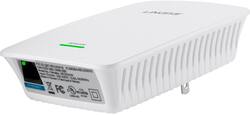
Linksys - N300 Wi-Fi Range Extender - White
Model: RE3000W
SKU: 7401033
This item is no longer available in new condition. See similar items below
- Key Specs
- Wireless Standard: N (The wireless networking protocol used by the device. Each iteration of the protocol is based on the 802.11 standard developed by the Institute of Electrical and Electronics Engineers (IEEE) Standards Association. Denoted by letters following 802.11 (802.11a, 802.11ac, etc.), each version, published in alphabetical order, encompasses all previous versions.)
- Frequency Band: Other (Bands may be grouped into categories such as low- and high-band VHF (Very High Frequency), low- and high-band UHF (Ultra High Frequency), or certain frequency channels (measured in MHz or GHz). Generally, higher frequencies transmit information faster but have shorter range than lower frequencies.)
- Number of Antennas: 2
- Number of LAN Ports: 0 (Number of devices able to be connected to the Local Area Network (LAN). LAN ports allow wired connections to other networking devices (wireless access points, range extenders, etc.) in order to share the internet connection received through a WAN port.)
- Wireless Networking Standard: Wi-Fi 4 (The wireless networking standard used by the device. Each iteration of the standard developed by the Wi-Fi Alliance corresponds to an existing IEEE 802.11 protocol; for example, standard 802.11ac (or AC) is termed Wi-Fi 5. Refers specifically to the standard the device is designed to use, but ultimately determines product interoperability and backward compatibility including previous versions.)
- General
- Brand: Linksys
- Model Number: RE3000W
- Product Name: N300 Wi-Fi Range Extender
- Color: White
- Network
- Wireless Networking Standard: Wi-Fi 4 (The wireless networking standard used by the device. Each iteration of the standard developed by the Wi-Fi Alliance corresponds to an existing IEEE 802.11 protocol; for example, standard 802.11ac (or AC) is termed Wi-Fi 5. Refers specifically to the standard the device is designed to use, but ultimately determines product interoperability and backward compatibility including previous versions.)
- Security
- Security Features: WPA2, WPA and WEP encryption
- Encryption Type: WPA2, WPA, WEP (The security protocols or certification programs that protect the Wi-Fi network.)
- Dimensions
- Product Height: 1.3 inches (The out of box height of the item. Height is measured as the vertical distance from the bottom of the item to the top as it would be primarily used or placed.)
- Product Length: 3.6 inches (The out of box length of the item. Length is measured as the longest dimension of the item.)
- Product Width: 4.9 inches (The out of box width of the item. Width is measured as the horizontal distance from one side of the item to the other as it would be primarily used or placed.)
- Product Weight: 0.34 pounds (The out of box weight of the item.)
- Warranty
- Warranty - Parts: 1 year limited
- Warranty - Labor: 1 year limited
- Other
- UPC: 745883654307
Linksys RE3000W Wireless-N Range Extender: This range extender expands the coverage area of your wireless network by repeating and redistributing the signal from the router, reducing the dead zones in your network.
- Boost your existing Wi-Fi network: Stay connected as this range extender reduces dead zones throughout your home.
- Compatible with Linksys and other brands: Repeats the Wi-Fi signals from select 802.11b/g/n routers and gateways.
- Fast Ethernet port gives you a reliable connection for wired devices: Connect a wired device like a desktop computer or smart TV to your range extender using an Ethernet cable.
Whats Included
- Linksys Wireless-N Extender
- Owner's manual
People also viewed
 $79.99The price was $99.99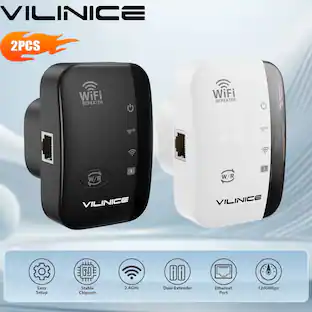
VILINICE - AC1200 WiFi Extender 2 Pack Dual Band Wireless Repeater Coverage 3000 Sq Ft Ethernet Port
$25.99The price was $49.96

Today's top picks
 $449.99The price was $829.99
 $2,449.99The price was $3,199.99
 $999.98The price was $1,639.98
 $199.99The price was $249.99
 $1,099.99The price was $1,499.99