Rating 4.7 out of 5 stars with 1688 reviews
4.7Customer Images
The vast majority of our reviews come from verified purchases. Reviews from customers may include My Best Buy members, employees, and Tech Insider Network members (as tagged). Select reviewers may receive discounted products, promotional considerations or entries into drawings for honest, helpful reviews.
- Rated 5 out of 5 stars
Trackball feels like it did back in the 90's
I already had previous version of this mouse, I had my expectations and it was exceeded. Feels very much solid and with touch you can feel the quality. Ball is very precise and easy to control, wrist is always relaxed during the usage. Difference and very big advantage is the possibility to pair with bluetooth. I use it on multiple devices and it is very convenient. Of course in case you want to you can use chip as well which was included also. As a summary, it worth more than it costs. Perfect pricing i will admit.
Posted by Sim31
- Rated 5 out of 5 stars
Best redesign yet!
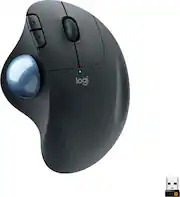
I have been buying these Logitech side ball mice at this price point or years, whenever one would start to act up (typically 1.5-2 years of heavy use) I would buy a replacement and this is the best version they have ever made. It is more comfortable than the previous version (which I considered inferior) less comfortable than it's predecessor) and the USB connector and Bluetooth dual functionality is fantastic for easily connecting to multiple devices. It has the same familiar Logitech unifying receiver and a single button on the bottom that functions to connect to Bluetooth (hold) and to switch between the receiver and Bluetooth (press twice). There is a light indicator that will flash white/blue to let you know which connection its using. You can see the differences in size and shape between this version and the previous one and while they look similar, the way they feel in the hand is significant. The flatter and wider surface of the Ergo is much more comfortable and the forward and back button shape and placement makes it more difficult to hit them accidentally. The texturing on the top also provides a better grip and the ball is smoother to operate. I can't speak for its durability yet but in my experience these mice are very durable and this one feels both better put together and higher quality than previous models.
Posted by Justin
- Rated 5 out of 5 stars
Mouse
Really good remote. Helps if you have wrist issues since your only using your thumb and index finger and don’t need a pad to move around. Very versatile and has good battery life.it’s a little big of you use medium size gloves. It’s a little bulky but sturdy.
Posted by Laptop
- Rated 5 out of 5 stars
Love This Mouse
I really like this mouse. I was not sure at first, it's a change from a traditional mouse that you have to move around. it took me a few days to really get used to it and now it is my favorite, and love that it takes up so little space next to my keyboard. oh, and if you have a Logitech keyboard (I do) you can par it and only need one USB receiver plugged into your computer for both. that's a win-win for me.
Posted by Dski
- Rated 5 out of 5 stars
Oh my, another Logitech product
I like trackballs. I had previously had 4 other Logitech trackballs and Trackman's that were wired versions that had quit working on previous computers. I have had many Logitech products that quit working. I had another TB I had bought when I replaced another computer recently-it died within a month. Desperate for control I went to my local Best Buy to get anything to mouse the new computer. I broke down and bought this M575 hopefully it won't die like all the other Logitech items I have bought in the last 20 years. I had sworn never again but here I am with another Logitech item just hoping it has a long life at least till windows 12 or 13...Other than that it is slick and works well. wireless version of a couple of my wired version.Too soo to tell about value and Quality. Works well now
Posted by HHollandSimms