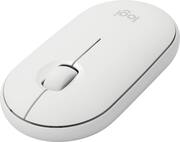
Logitech - Pebble i345 Bluetooth Optical Ambidextrous Mouse for iPad - Wireless - White
- Key Specs
- Lighting Type: None
- Maximum Sensitivity: 1000 dots per inch (Mouse sensitivity is measured in dots per inch (DPI). The higher the DPI, the more sensitive the mouse is and may be more useful for high-density pixel screens. Lower DPI typically means more precision and accuracy in mouse movement.)
- Number of Buttons (Total): 3
- Connection Type: Wireless
- General
- Brand: Logitech
- Model Number: 910-005888
- Product Name: Pebble i345 Bluetooth Optical Ambidextrous Mouse for iPad
- Color: White
- System Requirements: macOS 10.14 or later, iPadOS 13.4 or later (The software that a product must have for it to be able to integrate with another product.)
- Features
- Mouse Type: Standard
- Lighting Type: None
- Performance
- Mouse Operation: Button(s), Scroll wheel
- Handedness: Ambidextrous
- Tracking Method: Optical (There are several types of computer mice, optical and laser being among the most common. Optical mice detect less detail and provide more precise and accurate movement. Laser mice detect more detail and can be used on a wider variety of surfaces, but are more sensitive to small movements.)
- Maximum Sensitivity: 1000 dots per inch (Mouse sensitivity is measured in dots per inch (DPI). The higher the DPI, the more sensitive the mouse is and may be more useful for high-density pixel screens. Lower DPI typically means more precision and accuracy in mouse movement.)
- Number of Buttons (Total): 3
- Connectivity
- Connection Type: Wireless
- Wireless Connectivity: Bluetooth (The manner in which a device sends data to another device over a short distance without the use of wires or cables.)
- Operating System Compatibility: Apple iPadOS, Mac
- Power
- Mouse Power Source: Battery-powered
- On/Off Switch: true
- Rechargeable Battery (Mouse): false
- Battery Size: AA (The battery size required for operation.)
- Number of Batteries Required: 1
- Batteries Included: true (Indicates whether the product comes with the required batteries for its operation.)
- Dimensions
- Product Height: 1 inches (The out of box height of the item. Height is measured as the vertical distance from the bottom of the item to the top as it would be primarily used or placed.)
- Product Length: 0.01 inches (The out of box length of the item. Length is measured as the longest dimension of the item.)
- Product Width: 2.3 inches (The out of box width of the item. Width is measured as the horizontal distance from one side of the item to the other as it would be primarily used or placed.)
- Product Weight: 100 grams (The out of box weight of the item.)
- Warranty
- Warranty - Parts: 1 year
- Warranty - Labor: None
- Other
- UPC: 097855158703
Meet the Logitech Pebble i345. It takes your iPad to higher places with a level of precision and control you can’t get with a tablet alone. Use it to click, scroll, and control your workflow like never before. It’s small, portable, and comfortable—so you can keep exploring, wherever you go.
- Slim. Light. Portable.: Slip Logitech Pebble i345 in your bag or drop it in your pocket. Take it to a poolside lounge, cafe table, or airplane, and say "hello" to your new mobile office.
- Works on multiple surfaces: Logitech Pebble i345 tracks fast and accurately whether you use it on a table at your favorite coffee shop or directly on your bed covers.
- Beautiful slim design: Just like an iPad, Logitech Pebble i345 is sleek and streamlined. With round corners, clean lines, and modern colors, it is the perfect match to iPad and looks great in any setup.
- Easy setup with Bluetooth: Connect with energy-efficient Bluetooth LE for a reliable connection you can count on up to a 33ft range.¹
- Silent: Work in a cafe, library, or even a crowded train without disturbing anyone around you. You’ll get the same click feel you love, but make about 90% less noise.²
- Long-lasting 18-month battery: Up to 18-month battery life means you don’t have to worry about losing power. Logitech Pebble i345 automatically goes into battery-saving sleep mode when you’re taking a break.³
- Multiple colors: Choose Logitech Pebble i345 in white or graphite to perfectly match the rest of your accessories.
- More sustainable: Certified carbon neutral: the carbon impact of the product and packaging has been reduced to zero.
Whats Included
- Logitech Pebble i345
- 1 AA battery (pre-installed)
- User documentation
A: Actually, the i345 is compatible with any device that has BLE (bluetooth low energy) and not just IOS things. I've used the i345 with a PC and also a Chromebook. As far as I can tell, the only difference between the i345 and the M350/M355 is that the i345 doesn't have the USB dongle to use on devices that don't have bluetooth.
Q: Can this mouse connect to a MacBook Pro as well as the iPad?
A: Hello D! Yes, the Pebble i345 will work on both the MacBook Pro as well as any iPad with iPadOS 13.4 or later through Bluetooth connectivity.
A: I have the i345. If you're on iOS 13.4.1 and go into settings and search for "Customize Mouse Buttons" you can turn this on. Pointer Control - Devices - Connected Devices - Pebble i345 - Customize Additional Buttons You can set this up. Assistive touch also needs to be enabled.
Q: Does it work with Samsung Tablets
A: Hello Don! Yes the Pebble i345 Bluetooth Optical Mouse will work on Samsung Tablets with Android 7 or later.
A: Yes, although the Pebble i345 is designed for Mac, it can be used as a standard Bluetooth mouse for other devices and platforms as well. You may want to check out some of our Bluetooth mice with Multi-device capability, such as the M585, M720, or any MX series. Then you would not have to re-pair every time to use it with other devices: https://www.bestbuy.com/site/searchpage.jsp?_dyncharset=UTF-8&id=pcat17071&iht=y&keys=keys&ks=960&list=n&qp=brand_facet%3DBrand~Logitech%5Ecategory_facet%3DMice~pcmcat338200050008%5Efeatures_facet%3DFeatures~Bluetooth&sc=Global&st=logitech%20mouse&type=page&usc=All%20Categories - Will, Logitech.
Q: Does it work with my iPad 10.2 7th gen?
A: Yes it works well with my IPad 7 th Gen.
A: This mouse is true Bluetooth to my IPad, No usb required
Q: Will this mouse work with a MacBook Air 2020 running IOS Big Sur 11.4?
A: I said in a previous answer that t would not. However, I was wrong. It works fine once it connects to bluetooth. I am very sorry to put bad information and I apologize to Logitech for misrepresenting ther product. Chas


