- General
- Brand: Microsoft
- Model Number: 2WR-00001
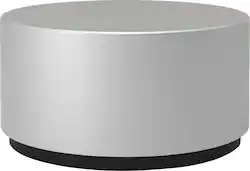
- Product Name: Surface Dial
- Color: Magnesium
- Warranty
- Warranty - Parts: 1 year
- Warranty - Labor: 1 year
- Other
- Product Width: 2.32 inches (The out of box width of the item. Width is measured as the horizontal distance from one side of the item to the other as it would be primarily used or placed.)
- Product Height: 1.18 inches (The out of box height of the item. Height is measured as the vertical distance from the bottom of the item to the top as it would be primarily used or placed.)
- Product Length: 2.12 inches (The out of box length of the item. Length is measured as the longest dimension of the item.)
- Product Weight: 0.32 pounds (The out of box weight of the item.)
- Number Of Keys: 0
- Software Compatibility: Windows 10
- UPC: 889842103502
Throw away your mouse for work, and take hold of the Microsoft Surface Dial for graphics work and scrolling. This intuitive device connects with your computer to adjust volume, pan through maps, and multiple other applications. This Microsoft Surface Dial is compatible with a range of Microsoft applications, including Sketchable, Mental Canvas and Bluebeam Revue.
- More productive and enjoyable creative process: Access to a wide range of innovative tools that help create an immersive work experience.
- Control your digital world: Store, customize, access, navigate - Surface Dial is a completely new way to interact with technology.
- Integration with leading applications: Simply press and hold to access tools and shortcuts in Adobe CC, Mental Canvas, Bluebeam, SolidWorks, Sketchable, Drawboard PDF, and more.
- Intuitive design: Manipulate images, adjust volume, change colors and more. All you need are three simple gestures: press & hold, click, and rotate.
- Preloaded for creativity: Comes with a range of controls and settings that help maintain your creative flow for tasks like digital illustration, animation, and more.
- Custom menu of tools: Select custom controls for your specific creative needs in the applications you use most.
- Combine with Surface Pen: With Surface Dial in one hand and Surface Pen in the other, you can unlock your creativity with easy access to shortcuts, controls, drawing tools, and more.
- Instant feedback at your fingertips: Built-in haptic feedback provides helpful vibrations so you can literally feel your creativity come to life.
- Radial menu of tools: Undo each individual line of a drawing, change pencil or brush size, scrub through video, rotate 3D vectors or manipulate parameters in a single turn of the dial.
- Seamless transitions through tasks: No need to click through multiple screens and drop-down menus to accomplish tasks. Surface Dial puts a range of tools and shortcuts at your fingertips so you can work without interruptions.
- Everyday tasks made more exciting: Change tracks in Spotify, scroll through news articles online, and fly through maps - all with a turn of the dial.
- Compatibility: Surface Dial works with Windows 10 Devices. Features include, press and hold for the menu, rotation, click and dynamic feedback. On-screen detection is compatible with Surface Studio only.
Whats Included
- Microsoft Surface Dial
- 2 AAA batteries
Q: What is the weight of the Microsoft Surface Dial?
A: It weighs 0.32 pounds.
Q: Does the Microsoft Surface Dial work with the Surface Pen?
A: Yes, you can use both the Surface Dial and Surface Pen together.
Q: Can the Microsoft Surface Dial be used with other devices?
A: It is compatible with Windows 10 devices.
Q: Does the Microsoft Surface Dial provide any feedback when in use?
A: Yes, it has built-in haptic feedback that provides vibrations.
Q: How do you access tools using the Microsoft Surface Dial?
A: Simply press and hold the dial to access tools and shortcuts.
Q: What can you do with the Microsoft Surface Dial?
A: You can adjust volume, pan through maps, and use it for multiple other applications.
Q: Can I pair this with an Alienware area 51 computer and use it to change the Colors of the computer
A: Surface Dial was specifically optimized to be compatible with Surface devices only.
Q: Can I use this for other laptops beside Microsoft? I having a XPS Dell Laptop and I kinda want this.
A: While Surface Dial was designed with the Surface line in mind, it is currently compatible with all Windows 10 devices. Features include, press and hold for the menu, rotation, click and dynamic feedback. On-screen detection is compatible with Studio only.
Today's top picks
 Tech Fest Deal$299.99The price was $469.99
 $199.99The price was $249.99
 Tech Fest Deal$179.99The price was $329.99
 Tech Fest Deal$749.99The price was $1,199.99
 Tech Fest Deal$39.99The price was $79.99
 Tech Fest Deal$199.99The price was $349.99