Microsoft - Surface Dial - Magnesium
- General
- Brand: Microsoft
- Model Number: 2WR-00001
- Product Name: Surface Dial
- Color: Magnesium
- Warranty
- Warranty - Parts: 1 year
- Warranty - Labor: 1 year
- Other
- Product Width: 2.32 inches (The out of box width of the item. Width is measured as the horizontal distance from one side of the item to the other as it would be primarily used or placed.)
- Product Height: 1.18 inches (The out of box height of the item. Height is measured as the vertical distance from the bottom of the item to the top as it would be primarily used or placed.)
- Product Length: 2.12 inches (The out of box length of the item. Length is measured as the longest dimension of the item.)
- Product Weight: 0.32 pounds (The out of box weight of the item.)
- Number Of Keys: 0
- Software Compatibility: Windows 10
- UPC: 889842103502
Throw away your mouse for work, and take hold of the Microsoft Surface Dial for graphics work and scrolling. This intuitive device connects with your computer to adjust volume, pan through maps, and multiple other applications. This Microsoft Surface Dial is compatible with a range of Microsoft applications, including Sketchable, Mental Canvas and Bluebeam Revue.
- More productive and enjoyable creative process: Access to a wide range of innovative tools that help create an immersive work experience.
- Control your digital world: Store, customize, access, navigate - Surface Dial is a completely new way to interact with technology.
- Integration with leading applications: Simply press and hold to access tools and shortcuts in Adobe CC, Mental Canvas, Bluebeam, SolidWorks, Sketchable, Drawboard PDF, and more.
- Intuitive design: Manipulate images, adjust volume, change colors and more. All you need are three simple gestures: press & hold, click, and rotate.
- Preloaded for creativity: Comes with a range of controls and settings that help maintain your creative flow for tasks like digital illustration, animation, and more.
- Custom menu of tools: Select custom controls for your specific creative needs in the applications you use most.
- Combine with Surface Pen: With Surface Dial in one hand and Surface Pen in the other, you can unlock your creativity with easy access to shortcuts, controls, drawing tools, and more.
- Instant feedback at your fingertips: Built-in haptic feedback provides helpful vibrations so you can literally feel your creativity come to life.
- Radial menu of tools: Undo each individual line of a drawing, change pencil or brush size, scrub through video, rotate 3D vectors or manipulate parameters in a single turn of the dial.
- Seamless transitions through tasks: No need to click through multiple screens and drop-down menus to accomplish tasks. Surface Dial puts a range of tools and shortcuts at your fingertips so you can work without interruptions.
- Everyday tasks made more exciting: Change tracks in Spotify, scroll through news articles online, and fly through maps - all with a turn of the dial.
- Compatibility: Surface Dial works with Windows 10 Devices. Features include, press and hold for the menu, rotation, click and dynamic feedback. On-screen detection is compatible with Surface Studio only.
- More productive and enjoyable creative process: Access to a wide range of innovative tools that help create an immersive work experience.
- Control your digital world: Store, customize, access, navigate - Surface Dial is a completely new way to interact with technology.
- Integration with leading applications: Simply press and hold to access tools and shortcuts in Adobe CC, Mental Canvas, Bluebeam, SolidWorks, Sketchable, Drawboard PDF, and more.
- Intuitive design: Manipulate images, adjust volume, change colors and more. All you need are three simple gestures: press & hold, click, and rotate.
- Preloaded for creativity: Comes with a range of controls and settings that help maintain your creative flow for tasks like digital illustration, animation, and more.
- Custom menu of tools: Select custom controls for your specific creative needs in the applications you use most.
- Combine with Surface Pen: With Surface Dial in one hand and Surface Pen in the other, you can unlock your creativity with easy access to shortcuts, controls, drawing tools, and more.
- Instant feedback at your fingertips: Built-in haptic feedback provides helpful vibrations so you can literally feel your creativity come to life.
- Radial menu of tools: Undo each individual line of a drawing, change pencil or brush size, scrub through video, rotate 3D vectors or manipulate parameters in a single turn of the dial.
- Seamless transitions through tasks: No need to click through multiple screens and drop-down menus to accomplish tasks. Surface Dial puts a range of tools and shortcuts at your fingertips so you can work without interruptions.
- Everyday tasks made more exciting: Change tracks in Spotify, scroll through news articles online, and fly through maps - all with a turn of the dial.
- Compatibility: Surface Dial works with Windows 10 Devices. Features include, press and hold for the menu, rotation, click and dynamic feedback. On-screen detection is compatible with Surface Studio only.
Whats Included
- Microsoft Surface Dial
- 2 AAA batteries
- Microsoft Surface Dial
- 2 AAA batteries
Q: What is the weight of the Microsoft Surface Dial?
A: It weighs 0.32 pounds.
Q: Does the Microsoft Surface Dial work with the Surface Pen?
A: Yes, you can use both the Surface Dial and Surface Pen together.
Q: Can the Microsoft Surface Dial be used with other devices?
A: It is compatible with Windows 10 devices.
Q: Does the Microsoft Surface Dial provide any feedback when in use?
A: Yes, it has built-in haptic feedback that provides vibrations.
Q: How do you access tools using the Microsoft Surface Dial?
A: Simply press and hold the dial to access tools and shortcuts.
Q: What can you do with the Microsoft Surface Dial?
A: You can adjust volume, pan through maps, and use it for multiple other applications.
Q: Can I pair this with an Alienware area 51 computer and use it to change the Colors of the computer
A: Surface Dial was specifically optimized to be compatible with Surface devices only.
Q: Can I use this for other laptops beside Microsoft? I having a XPS Dell Laptop and I kinda want this.
A: While Surface Dial was designed with the Surface line in mind, it is currently compatible with all Windows 10 devices. Features include, press and hold for the menu, rotation, click and dynamic feedback. On-screen detection is compatible with Studio only.
Compare similar products
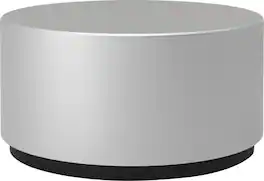
Throw away your mouse for work, and take hold of the Microsoft Surface Dial for graphics work and scrolling. This intuitive device connects with your computer to adjust volume, pan through maps, and multiple other applications. This Microsoft Surface Dial is compatible with a range of Microsoft applications, including Sketchable, Mental Canvas and Bluebeam Revue.
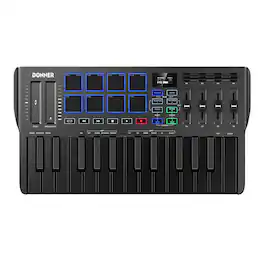
Donner DMK-25 Pro MIDI Keyboard Controller is designed for creativity on the go. Unlike a piano, it doesn’t generate sound on its own—it connects to your computer or mobile device’s DAW software (four included) for full music production. With Smart Dynamic Scale Mode offering 16 scales, you can easily play basslines, melodies, and leads across different genres. Its real-time control features—arpeggiator, note repeat, and chord functions—let you craft music clips anytime, anywhere. The touch bar with light scale adds stage-like expression, while 4 innovative wheels and 6 transport controls boost arrangement efficiency. The DMK-25 Pro also comes with 40 keyboard courses from beginner to advanced, helping you grow your skills. Compatible with major DAWs such as Cubase LE, Ableton Live, Logic Pro, and more, this compact MIDI keyboard ensures a smooth and inspiring workflow for every music creator.
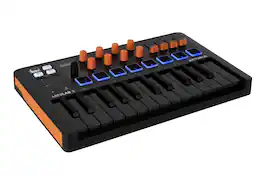
MiniLab 3 Orange is a compact MIDI controller decorated in a special-edition orange and black colourway, perfect for producers wanting a fresh and modern look for their setup. With its creative plug-and-play workflow, versatile pads & controls, 500 curated sounds from Analog Lab's massive library, and a bundle of world- class creative software, MiniLab 3 Orange gives beginners and pros alike the tools they need to get creative out of the box. · 25 note velocity-sensitive slim keyboard · 2 banks of 8 high quality velocity & pressure sensitive pads with RGB backlighting · Mini display & clickable browsing knob, with real-time feedback on tweaks and controls · Built-in Arpeggiator · Hold and Chord modes · Custom-written DAW scripts for intuitive integration with major DAWs · 8 DAW & user presets · DAW Transport Control · Octave up and down buttons for full range, Transpose for semitone transposition · Included Software: Analog Lab Intro, Ableton Live Lite, UVI Model D, Native Instruments Komplete 15 Select bundle of your choice (Select Beats, Select Band or Select Electronic), Loopcloud sample packs & subscription, Melodics subscription

The DDJ-REV1 matches perfectly with the free Serato DJ Lite software, boasting a brand-new battle-style layout that’s easy to use and perfect for playing like a pro. The design of this 2-channel DJ controller emulates a professional DJM-S mixer + PLX turntable setup, including specialized features for open-format and scratch DJs.
| Pros for Microsoft - Surface Dial - Magnesium | |||
|---|---|---|---|
| There were no pros for this product— | There were no pros for this product— | There were no pros for this product— | Ease of use |
Specs
Reviews
Customer Images
The vast majority of our reviews come from verified purchases. Reviews from customers may include My Best Buy members, employees, and Tech Insider Network members (as tagged). Select reviewers may receive discounted products, promotional considerations or entries into drawings for honest, helpful reviews.
- Rated 5 out of 5 stars
Functionality overload
Bought this Surface Dial for my Microsoft Surface Book 2. This device gives the SB2 added functionality. Ease of use is a hallmark feature as well.
This review is from Microsoft - Surface Dial - Magnesium
Digital Posted
- Rated 4 out of 5 stars
Great Build Quality, Lacks Support
Overall the Dial works and feels great. It is a pretty hefty metal puck with a semi grippy material on the bottom. It can be used on the screen (On Studio) or off the screen (normal Bluetooth) and can be programmed to a degree to do certain keyboard inputs when you twist it. My biggest issue with it is that it lacks a lot of meaningful support from the Adobe CC collection so if you use those programs you don't really need this item. Another kind of bummer is that even with the Studio screen in full draft position the puck will still slowly slide down the screen so you definitely have to keep a hand on the puck if you put it on the screen. On the plus side I was able to program it to give me 100,000 Simoleons in Sim City every tick when I turned it so that was entertaining. Really well built item that lacks support from Adobe (there is some official support but just not a lot) so it is hard to justify the high price for ultimately a volume knob unless you use the art programs provided with the Surface Studio.
This review is from Microsoft - Surface Dial - Magnesium
Erich Posted
- Rated 4 out of 5 stars
Specialized use cases
It is a great, well built device, with some unique use cases. Not sure the average person would need one. You can use it to scroll, or zoom in many programs, which is just as easy and more familiar using a mouse and touch pad. Other applications, largely graphics/photo oriented allow you to select many things that can be varied, such as color, line width, saturation, etc., either independently or while you are using the mouse or pen. This creates some interesting new capabilities for artists (I'm not one of those). It does require some learning, as do most professional tools. It will work 'on screen' with the new surfaces, but it takes up a bit of real estate using it that way. Works fine from off screen as well. Really suited for on-screen on the Surface Studio, but considering what those cost, picking up a dial would be trivial and a no-brainer. The one star off is just because this is such a niche device, it has limited utility for most. If you need one this is a 5 star unit.
This review is from Microsoft - Surface Dial - Magnesium
SvenJ Posted
Immerse yourself in sound Sponsored
- $475.99The price was $499.99
- $849.99The price was $1,124.99