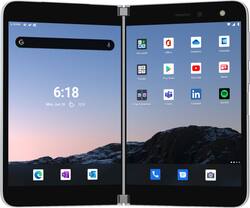
Microsoft - Surface Duo 256GB (Unlocked) - Glacier
- Key Specs
- Screen Size: 8.1 inches (Size of the screen, measured diagonally from corner to corner.)
- Carrier Compatibility: Verizon, AT&T, T-Mobile
- Built-in Storage: 256 gigabytes
- Processor Model: Qualcomm® Snapdragon™ 855 (Your computer's processor is like its brain. Working in combination with system memory, the power of the processor determines the complexity of software you can run, how many programs you can have open at the same time, and how fast those programs will run. Most computers feature an AMD, Intel or Snapdragon processor.)
- Phone Memory (RAM): 6 gigabytes (Random-access memory (RAM) temporarily stores data so that it can be accessed quickly. The size of the RAM determines how efficiently the phone can handle large amounts of information at once, such as switching between several open apps.)
- General
- Brand: Microsoft
- Model Number: TGM-00001
- Product Name: Microsoft Surface Duo 256GB (Unlocked)
- Color: Glacier
- Display
- Screen Size: 8.1 inches (Size of the screen, measured diagonally from corner to corner.)
- Screen Resolution: 2700 x 1800 (Screens come in a range of resolutions (measured in pixels, horizontal x vertical). The higher the resolution, the greater the picture quality.)
- Camera
- Integrated Camera: Front, Rear
- Front-Facing Camera: 11 megapixels
- Network
- Carrier: Unlocked
- Carrier Compatibility: Verizon, AT&T, T-Mobile
- Network Connectivity: GSM (The manner in which a device sends data to another device over a long distance using a cellular network.)
- Unlocked: true (Can be used with any carrier, typically by exchanging the phone's SIM card with another one compatible for the intended area of service. Can be used with a new or existing cellular service plan.)
- 4G LTE Band: 1,2,3,4,5,7,8,12,13,14,19,20,25,26,28,29,30,38,39,40,41,46,66
- Connectivity
- Headphone Jack: false (The device features an interface that allows for the connection of headphones.)
- Wireless Connectivity: Bluetooth (The manner in which a device sends data to another device over a short distance without the use of wires or cables.)
- Power
- Battery Capacity: 3577 milliampere hours (The amount of energy stored in the battery.)
- Wireless Charging: false
- Compatibility
- Charging Interface(s): USB-C (The connection for transmitting power to charge the device.)
- Voice Assistant Built-in: No (A digital assistant built into the device that uses voice commands to answer questions and control smart devices.)
- SIM Card Size: Standard SIM, Nano SIM
- Stylus Dock: None
- Stylus Included: false
- Features
- Model Family: Microsoft Surface Duo
- Sensors: Ambient light sensor, Proximity sensor, Hall effect sensor, Fingerprint sensor (Detects stimuli such as heat, light, sound, motion, or pressure and responds accordingly by operating a control or initiating a function of the device.)
- Built-in Storage: 256 gigabytes
- Performance
- Operating System: Android 10 (The operating system manages all software and hardware, including files, memory and connected devices. Most importantly, it lets you interact with your device and your programs in a visual way; otherwise, you'd be typing computer code to get anything done.)
- Processor Brand: Snapdragon
- Processor Model: Qualcomm® Snapdragon™ 855 (Your computer's processor is like its brain. Working in combination with system memory, the power of the processor determines the complexity of software you can run, how many programs you can have open at the same time, and how fast those programs will run. Most computers feature an AMD, Intel or Snapdragon processor.)
- Processor Speed: 2.84 gigahertz (Actual central processing unit (CPU) speed may vary by device configuration and design. Also referred to as clock speed, this is how quickly the central processing unit (CPU) can receive and interpret instructions. The higher the number, the more operations per second that can be completed. Working in combination with system memory, the power of the processor determines the complexity of software you can run.)
- Phone Memory (RAM): 6 gigabytes (Random-access memory (RAM) temporarily stores data so that it can be accessed quickly. The size of the RAM determines how efficiently the phone can handle large amounts of information at once, such as switching between several open apps.)
- Dimensions
- Product Height: 5.71 inches (The out of box height of the item. Height is measured as the vertical distance from the bottom of the item to the top as it would be primarily used or placed.)
- Product Width: 7.35 inches (The out of box width of the item. Width is measured as the horizontal distance from one side of the item to the other as it would be primarily used or placed.)
- Product Depth: 0.38 inches (The out of box depth of the item. Depth is measured as the distance from the front of the item to the back as it would be primarily used or placed.)
- Product Weight: 8.81 ounces (The out of box weight of the item.)
- Storage
- Media Card Slot: None
- Certifications Listings & Approvals
- EPEAT Qualified: false (The Electronic Product Environmental Assessment Tool (EPEAT) was designed to provide an environmental assessment tool for purchasers. In order to qualify for EPEAT, a product must meet all 23 required criteria.)
- Warranty
- Warranty - Parts: 1-year limited hardware warranty
- Warranty - Labor: Not available
- Other
- UPC: 889842625097
Surface Duo adapts to you. Two ultra-thin, high-resolution touchscreens unfold to open new possibilities on a mobile device. Designed to help you be productive, Surface Duo features multiple modes, the best of Microsoft 365 mobile experiences, every Android™ app in the Google Play store, and new dual-screen enhanced apps.* Now you can view two apps at once or span one across both screens, drag and drop between screens, and make phone calls. Say goodbye to constant app switching.
¹Requires the Your Phone app, a Windows 10 PC with the latest Windows updates, and download of the Windows 10 app from the Windows store. ²Excluding Surface Duo Bumper. ³Local Video Playback: Testing conducted by Microsoft in July 2020 using preproduction Surface Duo units and software. Testing consisted of full battery discharge during local video playback on a single screen. Video playback consisted of a repeated 30-minute .mp4 file in 1080p at 24 fps. All settings were default except: LTE and Wi-Fi were both associated with a network with ‘ask to join’ disabled and Adaptive Brightness was disabled, screen was set to 100 nits. Battery life varies significantly with network and feature configuration, signal strength, settings, usage, and other factors. Battery has limited recharge cycles and cannot be replaced. ⁴Standby Time: Testing conducted by Microsoft in July 2020 in an AT&T Validated Lab using preproduction Surface Duo units and software. Testing conducted in accordance with AT&T requirements and test specifications. All settings were default, and network settings were: connected to LTE, and Wi-Fi was enabled but not connected. Battery life varies significantly with network and feature configuration, signal strength, settings, usage and other factors. ⁵Talk Time: Testing conducted by Microsoft in July 2020 in an AT&T Validated Lab using preproduction Surface Duo units and software. All settings were default, and network settings were: connected to LTE, and Wi-Fi was enabled but not connected. ⁶Specified minimum dual battery capacity is 3462mAh. ⁷Network availability and coverage vary by carrier. See your carrier for details. ⁸Use of eSIM requires a wireless service plan (which may include restrictions on switching service providers and roaming, even after contract expiration). Not all carriers support eSIM. AT&T locked devices will not support eSIM. Use of eSIM in Surface Duo may be disabled when purchased from some carriers. See your carrier for details. ⁹System software uses significant storage space. Available storage is subject to change based on system software updates and apps usage. 1 GB = 1 billion bytes. Some apps and features may require a wireless plan, additional subscriptions, or fees. ¹¹Video playback formats will require 3rd party apps from the Google Play Store; fees may apply. ¹²Microsoft’s Limited Warranty is in addition to your consumer law rights.
- Do one better: Qualcomm® Snapdragon™ 855 Mobile Platform optimized for the dual-screen experience with 6GB RAM
- Universal unlocked: Compatible with all major U.S. carriers, including Verizon, AT&T, and T-Mobile. T-Mobile customers coming from the Sprint network will have to ensure they have a T-Mobile SIM card for their Surface Duo. SIM card not included.
- 4G LTE speed: Provides fast Web connection for downloading apps, streaming content and staying connected with social media.
- 11.0MP adaptive camera: Super resolution zoom, and super zoom up to 7x. Portrait mode with adjustable depth control. 4K video recording at 30 fps and 60 fps. Gyro-based digital video stabilization.
- Dual PixelSense™ Fusion displays: Two beautiful, 1800x1350 high-resolution 5.6” touchscreens that open to 8.1”.
- Mobile productivity, powered by two screens: View two apps at once or span one across both screens, drag and drop between screens, and say goodbye to constant app switching.
- Room to focus: Open and view different apps on each screen to easily reference and compare content. Say goodbye to constant app switching on your mobile device.
- Enhanced apps built for two screens: Revolutionary enhanced apps* respond to you and magically reorient to make best use of the dual screens.
- Drag and drop: Drag and drop to effortlessly move images, text, files, and more between screens so you can get things done quicker.
- Flexibility to do more: From Book to Compose to Tent mode, Surface Duo adapts to you. With multiple modes and dual-screen enhanced apps,* get things done easily – it’s a new way to be productive on the go.
- One device, many ways: Effortlessly move from one thing to the next thanks to the revolutionary 360◦ hinge. Hold like a book to view apps side by side, Type and take notes with the keyboard or inking with Surface Slim Pen** on one screen and a video call or streaming content on the other.
- More screen to do more: Experience websites, apps, photos, and more in a more immersive way across both screens, and position apps the way you want.
- Make calls: Fold back and make phone calls. Plus, view one app or take a photo in portrait or landscape on a single screen
- Lean back and watch: Set in Tent mode to relax and watch your favorite show.
- The best of Microsoft 365, together with Android™ apps: Experience the best of Microsoft 365 mobile experiences, every Android™ app in the Google Play store,* and built-in compatibility with your Windows 10 PC.¹
- Microsoft mobile productivity apps right at your fingertips: Outlook, Edge, OneNote, and lots more.* Plus with the Microsoft Launcher you can jump right in.
- Unlock new ways to play on Surface Duo with Xbox Game Pass Ultimate: Enjoy cloud gaming across two screens with selected Xbox games** on Surface Duo - with a clear view on one screen and Xbox touch controls on the other (membership sold separately).
- Your PC loves Surface Duo, too: With the Your Phone app and your Windows 10 PC, you get instant access to everything you love on your phone, right on your computer.¹
- Original design, created by Surface: Less than a centimeter thin, two high-resolution 5.6” PixelSense™ touchscreens open to an expansive 8.1” with a revolutionary 360◦ hinge – it’s Surface innovation in your pocket.
- Fits in your pocket: Surface Duo is 4.8 mm when unfolded, less than 1 cm when folded, and starting at just 250 grams.
- Revolutionary 360◦ hinge: Dynamic design enables multiple angles and postures in one device.
- Never miss a beat: Seamlessly connects with Surface Earbuds** via Fast Pair and automatically routes audio to earbuds when connected to Surface Duo.
- Coordinating, protective bumper: Included in box.
Whats Included
- Surface Duo 256GB
- Surface Duo Bumper (Color: Glacier)
- Surface Duo USB-C Power Supply (18w)
- Quick Start Guide
- Warranty and Compliance Guide
- SIM Ejector Tool
Product Manuals
Q: what else do i need for it to be compatible with the Verizon Network?
A: It's an unlocked phone, so basically you'll just have to install your Verizon sims card into the new device.
Q: Will Surface Duo cases be available at launch?
A: Surface Duo ships with the Surface Bumper in the box and Designed for Surface accessories will be available following August 28th. Customers planning to apply rear-panel protection should do so prior to installing the included Bumper.
Q: What is the difference between normal apps and enhanced apps on Surface Duo?
A: Surface Duo supports all of the apps in the Google Play store, but Duo’s dual-screen design offers new ways of interacting with apps, whether they have been specifically designed to run on Duo or not. o Launching two apps side by side is easy. App is launched on a side from where the app was selected from. For example, open Outlook mail by tapping the icon on the home screen on the left screen, then open your calendar by tapping the calendar icon on right screen. Now you can easily see you calendar, when someone is asking you availability on email. o Dual instance refers to the ability to have two instances of an app running next to each other. For example, Surface Duo with Microsoft Edge is the only mobile device that offers the ability to run two browser instances side-by-side, so you can cross-reference content or multitask. o Spanning and uniquely taking advantage of both screens (master/detail) o Enhanced apps gives you more capabilities when an app is spanned to two screens. For example see your inbox for mails on left, and read your emails on right, see your photo gallery and click photos on left, and see photos in full screen view on right.
Q: Does the slim pen attach magnetically or in some way
A: It appears that the pen does magnetically attach according to a developer video I just saw today.
A: Ethernet, keyboard, and mouse work through the USB C cable, but video does not, so you won't get anything on your monitors.
Q: What kind of wearable accessories are compatible with Surface Duo?
A: Every accessory (wearable, smart home, and others) that is capable with Android will run on the Duo
A: IRL? I'd say C-level execs, real estate professionals, surveyors, marketing professionals, engineers, collaborators - but really anyone that wants more out of their communication device/phone. If you're concerned about the tech specs or camera, then it may not be for you. But this device is a whole new tech dynamic, even more so than the Fold or Flip.
Q: I have many Samsung Watches and Buds, will they be compatible? My guess is no?
A: It will be compatible with Samsung watches and wireless Buds. Just need to download the galaxy wearable app from the Google play store. The previous answer is wrong.