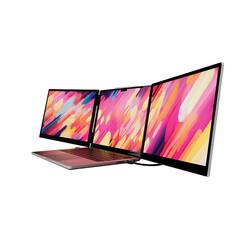
Monduo - 14" LED Portable Monitor - Silver
- Key Specs
- Refresh Rate: 144Hz (The number of frames per second the device can produce natively without enhancement. Higher rates help produce smooth, seamless pictures.)
- Maximum Resolution: 2560 x 1600 (Maximum resolution refers to the highest number of pixels that a screen can process and display. Higher resolution signals produce more detailed images.)
- Response Time: 3 milliseconds (The speed at which pixels can change colors is called response time. It is measured in milliseconds (ms).)
- Panel Type: QLED (Technology that affects response time and image quality.)
- Synchronization Technology: FreeSync (AMD Adaptive Sync) (Generally, these technologies allow syncing between a computer/console game's frame rate and the device's refresh rate for a smoother display without tearing.)
- Screen Size: 14 inches (Size of the screen, measured diagonally from corner to corner.)
- Display Connector(s): 1 x HDMI (The number and type of connectors used to connect to an external display.)
- General
- Brand: Monduo
- Model Number: MD020P
- Product Name: Monduo 14" LED Portable Monitor
- Color: Silver
- Operating System Compatibility: Mac, Windows
- Display
- Refresh Rate: 144Hz (The number of frames per second the device can produce natively without enhancement. Higher rates help produce smooth, seamless pictures.)
- Maximum Resolution: 2560 x 1600 (Maximum resolution refers to the highest number of pixels that a screen can process and display. Higher resolution signals produce more detailed images.)
- Native Resolution: 2560 x 1600 (Native resolution of a screen refers to its single, fixed resolution. Sometimes screens must scale an image up or down in order to fit the native resolution. This can cause a loss of resolution or detail.)
- Contrast Ratio: 1200:1 (Measured difference between a displayed image's brightest whites and darkest blacks. The larger the first number, the more detail and color that can be displayed.)
- Response Time: 3 milliseconds (The speed at which pixels can change colors is called response time. It is measured in milliseconds (ms).)
- Display Type: LED
- Panel Type: QLED (Technology that affects response time and image quality.)
- Synchronization Technology: FreeSync (AMD Adaptive Sync) (Generally, these technologies allow syncing between a computer/console game's frame rate and the device's refresh rate for a smoother display without tearing.)
- Aspect Ratio: 16:9 (The measurement of the width of a screen compared to the height of a screen, expressed as a ratio.)
- Curved Screen: false
- Pixel Density: 2560 pixels per inch (The number of pixels present per inch on the device's display. Higher pixel density improves the clarity and sharpness of the displayed image.)
- Brightness: 500 candela per square meter (A measure of the total light output.)
- Screen Size: 14 inches (Size of the screen, measured diagonally from corner to corner.)
- High Dynamic Range (HDR): true (An HDR-compatible 4K TV or other HDR-compatible product displays HDR video content when it's available from sources like 4K Ultra HD Blu-ray Discs and 4K streaming services.)
- Touch Screen: false (Touch-screen devices make navigating more intuitive. Using a touch-screen display, you can do things such as tap to select, hold and drag to move items, swipe to scroll, and pinch to zoom.)
- On-Screen Display Languages: 5 (The available language options for displayed text.)
- Display Surface: Standard glass
- Color Gamut (NTSC): 100 percent
- Color Gamut (Standard RGB): 100 percent
- Connectivity
- Number of HDMI Inputs (Total): 1
- Display Connector(s): 1 x HDMI (The number and type of connectors used to connect to an external display.)
- Number of USB Ports (Total): 1
- USB Ports: 1 x USB-C (The number and type of USB ports the product has.)
- Compatibility
- Wall Mountable: false (The product is able to be secured to a wall. Some products are designed ready to mount, while others may require additional hardware/accessories for installation.)
- Voice Assistant Built-in: No (A digital assistant built into the device that uses voice commands to answer questions and control smart devices.)
- Features
- Tiltable: true
- Built-In Webcam: true
- Integrated Speaker(s): true
- Built-in Speaker Type: Front firing (Backward, downward, and front-firing speakers direct sound into the room from those respective directions. A soundbar is typically long and rectangular, and designed to act as an all-in-one speaker with greater sound production than that of a TV alone. An acoustic surface is the result of small sound actuators embedded directly behind the screen, turning the entire screen's surface into a speaker.)
- Smart Capable: true (Smart, or smart-capable devices are able to connect directly to your home network in order to stream content from the Internet, run Internet-based apps, or connect to other smart devices.)
- Dimensions
- Product Height Without Stand: 8.43 inches
- Product Width: 13.13 inches (The out of box width of the item. Width is measured as the horizontal distance from one side of the item to the other as it would be primarily used or placed.)
- Product Depth Without Stand: 8.43 inches
- Product Weight: 4.18 pounds (The out of box weight of the item.)
- Stand Included: false
- Cord Length: 4 inches
- Power
- Power Consumption: 500 watts
- Certifications Listings & Approvals
- ENERGY STAR Certified: false (Devices carrying the ENERGY STAR service mark, such as computer products and peripherals, kitchen appliances, and other products, generally use 20% to 30% less energy than required by federal standards.)
- EPEAT Qualified: false (The Electronic Product Environmental Assessment Tool (EPEAT) was designed to provide an environmental assessment tool for purchasers. In order to qualify for EPEAT, a product must meet all 23 required criteria.)
- Warranty
- Warranty - Parts: 1 year limited
- Warranty - Labor: 1 year limited
- Other
- UPC: 198168647783
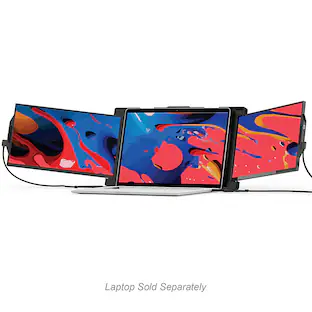
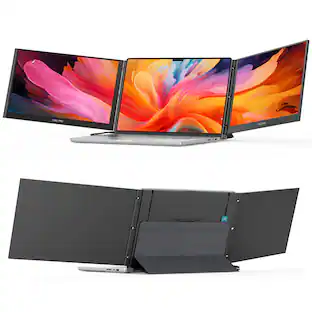
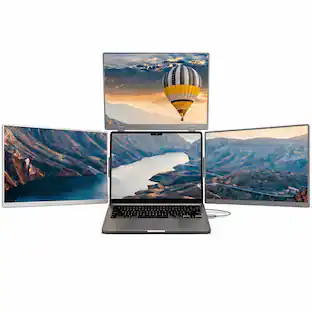
The Monduo 14-In. Pro Duo Display is a masterpiece of craftsmanship that seamlessly merges form and function. Crafted with an elegant aluminum housing and stunning glass screens, this display elevates workspace aesthetics. It offers a brilliant 2K resolution with an ultra smooth 144Hz refresh rate. The 100% DCI-P3 color gamut ensures true-to-life visuals with 500 nits of brightness make every detail shine, even in well-lit surroundings. This display is a versatile tool, accommodating the needs of creative professionals, multitasking enthusiasts, and passionate gamers. With 2 additional screens, it transforms your laptop into a productivity powerhouse or an immersive gaming setup and allows for seamless integration with the Monduo app. The 14-In. Pro Duo Display isn't just a laptop accessory; it's a statement of sophistication and your personal gateway to success.
- Resolution: Stunning 2K resolution presented behind glass screens, providing crystal-clear visuals that make every detail pop, enhancing both work and gaming environments. Durable aluminum housing, built to withstand the rigors of daily use while maintaining a high-end, sleek aesthetic that complements any setting.
- Refresh Rate: 144Hz refresh rate ensures ultra-smooth transitions without lag or flicker, optimizing user experience in fast-paced gaming scenarios or intense workflow sessions.
- Color Gamut: Offering a 100% DCI-P3 color gamut, the display delivers exceptionally accurate colors, crucial for professional graphic designers, video editors, and gamers seeking visual precision.
Whats Included
- Monduo 14" Tri-Screen Monitor
- 1x HDMI Cable
- 1x Power Cable
- 1x Short USB-C Cable
- 1x Long USB-C Cable
Product Manuals
Q: Does the Monduo monitor have built-in speakers?
A: Yes, the Monduo monitor comes equipped with integrated front-firing speakers.
Q: What is the color gamut supported by this monitor?
A: The Monduo monitor offers a 100% DCI-P3 color gamut, delivering exceptionally accurate colors.
Q: What is the resolution of this Monduo monitor?
A: This Monduo monitor boasts a stunning 2K resolution, displayed on elegant glass screens.
Q: Is this Monduo monitor tiltable?
A: Yes, the Monduo monitor is tiltable for user comfort and optimal viewing angles.
Q: How many HDMI inputs does the Monduo monitor have?
A: The Monduo monitor has one HDMI input for connecting to your devices.
Q: What type of panel does the Monduo monitor use?
A: The Monduo monitor utilizes a QLED panel for vibrant and immersive visuals.
Q: Does the Monduo monitor have a high refresh rate?
A: Yes, the Monduo monitor features a 144Hz refresh rate, ensuring ultra-smooth visuals without lag or flicker.
Q: How much does these weigh? I am looking for screens that will travel easy.
A: The Monduo 14" Pro Duo Display weighs 4.2LBS
People also viewed
 $749.99The price was $799.99