Outlet EventEnds Oct. 26. Limited quantities. No rainchecks.Shop now

Main Content
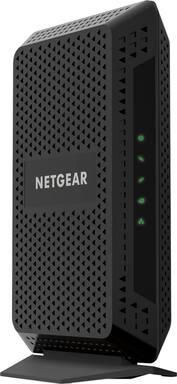
product image

NETGEAR - 24 x 8 DOCSIS 3.0 Cable Modem - Black

Model: CM600-100NAS
SKU: 4562300
This item is no longer available in new condition. See similar items below
  • Key Specs
    • Internet Service Provider (ISP) Compatibility: Cox Communications (The internet service provider(s) that the device is able to work with and/or connect to with minimal setup.)
    • DOCSIS Certification: 3.0 (DOCSIS (Data over Cable Service Interface Specification) is a telecommunications standard that allows high-bandwidth data transfer via a coaxial cable for internet access. Each version updates the previous standard and is backwards compatible with other versions.)
    • Downstream Data Speed: 960 megabits per second (The maximum speed at which data is downloaded from the internet.)
    • Upstream Data Speed: 320 megabits per second (The maximum speed at which data can be transferred from the client to the server, or the upload speed.)
  • General
    • Brand: NETGEAR
    • Model Number: CM600-100NAS
    • Product Name: 24 x 8 DOCSIS 3.0 Cable Modem
    • Color: Black
  • Network
    • Quality Of Service (QoS) Traffic Prioritization: false (Allows a user to manage a device's network performance by configuring the types of traffic that receive top priority for transmission. High priority functions and applications receive maximum network performance, while low priority traffic receives minimum performance.)
  • Certifications Listings & Approvals
    • DOCSIS Compliant: true
    • ENERGY STAR Certified: false (Devices carrying the ENERGY STAR service mark, such as computer products and peripherals, kitchen appliances, and other products, generally use 20% to 30% less energy than required by federal standards.)
  • Features
    • Auto Connect: true
  • Speed
    • Gigabit Ethernet Speed: true (Supports the gigabit Ethernet networking standard, which has a data rate of at least one gigabit per second, or 1,000 Mbps.)
  • Compatibility
    • System Requirements: PC: Windows 2000, XP, Vista, 7 or 8; Mac: OS; other operating systems running a TCP/IP network; Microsoft Internet Explorer 5.0, Firefox 2.0, Safari 1.4 or Google Chrome 11.0 or later; cable Broadband Internet service (The software that a product must have for it to be able to integrate with another product.)
  • Dimensions
    • Product Height: 8.7 inches (The out of box height of the item. Height is measured as the vertical distance from the bottom of the item to the top as it would be primarily used or placed.)
    • Product Length: 5.3 inches (The out of box length of the item. Length is measured as the longest dimension of the item.)
    • Product Width: 2.4 inches (The out of box width of the item. Width is measured as the horizontal distance from one side of the item to the other as it would be primarily used or placed.)
    • Product Weight: 1 pounds (The out of box weight of the item.)
  • Warranty
    • Warranty - Parts: 1 year limited
    • Warranty - Labor: 90 days
  • Other
    • Modem Type: High speed
    • UPC: 606449109573

The NETGEAR 24 x 8 DOCSIS 3.0 Cable Modem provides a connection to high-speed cable Internet, up to 960Mbps - 24 downstream & 8 upstream channels. It's CableLabs DOCSIS 3.0 Certified to work with cable Internet providers XFINITY from Comcast, Spectrum, Cox, Cablevision and more.

  • Cable Modem only. External Router needed: This is a cable modem. Separate WiFi router required for WiFi connectivity. Recommended to pair with a NETGEAR WiFi router.
  • Compatibility: Compatible with XFINITY from Comcast, Cox, and Spectrum. Call your Internet service provider for additional compatibility information.
  • Optimize your Internet: With an outdated modem, you may not be getting the Internet speeds you paid for. Update your equipment to get better upload and download speeds, and a better Internet experience at home.
  • Works with any WiFi Router: Connect any WiFi router to this modem's Ethernet port to support all your wireless devices.
  • Save on monthly rental fees: Is your cable service provider charging you every month to lease their equipment? Save money by buying and owning your cable modem or cable modem router. Replace your rented equipment can save you up to $168/yr in rental fees.
  • Best for cable provider plans up to 400Mbps speed: 24x8 Channel Bonding and DOCSIS 3.0 technology delivers fast Internet to your home - even during peak Internet usage hours!
  • DOCSIS 3.0 technology: Up to 16x faster download speeds than the DOCSIS 2.0 standard.
  • Ethernet Port: 1 Gigabit Ethernet port connects to your computer or separate WiFi router.
  • Cable Modem only. External Router needed: This is a cable modem. Separate WiFi router required for WiFi connectivity. Recommended to pair with a NETGEAR WiFi router.
  • Compatibility: Compatible with XFINITY from Comcast, Cox, and Spectrum. Call your Internet service provider for additional compatibility information.
  • Optimize your Internet: With an outdated modem, you may not be getting the Internet speeds you paid for. Update your equipment to get better upload and download speeds, and a better Internet experience at home.
  • Works with any WiFi Router: Connect any WiFi router to this modem's Ethernet port to support all your wireless devices.
  • Save on monthly rental fees: Is your cable service provider charging you every month to lease their equipment? Save money by buying and owning your cable modem or cable modem router. Replace your rented equipment can save you up to $168/yr in rental fees.
  • Best for cable provider plans up to 400Mbps speed: 24x8 Channel Bonding and DOCSIS 3.0 technology delivers fast Internet to your home - even during peak Internet usage hours!
  • DOCSIS 3.0 technology: Up to 16x faster download speeds than the DOCSIS 2.0 standard.
  • Ethernet Port: 1 Gigabit Ethernet port connects to your computer or separate WiFi router.
Whats Included
  • 24 x 8 DOCSIS 3.0 Cable Modem
  • Ethernet cable
  • Quick install guide
  • Power adapter
  • 24 x 8 DOCSIS 3.0 Cable Modem
  • Ethernet cable
  • Quick install guide
  • Power adapter

Q: if I buy this modem for my comcast Infinity do I also have to buy a seperate router? Is there a router /modem combo?

A: I think you can still rent a single router from comcast but I wouldn't recommend it. They are usually refurbished and you can save quite a bit of money instead of renting. Plus you can much faster routers to match the blast speeds that comcast puts out.

Q: Will this modem support Comcast cable t.v., internet and phone service?

A: This modem will support Comcast internet. I'm using it for that and am happy with the results. Note that you'll need a will need a separate wifi router, assuming you want a wifi connection. You can buy combination cable modem/wifi routers, but I'd recommend getting them separately so you can also replace them independently when the time comes. Comcast cable TV does not go through the cable modem (cable plugs directly into the X1 box) so is not relevant to your decision on a modem. This modem will NOT support Comcast phone service. When I got this modem I dropped my Comcast phone service and switched to Ooma (which I highly recommend for both quality and major price savings). [The Ooma device plugs in to your router via ethernet cable. You can then plug the phone line currently running from your Comcast-suppled modem into Ooma and you're good to go.]

Q: Do you need to have a router with this?

A: Yes. This modem only has a single Ethernet output, intended to hook up directly to a computer or (in most cases) a router.

Q: How does this compare to the Arris sb6190? I am having issues with mine and plan on switching to this one.

A: this should be the exact equivalent however, this arris version uses the chip that has been known to be extremely buggy. while I would normally urge people to use arris SB products, in this situation, I strongly advise against them. pick this up. you will not be disappointed.

Q: Is this modem compatible with Linksys EA6900 router?

A: no reason why it wouldn't be ! ...you might want to beef up your router to match max speeds is all.

Q: Does the stand on the bottom detach, so it can lay flat on table vs. standing upright?? Thanks!

A: There is a small security/torx screw at the bottom that can be removed so that the stand can be removed altogether. Like others have stated though, it is designed to stand upright for maximum cooling of the modems internals.