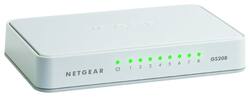
NETGEAR - 8-Port 10/100/1000 Mbps Gigabit Unmanaged Switch - White
- Key Specs
- Number of LAN Ports: 8 (Number of devices able to be connected to the Local Area Network (LAN). LAN ports allow wired connections to other networking devices (wireless access points, range extenders, etc.) in order to share the internet connection received through a WAN port.)
- General
- Brand: NETGEAR
- Model Number: GS208100PAS
- Product Name: 8-Port 10/100/1000 Mbps Gigabit Unmanaged Switch
- Color: White
- Speed
- Gigabit Ethernet Speed: true (Supports the gigabit Ethernet networking standard, which has a data rate of at least one gigabit per second, or 1,000 Mbps.)
- Dimensions
- Product Height: 1 inches (The out of box height of the item. Height is measured as the vertical distance from the bottom of the item to the top as it would be primarily used or placed.)
- Product Length: 3.7 inches (The out of box length of the item. Length is measured as the longest dimension of the item.)
- Product Width: 6 inches (The out of box width of the item. Width is measured as the horizontal distance from one side of the item to the other as it would be primarily used or placed.)
- Product Weight: 6.7 pounds (The out of box weight of the item.)
- Warranty
- Warranty - Parts: 1 year limited
- Warranty - Labor: 1 year limited
- Other
- UPC: 606449104516
The NETGEAR 8-Port Gigabit Ethernet Switch
Essentials Edition with plug-and-play and compact design provides an easy, reliable and affordable Gigabit Ethernet connection for your home network. Features include auto-MDI/MDIX, eliminating the need for crossover cables and LED indicators for ease of use. Energy-efficient technology provides power savings.
- Gigabit Ethernet: 8 auto-sensing 10/100/1000 Mbps Gigabit Ethernet ports with non-blocking switching architecture for maximum throughput at wire speed.
- Plug-and-Play: Simple set up with no software or configuration needed.
- Internet Splitter: Connectivity to your router or modem for additional wired connections (laptop, gaming console, printer, etc).
- Cost Effective: Most affordable connectivity to your network.
- Easy-monitoring: Per port LEDs for port activity and speed.
- Auto-MDI/MDIX: Eliminates the need for crossover cables.
Whats Included
- 8-Port Gigabit Ethernet Unmanaged Switch (GS208)
- Power adapter
- Quick start guide
A: I wondered the same before I made a recent purchase. The models appear to be nearly identical on paper. I consulted the NETGEAR forums for more information. Here is an excerpt that came directly from the NETGEAR® Community Team: "all PROSAFE line has a higher MTBF compared to the SOHO versions and it has a lifetime hardware warranty that is why the price is a little different. Performance should be the same though they may have different hardware and chipsets, the GS208 is the newer version of the GS608 you may consider it as a cheaper hardware update." It seems that for most normal use-case scenarios, the GS208 is the better choice. Strange then that Best Buy typically only stocks the more expensive model on the store-shelves. You usually have to order the cheaper version if you want it, in spite of it offering practically the same performance at half of the cost.
Q: OK stupid question if I have cable internet can I use this product
A: Hi, probably yes but it depends what you want to use it for and what existing equipment you have. If you cable company has provided you with a model/router and the router doesn't have enough ports for cable connections for your needs, this type of device will allow you to have more wired connections. It does nothing to speed up your cable internet speed but does allow you to have a larger wired network. A switch like this is typically 'better' than a hub as a hub shares the speed on the cables where a switch does not. If all your traffic is going to the internet that wont matter so much but if you have data going between devices at home it can make a difference.
A: They stay green, I connected a 10/100 switch to it just to be sure.
A: Hi JustRay, Unfortunately, it doesn't have a stand to be placed in an upright position. You may also check our click switches that are originally placed in an upright position. If you have any questions, you can also check out our NETGEAR community. Best regards, NETGEAR Amazon
Q: Can it be mounted on a wall?
A: I don't see any obvious slots for screw heads. (I suppose you could still use double-sided tape or the like, though!)
A: No even close. Less than a pound for sure.
A: A couple of things that might be the problem. 1. The cable from the modem to the router has to be plugged into the Wan port on the router. 2. The router has to be allowed to issue IP addresses on the LAN side of the network. Without knowing more about the router and how its setup, its hard to know how to help. The cable setup sounds right. It's an unmanaged switch so its plug and play.
Q: AB SWITCH
A: This product is an Ethernet switch - not what you want.
People also viewed


Today's top picks
 $199.99The price was $249.99
 $479.99The price was $729.99
 $799.99The price was $1,199.99
 $789.99The price was $1,049.99