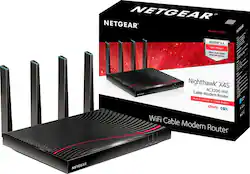
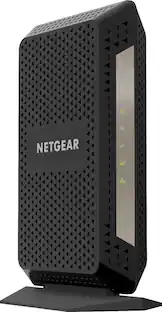
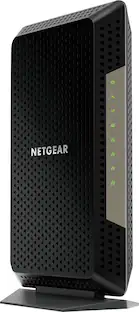
NETGEAR - Nighthawk X4S Dual-Band AC3200 Router with 32 x 8 DOCSIS 3.1 Cable Modem - Black
- Key Specs
- Internet Service Provider (ISP) Compatibility: XFINITY from Comcast (The internet service provider(s) that the device is able to work with and/or connect to with minimal setup.)
- DOCSIS Certification: 3.1 (DOCSIS (Data over Cable Service Interface Specification) is a telecommunications standard that allows high-bandwidth data transfer via a coaxial cable for internet access. Each version updates the previous standard and is backwards compatible with other versions.)
- Number of LAN Ports: 4 (Number of devices able to be connected to the Local Area Network (LAN). LAN ports allow wired connections to other networking devices (wireless access points, range extenders, etc.) in order to share the internet connection received through a WAN port.)
- General
- Brand: NETGEAR
- Model Number: C7800-100NAS
- Product Name: Nighthawk X4S Dual-Band AC3200 Router with 32 x 8 DOCSIS 3.1 Cable Modem
- Color: Black
- Certifications Listings & Approvals
- DOCSIS Compliant: true
- Speed
- Wired Speed: 1000 megabits per second (The maximum rate at which data is transferred between a network device and router using an Ethernet cable.)
- Gigabit Ethernet Speed: true (Supports the gigabit Ethernet networking standard, which has a data rate of at least one gigabit per second, or 1,000 Mbps.)
- Compatibility
- System Requirements: Apple MacOS, Microsoft Windows 2000/XP/Vista/7/8/10 (The software that a product must have for it to be able to integrate with another product.)
- Dimensions
- Product Height: 7.5 inches (The out of box height of the item. Height is measured as the vertical distance from the bottom of the item to the top as it would be primarily used or placed.)
- Product Length: 10.4 inches (The out of box length of the item. Length is measured as the longest dimension of the item.)
- Product Width: 12.4 inches (The out of box width of the item. Width is measured as the horizontal distance from one side of the item to the other as it would be primarily used or placed.)
- Product Weight: 3.15 pounds (The out of box weight of the item.)
- Other
- Modem Type: High speed
- UPC: 606449111088
The Nighthawk X4S AC3200 WiFi DOCSIS 3.1 Cable Modem Router delivers WiFi speeds of up to 3.2Gbps. It ensures uninterrupted HD video streaming with 32x8 channel bonding. Save up to $120 a year by eliminating rental fees. It's ideal for the fastest Internet speed tiers offered by XFINITY from Comcast.
- Compatibility: Compatible with XFINITY from Comcast, Cox (not compatible with Cable bundled voice services). Contact your internet service provider for more compatibility information.
- Higher Speeds: Up to 3.2 Gbps modem speed delivers multiple HD videos with ease.
- Gigabit Ethernet Port: Fastest wired speeds to connect your router or computer.
- Save on Fees: Eliminate monthly cable modem rental fees - Up to $120 per year.
- Improved WiFi Connection: Boosts speed, reliability, & range of WiFi connections.
- Reduce Interference: Simultaneous dual band reduces WiFi interference and doubles bandwidth.
- Parental controls: Enable easy Web filtering. Guest network access provides separate and secure connectivity for visitors.
- ReadySHARE USB Access: Wirelessly access and share USB hard drive with two 3.0 USB ports.
- Enhanced Performance: Powerful 1.5 GHz processor boosts performance for streaming & gaming.
Whats Included
- Ethernet cable
- NETGEAR Nighthawk X4S Dual-Band AC3200 Router with DOCSIS 3.1 Cable Modem
- Power adapter
- Quick install guide
Product Manuals
Q: Would this be a good setup for 4K Tv, gaming and VR?
A: Yes it is meant for 4K TV and gaming if you go on Netgear website and go to their wifi routers and look at their top four wifi routers it shows you how it works I don't know why they don't show it in there all in one it's basically the same as the AC 3200 wifi router and ac4000 Wi-Fi router
A: Sorry - to have the best Cable Modem, you must compromise XFINITY Voice here. Therefore, I canceled my telephone service.
A: Let me answer my own question. Yes, this works with Spectrum, just got it connected with the 400 MB download plan and is doing 422. Waiting for the upgrade to 1 Gig to be processed in order to get more speed.
Q: Does it work with Mediacom?
A: It will work with all cable internet connections.
A: Hope you've managed to solve your slow speed issue. Writing the following in the hope that my experience may benefit someone else. All your testing should be done wired, with a capable computer (including reliable 1GHz network adapater). Do NOT test via wireless! That won't tell you the full story. I suggest you first verify that you are consistently getting close to the 'promised' speeds with a rental modem from your cable provider. If not, the problem might be the capabilities of your computer, or it might be the test center location you're using for measuring your speeds. On Win 10, you'll get much better, and more consistent tests if you download Ookla's app from speedtest.net. It does a decent job of auto-selecting test centers, based on ping speed, but you should probably play around with various test centers to make sure you've got a reliable measurement source. Speaking from personal experience, there can be MANY problems between 'the box outside' your residence, to where the signal ultimately reaches your computer. In my case, I was experiencing wildly inconsistent speeds. Managed to get my provider to replace ALL the cabling between the box in the basement of the apartment building, where I live, all the way to my computer (and DVR, etc.) Best to limit the number of splitters used, since each one loses signal. After all that, speeds were still wildly inconsistent. Installed a new copy of Win 10 (since I'd mucked up the regular OS by hastily trying suggestions I found online for increasing internet speed. Bad idea, but I was frustrated. Even with new OS, still had unreliable speeds. Finally found a sympathetic supervisor in the loyalty department. He talked to his boss. His boss recommended a colleague in a department I wouldn't have been able to reach. When they checked the line, they found the signal to the outside box was too strong. A line tech fixed that without my involvement. Since that adjustment, my speeds are consistent, and coming in pretty close to the maximum. If you take all the above into consideration, and get your ISP to go 'above and beyond' to deliver the speed you're paying for (consistently), this modem/router should give you slightly better speeds, without the monthly rental cost. In general, I suspect that newer construction is less likely to have problems like this. In my case, I'm living in a building that's about 112 years old. The cabling in the basement is a bit of a rat's nest, with many splitters and extenders. My last technician was awesome - checking ALL the taps from the feed in the basement, as well as all coax junctions in my apartment. Best of luck to all who are dealing with this issue. The above information was gleaned from about 50 hours of effort, 5 or 6 installer appointments, and far too many hours spent on hold, developing a strong dissatisfaction with call centers in other countries/continents. BTW - Netgear has decent products, but working with their tech support can be EXTREMELY frustrating. Good luck.
A: It is a DOCSIS 3.1 cable modem + AC3200 router. It looks like the product description is now accurate.
A: i would go with this set up had had two separate devices and this one blow that set up out of the water.
Q: why is this modem double the price of all other offerings on the market?
A: The Netgear AC3200 X4S C7800 is a DOCSIS 3.1 modem/router in a market currently favoring DOCSIS 3.0 pending the rollout if gigabit services by the ISPs. Please refer to the following chart gleaned from one of Cisco's blog pages at https://blogs.cisco.com/sp/the-benefits-of-docsis-3-1.
People also viewed
 $300.99The price was $329.00
Today's top picks
 $199.99The price was $249.99
 $789.99The price was $1,049.99












