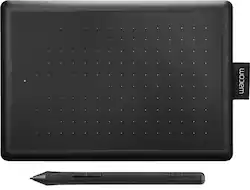
One by Wacom Student Drawing Tablet (small) – Works with Chromebook, Mac, PC - Black/Red
- Key Specs
- Screen Size: 0 inches (Size of the screen, measured diagonally from corner to corner.)
- Multi-Touch Screen: false (A screen that recognizes multiple points of contact, allowing for intuitive navigation functions such as pinch to zoom.)
- Active Area: 6.0" x 3.7" (The size of the screen area that a user interacts with, either by stylus and/or touch (if supported).)
- Total Storage Capacity: 0 gigabytes
- Pressure Levels: 2048 (Allows the device to recognize different pressures from a compatible pen or stylus, which may control line thickness, opacity, or color. The more pressure levels, the more responsive the pen will feel.)
- General
- Brand: Wacom
- Model Number: CTL472K1A
- Product Name: One by Wacom Student Drawing Tablet (small) – Works with Chromebook, Mac, PC
- Color: Black/Red
- Year of Release: 2019
- Display
- Screen Size: 0 inches (Size of the screen, measured diagonally from corner to corner.)
- Stylus Input: Active (Electromagnetic Resonance) (An active stylus/pen is able to communicate directly with a compatible device; active electromagnetic resonance (EMR) pens are powered via a device's screen and active electrostatic (AES) pens require an additional power source. A passive stylus does not have electronic features and is compatible with most capacitative touch screens.)
- Multi-Touch Screen: false (A screen that recognizes multiple points of contact, allowing for intuitive navigation functions such as pinch to zoom.)
- Graphic Resolution: 2540 lines per inch (The resolution generated by the device. The higher the resolution, the finer the detail that can be seen and reproduced.)
- Active Area: 6.0" x 3.7" (The size of the screen area that a user interacts with, either by stylus and/or touch (if supported).)
- Aspect Ratio: 16:10 (The measurement of the width of a screen compared to the height of a screen, expressed as a ratio.)
- Storage
- Total Storage Capacity: 0 gigabytes
- Compatibility
- Operating System Compatibility: Mac OS, Windows, Chrome
- System Requirements: PC: Windows 7 or later, Mac: OS X 10.10 or later, Chromebook: devices running the latest Chrome OS (The software that a product must have for it to be able to integrate with another product.)
- Connectivity
- Interface(s): USB Type A (Refers to the types of connections that devices use to interact and communicate with each other.)
- Power
- Charging Interface(s): Micro-USB (The connection for transmitting power to charge the device.)
- Features
- Pressure Levels: 2048 (Allows the device to recognize different pressures from a compatible pen or stylus, which may control line thickness, opacity, or color. The more pressure levels, the more responsive the pen will feel.)
- Number of Shortcut Keys: 0 (Allows for convenient access to frequently used software shortcuts.)
- Dimensions
- Product Height: 0.3 inches (The out of box height of the item. Height is measured as the vertical distance from the bottom of the item to the top as it would be primarily used or placed.)
- Product Width: 8.3 inches (The out of box width of the item. Width is measured as the horizontal distance from one side of the item to the other as it would be primarily used or placed.)
- Product Depth: 5.7 inches (The out of box depth of the item. Depth is measured as the distance from the front of the item to the back as it would be primarily used or placed.)
- Product Weight: 8.82 ounces (The out of box weight of the item.)
- Included
- Stylus Included: true
- Stylus Model Included: Wacom 2K Pen
- Other
- UPC: 753218985835
One by Wacom drawing tablet is designed to make learning easier. Use the digital pen and tablet with your computer to draw, edit photos, express ideas, write formulas and interact in online classes in a way you can’t with a keyboard and trackpad. The simple USB connection to a Chromebook, Mac or Windows computer couldn’t be easier (some devices require a USB-C adapter) and the battery-free pressure-sensitive pen doesn’t require charging so it works the moment it touches the tablet surface. With Wacom’s 35+ years of digital pen development, you can count on One by Wacom as a high-quality, reliable product to last well beyond your school years. This product works with devices capable of running the latest version of Chrome OS and has been certified to meet Google's compatibility standards. Google is not responsible for the operation of this product or its compliance with safety requirements. Chromebook and the Works With Chromebook badge are trademarks of Google LLC.
- Works With Chromebook: This product has been certified to meet Google's compatibility standards. Certified accessories work seamlessly to help you get the most from your Chromebook.
- Ideal for students: Move beyond the limitations of a mouse with a Wacom drawing tablet; ideal for students & teachers seeking a digital pen for their computer to draw, edit photos, express ideas & interact in online classes in a natural way
- Battery-free, pressure-sensitive pen: The digital pen is comfortable, sturdy, accurate, and feels like pen on paper on the tablet surface. Pen must be used in conjunction with the tablet to function with Chrome OS.
- Compact and portable: Small footprint with an active working area (6.0 x 3.7 inch) and can be configured for both left or right-handed use.
- Included EdTech software: Register your tablet to receive Education Software: Kami App (6-Months), and 3-months of Explain Everything, Pear Deck, & Limnu as well as Foxit PDF Editor for Education.
- Creative software for Chromebook users: Get started in digital artwork by trying your One by Wacom with Clip Studio Paint - trail software available for Chromebook users when you register your tablet.
- Creative Software: Register your One by Wacom and receive a 3-month trial of Magma, Concepts, and Bluescape.
Whats Included
- Nib removal tool
- Owner's manual
- Pen
- Three standard replacement pen nibs
- USB cable
- Wacom One By Wacom Small Pen Drawing Tablet
Product Manuals
Q: Do you need special software to use this with a desktop?
A: Hi there, thank you for asking. What you need is a computer running a supported Mac OS or Windows operative system, from there you simply install the driver that's available from our website and that is all you need to get it going. Hope that helps. Best
Q: Can it work with el capitan 10.11.6 mac os x
A: Yes, you would just need the compatible driver from the 'older versions' section of the Wacom driver page.
Q: Will this work with ibis paint?
A: I don't have Ibis Paint, but this tablet functions for pretty much every other computer function I've tried from Photoshop to the games I had on hand so it should work for Ibis Paint. The only thing is that you'll have to use keyboard hotkeys or will have to select your brushes manually.
Q: Will this work with my I pad?
A: No, it will not work with an Ipad.
Q: will this wacom tablet hook up to my samsung chrome book
A: If your chromebook can install the drivers and applications needed to run the device, it should work.
Q: Will this work with a Acer nitro 5 if not what kind of computer would work with it.
A: Thank you for the question. The One by Wacom tablet upon review of the technical specifications of the Acer nitro 5, does look like it will work. As it does support Window 11, Intel Chip,I and USB ports that the One by Wacom needs. Regards
Q: Does this work with 3D modeling?
A: Yes, I use one by wacom in a blender and it works
Q: Would this work with whiteboard.chat ? Thank you
A: Thank you for your question. If the whiteboard.chat supports pen input and you are on a compatible Windows, Mac, or Chromebook, then the One by Wacom should work for you. Hope that helps
People also viewed
 $429.95The price was $499.95

Today's top picks
 $199.99The price was $249.99
 $789.99The price was $1,049.99











