Labor Day Appliances SaleEnds 9/16. Limited quantities. No rainchecks.Shop now

Skip to contentGo to Product Search
Main Content

PAC - Steering Wheel Control Interface for Select Vehicles - Black

Model: SWI-CP2
SKU: 5981802
Sold byBest Buy

Customers are saying

Customers consistently note that this product is highly regarded for its ease of use, reliable steering wheel controls, and overall performance. Users also appreciate the straightforward installation process and its strong compatibility with various head units. While the majority of feedback is positive, some customers have expressed concerns regarding the price point and occasional limitations with media or phone connectivity.

Generated by AI based on customer reviews.
Features
  • Compatible with select 1994-2023 vehicles from a variety of manufacturers*

    Including Acura, Audi, BMW, Buick, Cadillac, Chevrolet, Chrysler, Dodge, Fiat, Ford, GMC, Harley-Davidson, Honda, Hummer, Hyundai, Infiniti, Isuzu, Jaguar, and Jeep models.

  • Also compatible with Kawasaki, Kia, Land Rover, Lexus, Lincoln, Mazda, Mercedes-Benz, Mercury, Mini, Mitsubishi, Nissan, Oldsmobile, Plymouth, Pontiac, Porsche, RAM, Saab, Saturn, Scion, Subaru, Suzuki, Toyota, Volkswagen, and Volvo models.

  • Works with analog (resistive) and data SWC systems

    Including CAN-Bus, GMLAN, and Class II.

  • Retains built-in steering wheel controls

    Allows you to keep your SWC functions when replacing your factory radio.

  • Provides 2-amp 12V ACC output

    For data-bus applications.

  • Multiple configuration methods

    Allows both manual programming or fast 3-step setup through the ControlPRO app.

See all features
Specifications
  • Brand
    PAC
    Model Number
    SWI-CP2
    Product Name
    Steering Wheel Control Interface for Select Vehicles
    Color
    Black
    Vehicle Compatibility
    Acura, Audi, BMW, Buick, Cadillac, Chevrolet, Chrysler, Dodge, Ford, GMC, Honda, Hyundai, Jaguar, Jeep, Kia, Land Rover, Lexus, Mazda, Mercedes, Mercury, Mini, Mitsubishi, Nissan, Plymouth, Pontiac, Porsche, RAM, Saab, Subaru, Suzuki, Toyota, etc.
    Product Compatibility
    Stereo/receiver
Sponsored

Reviews

Customers are sayingCustomers consistently note that this product is highly regarded for its ease of use, reliable steering wheel controls, and overall performance. Users also appreciate the straightforward installation process and its strong compatibility with various head units. While the majority of feedback is positive, some customers have expressed concerns regarding the price point and occasional limitations with media or phone connectivity.
This summary was generated by AI based on customer reviews.
  • Ease of use (35)
  • Steering Wheel Controls (33)
  • Overall Performance (31)
  • Compatibility (16)
  • Installation (16)
  • Price (5)
  • Media Control (3)

Customer Images

The vast majority of our reviews come from verified purchases. Reviews from customers may include My Best Buy members, employees, and Tech Insider Network members (as tagged). Select reviewers may receive discounted products, promotional considerations or entries into drawings for honest, helpful reviews.

  • Rated 5 out of 5 stars

    Excellent steering wheel interface

    I had this steering wheel control interface for my 1971 Pink Ford Pinto installed so I could safely maneuver the volume and channel controls directly from the sides of my Pink Ford Pinto steering wheel without having to glance over at the head unit.

    Posted by AZNPRYDE69

  • Rated 2 out of 5 stars

    Works but instructions suck

    [Employee of bestbuy] This works but something to note is the instructions suck. The pin numbers itself are correct in the instructions but the diagram showing you where the pins are is incorrect, at least for my vehicle: 2012 Honda Civic EX-L. I had to attempt to install this twice because I ended up tapping into the wrong wire the first time. That isn't the only issue with the instructions, it also had a very confusing step where it told me to tap into one wire but it highlighted 2 pins. I'm unsure why it highlighted 2 pins on the diagram but I only had to tap into 1. But wait there's more and this one gave me the biggest trouble. The final step told me to plug in the 3.5mm into the car stereo which was correct obviously AND connect the red white accesory wire from the product into the red accesory from car stereo. THIS WAS INCORRECT AND NOT NECESSARY. On my 1st attempt to install I had given up and unplugged the product for me to install later. On the 2nd attempt I finally got the steering wheel controls to work (I had to turn to another steering wheel control interfaces instructions that were much more helpful and showed accurate diagrams to figure out what wires to tap into) BUT the accessory power would remain on even when the car was off and my imid screen told me to return key to 0 lock position when the key was already out of the ignition. This meant my car stereo remained on as well as my car outlet. Because of this I had to unplug my car battery everytime I parked my car to avoid the battery dying which was annoying. I only recently found out what was causing the issue and it was that final step of connecting red white accesory to red accesory from car stereo. It was incorrect I didn't need to do that. Steering wheel controls work fine now I only needed the yellow and black wire for power not the red white. This was a big headache and while the product works the instructions were awful for my vehicle. Buy with caution

    Posted by SpoopyEd

  • Rated 5 out of 5 stars

    Works great

    Tech Used it for my control on the steering wheel to work with the radio installation

    Posted by DuvellS

  • Rated 5 out of 5 stars

    Great Fit for 2016 Corolla S

    Pros: ===== -> 5 stars for the device as well as the great technician, Brandon at Best Buy, Marlborough! -> I actually got it suggested by Brandon for my 2016 Corolla S as with the initial one we tried (Maestro - Universal Analog Steering Wheel Interface - Black) only the Volume and Siri Buttons worked. I wanted the Track Change Arrow Buttons also to work as it's really difficult to reach out to the touchscreen every time to change the music while driving. -> With PAC SWI-CP2, all the Volume, Track Change (Up and Down Arrows), Mode, Call Answer/ Decline, and Siri buttons are working fine on my 2016 Corolla S. -> Best Buy installed this for no additional cost as I had already paid for the Steering Wheel Control Instal service along with the Maestro SWI. They also returned the Maestro SWI and provided me with a refund for the device. Cons: ====== -> A bit more expensive (USD 80) than Maestro SWI (USD 60). -> The Right and Left Arrows however don't work, but I guess that's no big deal. -> Also, in the factory audio, the Arrow Buttons could be used on the Call Screen as well to move up and down to select the contacts and to call with the button at the center of the arrows. But with my Planet Audio Wireless CarPlay and this SWC, the Arrows work only for music and cannot be used on the Call screen, not sure if it's a limitation with the CarPlay or the SWC.

    Posted by Sree

  • Rated 5 out of 5 stars

    Steering Wheel Control Interface for Select Vehic

    For older vehicles with the desire to use NEWER aftermarket radios this interface module is essential. The instrctions are easy to follow, and highly detailed. I love how I can use my factory steering wheel controls to operate my aftermarket headunit in my 2005 Pontiac GTO.

    Posted by RobertD

Compare similar products

PAC - Steering Wheel Control Interface for Select Vehicles - Black

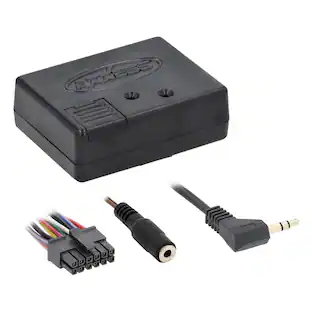
Keep your built-in steering wheel controls when upgrading to an aftermarket radio with this steering wheel control interface by PAC. The SWI-CP2 is compatible with a wide range of popular vehicles and motorcycles. Save time during installation with an easy three-step setup process using the ControlPRO app for smartphones.
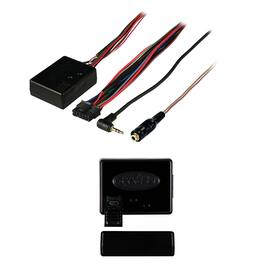
AXXESS - AXSWC Steering Wheel Control Interface - Black

Are you changing out a factory radio on your car to an aftermarket one and want to retain the steering wheel control functions? Then you need the Axxess Integrate Steering Wheel Control Interface! The AXSWC is an all-in-one steering wheel control interface so no additional interfaces are needed. It is designed to be compatible with all major radio brands because it auto detects the vehicle type thanks to patented technology, radio connection, and presets controls. It even has the ability to dual-assign the steering wheel control buttons.

Maestro - Universal Analog Steering Wheel Interface - Black

Control an aftermarket radio from your steering wheel with the help of this Maestro ADS-MSW universal analog steering wheel interface that allows you to program 2 unique radio functions for each button. Plastic and copper materials ensure durability.

Metra - Steering Wheel Control Interface - Black
4.4(81)

Interact with your Alpine, Audiovox, JVC, Kenwood, Pioneer or Sony car radio when driving with this Metra steering wheel interface. The USB updatable function offers access to suitable devices, while compatibility with select radios delivers enhanced control from your steering wheel. Featuring a length of 7.5 inches, this black Metra steering wheel interface allows for smooth installation.

Pros for PAC - Steering Wheel Control Interface for Select Vehicles - Black
Ease of use, Steering Wheel Controls, Overall Performance, Compatibility, InstallationThere were no pros for this productSteering Wheel Controls, Ease of use, Compatibility, Overall Performance, InstallationEase of use, Overall Performance, Steering Wheel Controls, Installation
Cons for PAC - Steering Wheel Control Interface for Select Vehicles - Black
Price, Media ControlThere were no cons for this productPrice, Instructions, Programming, Bluetooth, LagCompatibility

Specs

Questions & Answers
  • Can the interface be configured using a smartphone or tablet?

    Yes, you can configure the interface using a smartphone or tablet. The wiring and vehicle configuration switch settings are accessible through mobile applications for these devices.

    This question and answer was generated by AI based on customer and product data.
  • Is the interface compatible with most aftermarket stereos?

    This steering wheel control interface is compatible with most aftermarket stereos.

    This question and answer was generated by AI based on customer and product data.
  • What accessories are included with the interface?

    The steering wheel control interface includes a harness as an additional accessory.

    This question and answer was generated by AI based on customer and product data.
  • Does the interface support analog signals?

    This steering wheel control interface is compatible with analog signal types.

    This question and answer was generated by AI based on customer and product data.
  • What are the different ways to configure the interface?

    The SWI-CP5 interface offers configuration through DIP switches, USB connection to a PC, button learning, and by using the ControlPRO web and mobile applications.

    This question and answer was generated by AI based on customer and product data.
Ask a question
No content
Sponsored

Finance Options

My Best Buy® Credit Card
Buy Now, Pay Later