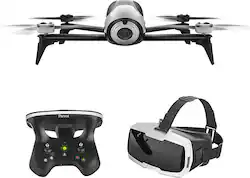
Record stunning high-definition videos with this Parrot Bebop drone. Maneuver through the air for up to 25 minutes using the FreeFlight Pro app on a tablet or smartphone, and capture 1080p images with the 14-megapixel camera. A 300-meter range and built-in GPS make navigation easy, and the goggles included with this Parrot Bebop drone supply a real-time viewing experience.
Fly Responsibly:
Before takeoff, update all software and firmware, and read the instructions thoroughly.
See the FAA website for registration requirements and information about flying a drone safely: https://www.faa.gov/uas/getting_started/. Additional state or local requirements may apply. Check your local jurisdiction. The following websites may help you make informed decisions about flying your drone: www.knowbeforeyoufly.org and www.modelaircraft.org.
A: I agree with all the other Bepop 2 owners, this drone does not have the range it claims to have.
A: The only time you will want to connect to your computer is to download the images/videos from the drone after your flight(s). This is done via the microUSB port on the drone. You do not need to use the FPV goggles to fly the drone. You can fly it with your Smartphone mounted on the sky controller if using the sky controller OR you can fly directly off of your smart device using the on-screen flight controls. I prefer the sky controller with my iPhone mounted on the sky controller. In my opinion it gives me the best control over the drone and the flight feels more real to me. This is only a personal preference.
Q: Does this Drone have auto-follow feature?
A: Yes, it has FollowMe & also FlightPlan as part of 2 addon packages you can purchase for an additional $20 each. FreeFlight Pro comes with the Bebop 2 & allows you to fly the drone & adjust many parameters. I've used the FollowMe feature (it comes with a 15 day free trial) and it works great as long as you follow the instructions & set it properly.
Q: Can the drone fly sideways?
A: Yes, it will fly sideways. This is known as yaw. It is achieved by moving the right joystick on the sky controller left or right. The joystick controls are: fly Up/Down and turn Left/Right on the left joystick. Fly Forward/Reverse and yaw Left/Right on the right joystick. This is a very easy drone to fly and a great starter drone if it is your first drone.
Q: Is there a micro SD or other means of recording without a phone or tablet connection?
A: It has on board storage of 8 Gb, this can be EASILY modified to 32 Gb. You download your video/photos when your done flying.
A: My husband owns the bebop 2, when he connects his phone to the skycontroller or just uses the app to fly the drone, it saves the videos on his phone in the free flight pro app. We have been extremely happy with the drone and parrot also has top notch customer service. We highly recommend this company and the bebop 2.
Q: What comes in the box? How many batteries?
A: This product includes the following items: Parrot Bebop 2 Skycontroller 2 Cockpitglasses High-capacity battery USB cable Charger Owner's manual
Q: Do you need a smart phone to work this drone
A: Bebop 2 can be flown with a SkyController 2 alone, without a device or app running. The cockpitglasses (FPV goggles) requires a smartphone.