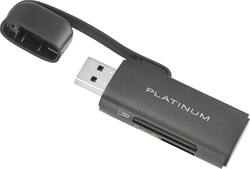
Platinum™ - UHS-I USB 3.2 Gen 1 Memory Card Reader - Black
- General
- Brand: Platinum™
- Model Number: PT-CRSA1
- Product Name: UHS-I USB 3.2 Gen 1 Memory Card Reader
- Color: Black
- Other
- USB Cable Included: false
- LED Indicator(s): false
- Computer Connectivity: Windows, Mac
- Plug and Play Operation: true
- Host Interface(s): USB Type A
- Media Support: Secure Digital, miniSD, microSD, Secure Digital High Capacity (SDHC), microSDHC, Secure Digital Extended Capacity (SDXC) Card, microSDXC
- Number Of Memory Cards Supported: 7
- Number Of Slots: 2
- UPC: 600603262593
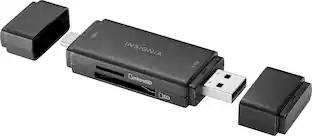
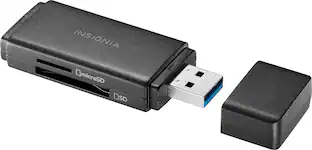
Enjoy all the benefits of both fast and portable technology with the Platinum PT-CRSA1 UHS-I USB 3.2 Gen 1 Memory Card Reader. Compatible with SD and Micro SD cards, you can quickly move files from your camera, tablet, or smartphone into your computer. A USB 3.2 Gen 1 interface provides you with ultra-high speed, so you can back up, transfer and copy images, videos and more. Plug-and-play technology lets you start transferring as soon as you connect, without the need for additional software. Plus, the compact stick design makes this adapter easy to carry anywhere. Technology doesn’t have to be slow or bulky. Take your adapter with you, knowing that you can fully depend on its power without it weighing you down.
- Designed for desktops, laptops and more: Back up, transfer and copy files from your memory cards to laptops, desktops, Chromebook and more.
- High-speed technology: A USB 3.2 Gen 1 design transfers data quickly, keeping you on the cutting edge. It’s backwards compatible with older USB ports to support legacy devices.
- Micro SD card reader: Supports Micro SD, Micro SDXC and Micro SDHC cards.
- SD card reader: Supports SD, Micro SDHC, SDXC and Mini SD cards.
- Plug-and-play connectivity: Just plug it into your computer’s USB port—no extra software needed.
- System compatibility: Designed for Windows 10 (32 Bit/64 Bit), Mac OS X 10.4 or Chrome OS 78 or later.
- Compact design: Sleek, compact design for easy transport and quick accessibility.
- Attached cap: A cap protects the card reader from damage, and a tether keeps it attached.
Whats Included
- Platinum UHS-I USB 3.2 Gen 1 Memory Card Reader
Product Manuals
Q: Can data be stored on this card in addition to it being a reader?
A: No this is not a card, it’s a card reader. For if you have files on an SD card (from a camera or something) that you want to put on your computer, but your computer doesn’t have a slot to insert an SD card, you can slide the SD card into this device, and plug this into one of your computer’s USB ports. So it basically converts one of your USB ports into an SD card slot, but this doesn’t have any storage of its own, you have to buy SD cards separately.
Q: What is the speed of the reader, in Mbps ?
A: The speed of this memory card reader is 5Gbps.
A: This product is designed for Windows 10 (32 Bit/64 Bit), Mac OS X 10.4 or Chrome OS 78 or later. Dina || Platinum Support
Q: Does this work with windows 11?
A: yes! works great without any issues
Q: will these readers transfer pictures to my desktop permanently ??
A: Yes, you can use this memory card reader to transfer pictures to a desktop computer.
Q: Can I use this to play music recorded on 16GB micro SD memory card in my truck usb port ?
A: It likely will. It works in my SUV with a 4GB Lexar microSD.
Q: does this work to add extra storage to my PS4?
A: Yes. Provided that you use at least a 256GB card. It works for extended storage on PS4 and PS5. I tested it on both. I had some trouble plugging it in the front of PS4. I used an extension cable to overcome that problem. On PS5, you need to plug it in the back. ***** Samsung - Pro Plus 256GB SDXC Memory Card: https://www.bestbuy.com/site/samsung-pro-plus-256gb-sdxc-memory-card/6540989.p?skuId=6540989 Insignia - 12' USB 3.0 A-Male to A-Female Extension Cable - Black: https://www.bestbuy.com/site/insignia-12-usb-3-0-a-male-to-a-female-extension-cable-black/6474394.p?skuId=6474394
People also viewed
 $18.99The price was $19.99
 $30.99The price was $35.52

Today's top picks
- $18.99The price was $19.99