Plugable - Alt Mode Monitor Adapter - USB-C to DVI for Windows,Mac,Driverless - Black
About this product
Plugable's USB-C to DVI Adapter allows you connect a DVI display to your laptop, tablet, or desktop which supports USB 3.1 Alternate Mode video output functionality. Currently the MacBook Retina 12" 2016/2017, 2016/2017 MacBook Pros, Google Pixelbook, Dell XPS 13 & 15 (9350x 9360, 9550, 9560), Microsoft Surface Book 2, and Samsung Galaxy S8/S8+ support this functionality. Performance USB-C Alt Mode graphics adapters utilize a direct pipeline to the graphics processor in your system, and your connected monitor will function and perform as a natively attached display. Compatible Systems Plug and Play on any Windows, Mac, or Linux host which supports DisplayPort Alternate Mode video output functionality. Adapter has been tested for functionality on the 2017 iMac/iMac Pro, 2017 MacBook/MacBook Pro, MacBook Retina 12" 2016/2017, MacBook Pro 2016/2017, Microsoft Surface Book 2, Dell XPS 9350 / 9550, Lenovo P50, & more. Apple Notes: To use a DVI display with MacBook systems, the display must support HDCP copy protection. Some older DVI displays do not support HDCP and will result in unusable behavior. This requirement is only enforced in OS X, as BootCamp Windows installations behave correctly with non-HDCP DVI displays. For additional compatibility information, please see plugable.com/usbc-dvi Incompatible Systems Most current phones and tablets with USB-C ports do not support Alt Mode video output. ASMedia USB 3.1 controllers do not support Alt Mode video at this time. Not compatible with Apple Cinema Displays and 2560x1440 monitors which require a dual-link DVI connection In the Bag Plugable USB-C to DVI Adapter (6in/15cm)
USB-C to DVI
Utilizes the native video capabilities of USB-C ports on supported computers to drive a DVI monitor with resolutions up to 1920x1200 @ 60Hz
Ideal for IT teams modernizing laptops while extending the l
The Plugable USB-C to DVI Adapter enables driverless, plug-and-play connectivity across Windows, macOS, Chrome OS, and Linux, allowing organizations to issue newer USB-C/Thunderbolt laptops without replacing large inventories of 1080p/1200p DVI displays—reducing refresh costs, minimizing help desk tickets, and simplifying standardization for mixed-device environments
Great For Travel
The compact and lightweight design of this USB-C to VGA adapter allows you to quickly pack it for business trips, commuting, or anytime you need a way to connect to a monitor or projector.
Compatibility
Works with iPhone 15, modern M-Series MacBooks, Dell XPS, Microsoft Surface, HP Spectre x360 systems with Thunderbolt 4, Thunderbolt 5, and USB4, and DisplayPort Alternate Mode over USB-C ports
2-Year Coverage, Lifetime Support
Every Plugable product, including this USB C to DVI adapter, is covered against defects for 2 years and comes with lifetime support. If you ever have questions, contact our North American-based team - even before purchase
- Connector Type (End 1)USB-CGender (End 1)MaleConnector Type (End 2)DVIGender (End 2)MaleMaximum Data Transfer Rate5000 megabits per secondJacket MaterialRubber
Reviews
This product doesn't have any reviews yet.
Compare similar products
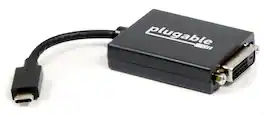
Plugable's USB-C to DVI Adapter allows you connect a DVI display to your laptop, tablet, or desktop which supports USB 3.1 Alternate Mode video output functionality. Currently the MacBook Retina 12" 2016/2017, 2016/2017 MacBook Pros, Google Pixelbook, Dell XPS 13 & 15 (9350x 9360, 9550, 9560), Microsoft Surface Book 2, and Samsung Galaxy S8/S8+ support this functionality. Performance USB-C Alt Mode graphics adapters utilize a direct pipeline to the graphics processor in your system, and your connected monitor will function and perform as a natively attached display. Compatible Systems Plug and Play on any Windows, Mac, or Linux host which supports DisplayPort Alternate Mode video output functionality. Adapter has been tested for functionality on the 2017 iMac/iMac Pro, 2017 MacBook/MacBook Pro, MacBook Retina 12" 2016/2017, MacBook Pro 2016/2017, Microsoft Surface Book 2, Dell XPS 9350 / 9550, Lenovo P50, & more. Apple Notes: To use a DVI display with MacBook systems, the display must support HDCP copy protection. Some older DVI displays do not support HDCP and will result in unusable behavior. This requirement is only enforced in OS X, as BootCamp Windows installations behave correctly with non-HDCP DVI displays. For additional compatibility information, please see plugable.com/usbc-dvi Incompatible Systems Most current phones and tablets with USB-C ports do not support Alt Mode video output. ASMedia USB 3.1 controllers do not support Alt Mode video at this time. Not compatible with Apple Cinema Displays and 2560x1440 monitors which require a dual-link DVI connection In the Bag Plugable USB-C to DVI Adapter (6in/15cm)
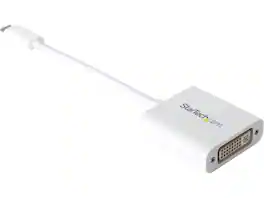
StarTech.com CDP2DVIW USB C to DVI Adapter - White - 1920x1200 - USB Type C Video Converter for Your DVI D Display / Monitor / Projector (CDP2DVIW)

The Best Buy essentials 6’ HDMI-to-DVI-D Monitor Cable mirrors or extends your computer’s desktop. Simply connect the cable from your computer’s single-link DVI-I or DVI-D port to a HDMI-enabled display. Compatible with monitors, TVs, projectors and more, resolutions from your computer’s single-link DVI-I or DVI-D port up to 1920 × 1200 grant you optimal high-quality images that leave everyone impressed. Nickle-plated connectors with PVC molding make this cable corrosion resistant and give it long-lasting use. Providing flexible placement options, a 6 ft. cable gives you the ideal length to reach your devices. And the cable is backed by Best Buy, so you can have confidence in your computer’s setup.

The Insignia 6' DVI-D to HDMI Cable lets you mirror or extend your screen by connecting the cable from your computer’s HDMI port to a monitor, TV or projector with a DVI-D or DVI-I port. A 6 ft. length gives you flexible placement options. In addition, it supports resolutions of up to 1920 × 1200, granting quality images that will leave you impressed. Gold-plated connectors with PVC molding make this cable corrosion resistant and give it long-lasting use.
| Pros for Plugable - Alt Mode Monitor Adapter - USB-C to DVI for Windows,Mac,Driverless - Black | |||
|---|---|---|---|
| There were no pros for this product— | There were no pros for this product— | Compatibility, HDMI, Ease of use, Overall Performance, Price | HDMI, Compatibility, Ease of use, Quality, Connection |
| Cons for Plugable - Alt Mode Monitor Adapter - USB-C to DVI for Windows,Mac,Driverless - Black | |||
| There were no cons for this product— | There were no cons for this product— | Lag, Resolution | There were no cons for this product— |
Specs
Be the first to ask a question.
We’ll try to get your question answered within 24 hours by a Best Buy customer or brand representative.