Plugable - Thunderbolt 4 Dock for M4 MacBook Air & Pro: 100W Charging, 4K HDMI Dual Monitor or Single 6K - Space Gray
About this product
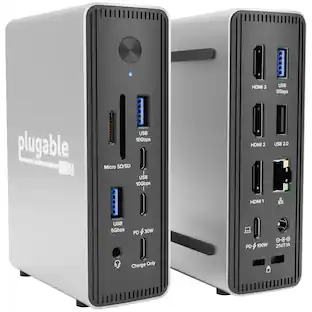
Meet the Plugable TBT-UDM, our premium Thunderbolt 4 docking station, purpose-built for Mac users who want top-tier performance without sacrificing style. Housed in a sleek space-gray aluminum shell to match your Apple setup, this plug-and-play dock delivers the full power of Thunderbolt 4. Expand a single Thunderbolt port into 13 essential connections with this Plugable docking station, including dual HDMI 2.0 ports for up to two 4K 60Hz displays on M4, M3 (in clamshell mode), and Pro/Max M-Series Macs, 100 charging (96W certified) for your laptop, a 40Gbps downstream Thunderbolt port also capable of 15W charging and up to 8K video, plus SD/microSD UHS-II card readers, USB-C and USB-A ports, Ethernet, and audio. It’s plug-and-play ready—no drivers required. For the creative pros, hybrid workers, and power users juggling monitors, drives, and peripherals, this Thunderbolt docking station keeps your workspace clean and connected with one cable. Compatible with Thunderbolt 4 and USB4 systems on both macOS and Windows, it's the perfect dock to streamline your setup and supercharge your workflow.
Features
13-in-1 Thunderbolt Performance
Need a high-performance Mac docking station? The Plugable TBT-UDM laptop docking station is a space gray aluminum-clad Thunderbolt 4 dock designed for your Mac. It packs 13 ports, dual 4K HDMI, 100W charging, and driverless compatibility into one plug-and-play powerhouse
Dual 4K Display
Want dual monitors without driver downloads or a dongle mess? This docking station for laptop supports up to two 4K 60Hz HDMI displays on all M4 systems, Pro/Max M-series Macs, and M3 Macs in clamshell mode. No drivers required. The preferred docking station dual monitor combo for video editors, designers, and multitaskers
Make a Connection
Tired of slow docks and cable chaos? Get 13 streamlined ports, including 1x downstream Thunderbolt 4 (40Gbps), 1x USB-C, 4x USB-A, SD/microSD UHS-II, Ethernet, 3.5mm audio, and 100W host charging to keep your MacBook powered all day. Perfect for hot-desks, home setups, or dev studios
Works With
Full compatibility with all M4 MacBooks and M1/M2/M3 MacBooks with Pro or Max CPU. Base M1 and M2 MacBooks support only a single external display; base M3 Macs support dual displays in clamshell mode only. Also supports Windows systems with Thunderbolt 4 or USB4. Fully plug-and-play over Thunderbolt or USB4 connections.
Lifetime Support
This Windows and MacBook docking station has been designed with reliability at its core and was built to meet the deployment demands of IT departments and the ease of use necessary for home offices. Includes lifetime support from our North American team of connectivity experts
Specifications
- Maximum Number of Displays Supported2Number of DisplayPort Outputs (Total)0Number of Thunderbolt Ports (Total)2Passthrough PowerYes
Reviews
Rating 3 out of 5 stars with 1 review
The vast majority of our reviews come from verified purchases. Reviews from customers may include My Best Buy members, employees, and Tech Insider Network members (as tagged). Select reviewers may receive discounted products, promotional considerations or entries into drawings for honest, helpful reviews.





Compare similar products
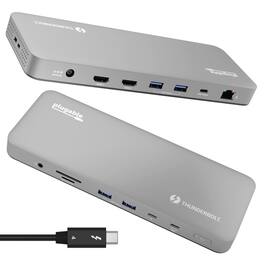
Meet the Plugable TBT-UDM, our premium Thunderbolt 4 docking station, purpose-built for Mac users who want top-tier performance without sacrificing style. Housed in a sleek space-gray aluminum shell to match your Apple setup, this plug-and-play dock delivers the full power of Thunderbolt 4. Expand a single Thunderbolt port into 13 essential connections with this Plugable docking station, including dual HDMI 2.0 ports for up to two 4K 60Hz displays on M4, M3 (in clamshell mode), and Pro/Max M-Series Macs, 100 charging (96W certified) for your laptop, a 40Gbps downstream Thunderbolt port also capable of 15W charging and up to 8K video, plus SD/microSD UHS-II card readers, USB-C and USB-A ports, Ethernet, and audio. It’s plug-and-play ready—no drivers required. For the creative pros, hybrid workers, and power users juggling monitors, drives, and peripherals, this Thunderbolt docking station keeps your workspace clean and connected with one cable. Compatible with Thunderbolt 4 and USB4 systems on both macOS and Windows, it's the perfect dock to streamline your setup and supercharge your workflow.
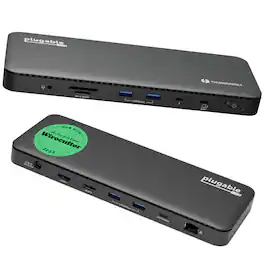
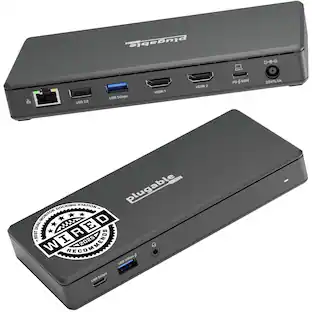
A “do-it-all” dock, the Thunderbolt Certified TBT4-UD5 Plugable Docking Station was awarded The Best Thunderbolt Docking Station by Wirecutter in 2025. It stands out as a versatile and powerful hub for modern workspaces. Its robust design includes an array of 13 ports, catering to a wide range of connectivity needs. Starting with the 40Gbps Thunderbolt 4 host port, this TB4 dock offers plenty of bandwidth to support two HDMI ports, each capable of driving dual 4K 60Hz displays. A downstream 40Gbps Thunderbolt 4 port is also included to provide high-speed connectivity for advanced Thunderbolt-based applications, such as fast storage devices. In addition to its display options, this Thunderbolt USB4 dock boasts a USB-C port with a 10Gbps transfer rate, ideal for quick file transfers and efficient data management. There are also 4x USB 3.0 ports (2x 10Gbps, 2x 5Gbps), perfect for connecting a variety of peripherals like keyboards, mice, and external drives. Throw in SD and Micro SD slots, a combo audio jack, Gigabit Ethernet, and a slot for a K lock, and this setup ensures that users can create a powerful and integrated workstation. Speaking of power, the TBT4-UD5 docking station Thunderbolt 4 packs it in with up to 100W Power Delivery (96W certified) — more than enough for most power-hungry laptops. Especially useful in business and education environments, the Plugable TBT4-UD5 Docking Station delivers exceptional functionality and convenience.

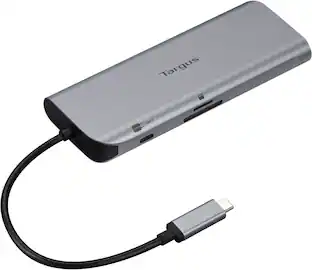
Introducing the HyperDrive Next Duo Pro Slim 8 Port Hub for MacBook. Seamlessly expand your MacBook with 8 ultra-fast ports; made with EcoSmart recycled materials. With extended 4K60Hz monitor, 8 ultra-fast ports, and lightning-fast data transfers, unleash your creative potential anywhere. Experience 2X faster file transfers using the 10Gbps USB ports and 3X faster photo and video transfers with microSD and SD 4.0. Power any MacBook up to 100W with a 100W PD power pass-through port, ensuring efficient charging. The HyperDrive Next Duo Pro features a dual USB-C connection with magnetic security grips for ensure a safe connection with your MacBook. The Duo Pro Slim is compatible with any MacBook and seamlessly fits any MacBook with a protective case. To ensure universal compatibility, the Duo Pro Slim comes with a universal USB-C adapter to connect to your iPad, PC, or Chromebook.
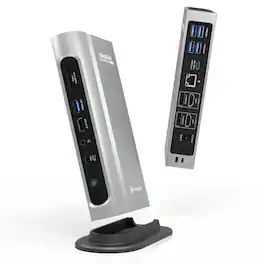
The Thunderbolt Certified 16-in-1 Quad docking station from Plugable delivers peak performance. The innovation starts with our display connections. Connect your 4K screens through 2x HDMI ports and 2x DisplayPort ports — a rare level of display flexibility in a Thunderbolt dock. But the real expansion picks up at the ports. Offering sixteen total ports to park your peripherals, including 7x USB ports, SD and microSD card readers, Audio, and 2.5Gbps Ethernet. It even adapts to your desk with an included stand for vertical or horizontal orientation options. Quad Display With this Thunderbolt 4 docking station Windows computers can use the 2x HDMI ports, and 2x DisplayPort ports to connect as many as 4x screens at up to 4K 60Hz. Can also be used a single, dual, or triple display docking station. On Mac (Intel, M1 / M2 / M3 Pro/Max, M4 / Pro/Max, M5 / Pro/Max CPU), extend your desktop to 2x screens using any combination of HDMI and/or DisplayPort. Macs with an M1 / M2 / M3 CPU only support one external display. 100W Power Delivery The laptop Thunderbolt docking station offers USB Power Delivery up to 100W (98W certified) — no more climbing under the desk to get plugged in. Not all laptop docking stations handle power the same. With the TBT4-UDZ, if your laptop needs less power, the docking station adjusts and only sends the optimal wattage. And with 6x available USB ports, and one USB-C port, your devices will always have a place to connect. Compatibility The TBT4-UDZ is compatible with *Windows 10 and later and **macOS 11+. Actual number of screens that can be extended depends on capabilities of the host computer. Be sure to see the Display Compatibility Chart below. *On some Windows laptops, enabling four displays may require a Windows settings change to disable the internal screen. **On Macs, additional monitors beyond specs below may not function, and/or will “mirror” rather than extend.
| Pros for Plugable - Thunderbolt 4 Dock for M4 MacBook Air & Pro: 100W Charging, 4K HDMI Dual Monitor or Single 6K - Space Gray | |||
|---|---|---|---|
| There were no pros for this product— | Overall Performance | Overall Performance, Ease of use, Connectivity, USB-C, Port Expansion | There were no pros for this product— |
Specs
Customers often buy these together
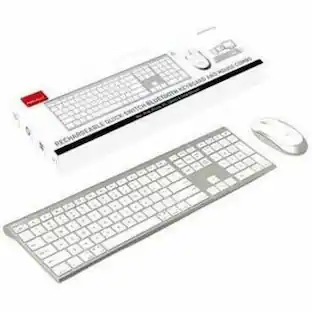
Macally Wireless Bluetooth Keyboard for Mac - Compatible Apple Keyboard - Up to 3 Devices with 110 Keys
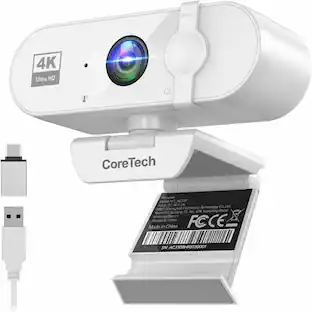
$49.99The price was $59.99Core Tech 4K UHD USB-C Webcam with Autofocus, Noise-Reducing Microphone, Privacy Cover and USB-A Adapter
$69.99The price was $89.99


Customers ultimately bought


Explore tech essentials Sponsored



Keep exploring
Dell D6000 Universal Laptop Dock – USB-C & USB-A, 65W Power Delivery, 3 Monitors
$219.89The price was $249.99