Plugable - USB C Docking Station Dual Monitor 2 HDMI Ports, Power Delivery Dock Dual 4K Monitor for Windows, ChromeOS - Black
About this product
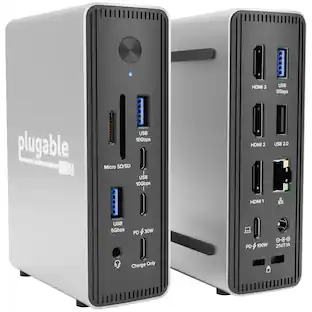
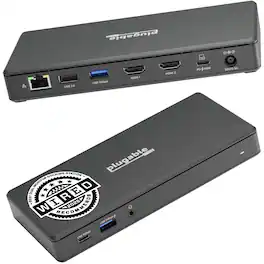
Transform your workspace with one cable. The Plugable UD-MSTH2 docking station for laptop turns a compatible laptop into a complete workstation reducing cable clutter while adding dual-monitor productivity, charging, and everyday connectivity. The UD-MSTH2 was awarded the “Best Dual Monitor Docking Station” by WIRED Connect two HDMI monitors and expand your desktop for smoother multitasking across email, spreadsheets, and video calls. This is an MST dock (Multi-Stream Transport), enabling two displays from a single USB-C video connection on supported systems. Each display can support up to 4K 60Hz, but your actual resolution/refresh rate depends on your laptop’s capabilities. For video output, your USB-C port must support DisplayPort Alt Mode (not all USB-C ports support video). Beyond displays, the UD-MSTH2 works as an all-in-one connectivity hub with up to 65W laptop charging, Gigabit Ethernet for stable wired networking, USB ports for peripherals and storage, and a 3.5mm audio jack for headsets or speakers—ideal for remote work, shared desks, and office setups where you want everything ready the moment you plug in. Designed to be simple and stress-free on supported systems with driverless, plug-and-play operation. It’s a great fit for Windows 10+ and ChromeOS laptops that support USB-C video output, including many popular business and productivity lines and it can be a solid option for users searching for a Lenovo docking station as long as the Lenovo laptop’s USB-C port supports DisplayPort Alt Mode. macOS users should note that Apple’s display limitations mean this dock will support only one external display, so it is not recommended if you need two extended monitors. In the box: UD-MSTH2 dock, 110W power adapter (supports up to 65W charging), 1m USB-C host cable, and Quick Start Guide. Backed by Plugable’s lifetime support from our North American team of connectivity experts.
One Cable Desk Setup
Turn your laptop into a full workstation with one connection, run two HDMI monitors (up to 4K 60Hz each on supported systems) and keep your desk setup ready for multitasking, spreadsheets, and video calls. Monitor resolution and refresh rate depend on your host system’s capabilities (dual 4K 60Hz requires a host that supports higher-end display output).
Compatibility Checklist
Designed for Windows 10+ / USB4 / Chromebook systems that support DP Alt Mode + MST. Not recommended for macOS if you need dual extended displays (Mac will be limited to one external monitor).
Easy Setup, No Drivers
True plug-and-play, no software installation required on supported systems. Just connect power, plug into your laptop, and attach your monitors and accessories. Host must support USB-C DisplayPort Alt Mode (DP Alt Mode) for video output (not all USB-C ports support video).
10-in-1 Connectivity for a Ready to Go Workstation
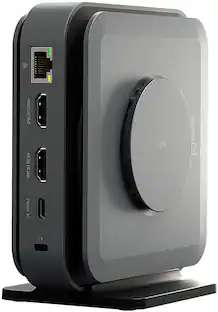
Connect your everyday desk essential – keyboard/mouse, external storage, Ethernet, and a headset for calls through one dock. Includes 1x USB-C (5Gbps), 2x USB-A 3.0 (5Gbps), 1x USB-A 2.0 (480Mbps), Gigabit Ethernet, and audio in/out, plus a secure K-Lock slot for office environments.
What’s Included + Lifetime Support
In the box you’ll get the UD-MSTH2 dock, 110W power adapter, 1m USB-C host cable, and a Quick Start Guide for fast setup. Backed by Plugable’s lifetime support from our North American team of connectivity experts.
- Maximum Number of Displays Supported2Maximum Supported Resolution4K (2160p)Number of DisplayPort Outputs (Total)0Passthrough PowerYes
Reviews
Rating 5 out of 5 stars with 1 review
The vast majority of our reviews come from verified purchases. Reviews from customers may include My Best Buy members, employees, and Tech Insider Network members (as tagged). Select reviewers may receive discounted products, promotional considerations or entries into drawings for honest, helpful reviews.
Compare similar products
Transform your workspace with one cable. The Plugable UD-MSTH2 docking station for laptop turns a compatible laptop into a complete workstation reducing cable clutter while adding dual-monitor productivity, charging, and everyday connectivity. The UD-MSTH2 was awarded the “Best Dual Monitor Docking Station” by WIRED Connect two HDMI monitors and expand your desktop for smoother multitasking across email, spreadsheets, and video calls. This is an MST dock (Multi-Stream Transport), enabling two displays from a single USB-C video connection on supported systems. Each display can support up to 4K 60Hz, but your actual resolution/refresh rate depends on your laptop’s capabilities. For video output, your USB-C port must support DisplayPort Alt Mode (not all USB-C ports support video). Beyond displays, the UD-MSTH2 works as an all-in-one connectivity hub with up to 65W laptop charging, Gigabit Ethernet for stable wired networking, USB ports for peripherals and storage, and a 3.5mm audio jack for headsets or speakers—ideal for remote work, shared desks, and office setups where you want everything ready the moment you plug in. Designed to be simple and stress-free on supported systems with driverless, plug-and-play operation. It’s a great fit for Windows 10+ and ChromeOS laptops that support USB-C video output, including many popular business and productivity lines and it can be a solid option for users searching for a Lenovo docking station as long as the Lenovo laptop’s USB-C port supports DisplayPort Alt Mode. macOS users should note that Apple’s display limitations mean this dock will support only one external display, so it is not recommended if you need two extended monitors. In the box: UD-MSTH2 dock, 110W power adapter (supports up to 65W charging), 1m USB-C host cable, and Quick Start Guide. Backed by Plugable’s lifetime support from our North American team of connectivity experts.
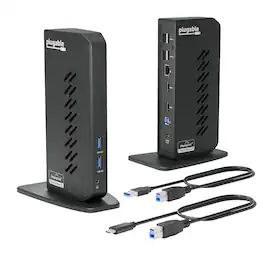
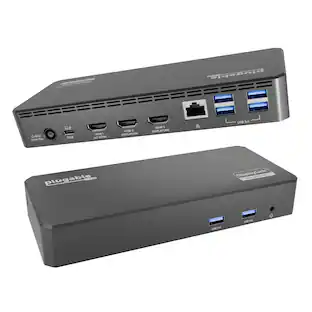
The Plugable UD-3900Z USB 3.0 and USB-C docking station is a reliable USB docking station designed for standardized workstation deployments across Windows, macOS, and ChromeOS environments. As a universal docking station, it enables consistent desk setups across mixed device fleets, expanding laptops and desktops with dual monitors, wired networking, audio, and USB peripherals through a single connection. This USB docking station dual monitor solution supports two HDMI displays up to 1920x1200 @ 60Hz and uses DisplayLink technology to enable extended or mirrored desktops on compatible Windows and ChromeOS systems, as well as on Apple Silicon MacBooks including M1, M2, M3, M4, M5, and MacBook Neo models, even on systems that are typically limited to a single native external display. The UD-3900Z provides 10 expansion ports, including 2 HDMI outputs, 2 USB 3.0 ports for high-speed devices, 4 USB 2.0 ports for keyboards, mice, and receivers, Gigabit Ethernet for stable wired network connectivity, and 3.5mm audio input/output. Both USB-C and USB-A host cables are included, allowing this USB A docking station to support legacy systems while also functioning as a modern USB C docking station. The compact vertical design helps reduce cable clutter and fits easily between monitors, making it well suited for hot-desking and shared workspace environments. This dock is HDMI-only and does not support DisplayPort. HDCP is not supported, so encrypted content such as Netflix, Hulu, or Blu-ray will not play. Designed for business applications rather than GPU-intensive workloads, it is not recommended for gaming or full-screen video playback. The included 24W external power supply powers connected accessories but does not charge the host laptop. In the box: UD-3900Z dock (7.5” x 2.8” x 5.3”), 24W power adapter with US wall plug (100-240V, 50/60Hz, 1.5m / 5ft), USB-A (USB 3.0) to USB-B cable (0.9m / 2.95 ft), USB-C to USB-B host cable (2.9m / 9.5 ft), and quick-install guide.
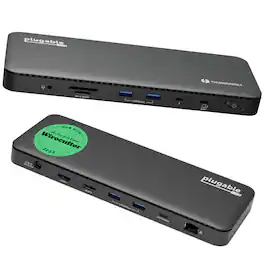
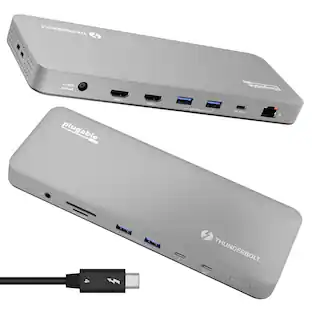
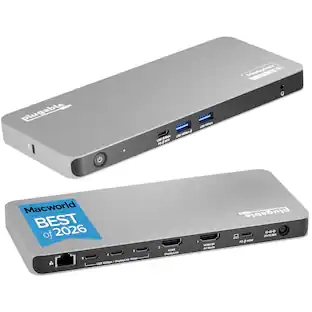
A “do-it-all” dock, the Thunderbolt Certified TBT4-UD5 Plugable Docking Station was awarded The Best Thunderbolt Docking Station by Wirecutter in 2025. It stands out as a versatile and powerful hub for modern workspaces. Its robust design includes an array of 13 ports, catering to a wide range of connectivity needs. Starting with the 40Gbps Thunderbolt 4 host port, this TB4 dock offers plenty of bandwidth to support two HDMI ports, each capable of driving dual 4K 60Hz displays. A downstream 40Gbps Thunderbolt 4 port is also included to provide high-speed connectivity for advanced Thunderbolt-based applications, such as fast storage devices. In addition to its display options, this Thunderbolt USB4 dock boasts a USB-C port with a 10Gbps transfer rate, ideal for quick file transfers and efficient data management. There are also 4x USB 3.0 ports (2x 10Gbps, 2x 5Gbps), perfect for connecting a variety of peripherals like keyboards, mice, and external drives. Throw in SD and Micro SD slots, a combo audio jack, Gigabit Ethernet, and a slot for a K lock, and this setup ensures that users can create a powerful and integrated workstation. Speaking of power, the TBT4-UD5 docking station Thunderbolt 4 packs it in with up to 100W Power Delivery (96W certified) — more than enough for most power-hungry laptops. Especially useful in business and education environments, the Plugable TBT4-UD5 Docking Station delivers exceptional functionality and convenience.
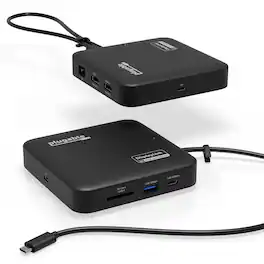
Don’t let the size fool you. The Plugable USB-C Dual HDMI Docking Station (USBC-6950PDZ) may look like a compact USB-C travel hub, but it delivers the full functionality of a desktop docking station. With dual HDMI ports, Gigabit Ethernet, USB-A and USB-C ports, an SD card slot, and support for up to 82W pass-through charging, this small yet powerful dock expands your laptop’s capabilities whether you’re at home, in the office, or on the go. One of its most impressive features is the ability to support two extended 4K 60Hz HDMI displays, even on laptops that don’t natively support dual video output. Thanks to advanced DisplayLink technology, this displaylink hub handles video processing internally for smooth and reliable performance. Whether you use Windows or macOS, this displaylink docking station solution enables a seamless dual monitor setup, making it a great choice for MacBook Air, Mac Mini, and iMac users who need a dependable dual-monitor docking station. DisplayLink driver installation is required for full functionality. On Windows systems, the driver installs automatically through Windows Update if driver updates are enabled. If your computer is managed by your organization, check with your system administrator, as corporate policies may restrict automatic installation or require administrator approval. On macOS, users must manually download and install the DisplayLink Manager application (administrator rights required). This ensures the displaylink adapter works properly with Apple Silicon systems, including M1, M2, M3, M4 and M5 MacBooks. Power delivery is straightforward and flexible. The dock does not include its own power supply but is designed to work with your existing USB-C laptop charger. It accepts up to 100W of input power, providing up to 82W to the connected laptop while reserving 18W for dock operation. Your laptop must support USB-C Power Delivery (PD) for charging to function, and charging speeds may vary slightly compared to a direct connection. The USBC-6950PDZ is compatible with Windows 10 and later, macOS 11 and later, and laptops equipped with USB-C, USB4, or Thunderbolt 3 or 4 ports. It fully supports Apple Silicon MacBooks once the DisplayLink driver is installed. This dock does not support playback of HDCP-protected content, so streaming services such as Netflix, Hulu, and Disney+ may be blocked or fail to display on external monitors. Compact yet durable, the USBC-6950PDZ is built for hybrid work, travel, and mobile productivity. The dock measures 1 x 4.7 x 4.7 inches, and the attached USB-C cable is 1.64 feet long—offering a portable design that’s easy to pack and connect anywhere. This docking station provides an ideal balance of portability, connectivity, and performance, helping you stay powered, connected, and productive wherever work takes you.
Specs
Customers often buy these together
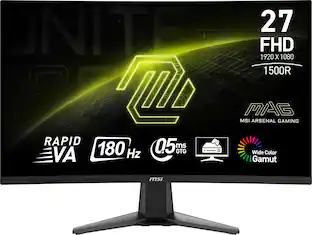 $107.99The price was $159.00



Customers ultimately bought
 $119.99The price was $129.99
 Top Deal$124.99The price was $139.99




Explore tech essentials Sponsored
 Top Deal$44.99The price was $49.99


Discover related products
 $7.99The price was $14.99





Keep exploring
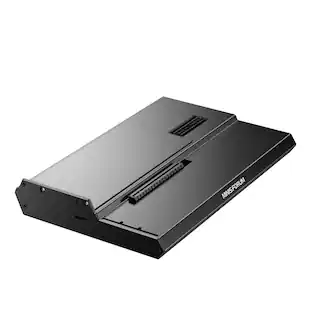 $111.00The price was $139.00
Acer - 5 in 1 USB C Hub with 4K HDMI, 100W Power Delivery, 3 USB A Data Ports, USB C to HDMI Adapter
$15.99The price was $16.99