
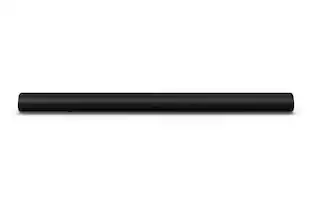
Polk Audio - 2.0-Channel Soundbar with Digital Amplifier - Black
- Key Specs
- Wireless Connectivity: Bluetooth (The manner in which a device sends data to another device over a short distance without the use of wires or cables.)
- Wall Mountable: true (The product is able to be secured to a wall. Some products are designed ready to mount, while others may require additional hardware/accessories for installation.)
- General
- Brand: Polk Audio
- Model Number: SIGNA SOLO
- Product Name: 2.0-Channel Soundbar with Digital Amplifier
- Color: Black
- Audio
- Number of Channels: 2.0 (The number of discrete channels of sound output. This can be a single number or multiple numbers separated by decimal(s). The first number is the primary, horizontally directed audio channels. The number after the first decimal, if applicable, is the number of subwoofer outputs or channels. The number after the second decimal, if applicable, is the number of height or atmospheric channels designed to immerse the listener by producing overhead sound effects.)
- Connectivity
- Wireless Connectivity: Bluetooth (The manner in which a device sends data to another device over a short distance without the use of wires or cables.)
- HDMI Audio Return Channel (ARC): false
- Number of USB Inputs: 0
- Number of Optical Audio Inputs: 1
- Features
- Wall Mountable: true (The product is able to be secured to a wall. Some products are designed ready to mount, while others may require additional hardware/accessories for installation.)
- Speaker
- Driver Size: 2.5 inches
- Dimensions
- Product Height: 3.54 inches (The out of box height of the item. Height is measured as the vertical distance from the bottom of the item to the top as it would be primarily used or placed.)
- Product Width: 39 inches (The out of box width of the item. Width is measured as the horizontal distance from one side of the item to the other as it would be primarily used or placed.)
- Product Depth: 3.91 inches (The out of box depth of the item. Depth is measured as the distance from the front of the item to the back as it would be primarily used or placed.)
- Product Weight: 7.5 pounds (The out of box weight of the item.)
- Included
- Remote Control Included: true
- Cable(s) Included: None
- Mounting Hardware Included: true
- Certifications Listings & Approvals
- ENERGY STAR Certified: false (Devices carrying the ENERGY STAR service mark, such as computer products and peripherals, kitchen appliances, and other products, generally use 20% to 30% less energy than required by federal standards.)
- Other
- UPC: 747192128609
Improve home theater audio with this Polk Audio sound bar. It creates wide, expansive stereo sound in a compact package, and its VoiceAdjust technology lets you customize voice levels for hearing crisp, clear dialogue during movies. This Polk Audio sound bar has built-in Bluetooth for wireless music streaming from portable devices.
- Four-speaker enclosure: Features four 2.5" mid/woofer drivers to deliver a movie theater experience in your own home.
- Bluetooth music streaming: Makes it easy to enjoy tracks stored on a compatible Bluetooth-enabled device (not included).
- Sleek appearance: Fits seamlessly along most HDTVs for a streamlined look.
- Inputs: Includes optical digital audio and mini jack.
- Remote: Enables simple operation from a distance.
- Wall-mountable: With the included bracket.
Whats Included
- 2 batteries
- Optical cable
- Polk Audio 2.0-Channel Soundbar with Digital Amplifier
- Power adapter with 6.5' power cord
- Remote control
- Sound bar wall mount template
Q: How do I program my remote to the sound bar so I can use my existing remote to control the volume?
A: If your other remote is Infrared then you can program the bar. On the audio bar, hold the source button ( about 3 seconds) until you see the LED indicators start to blink a pattern. Next on the sound bar, press and release the function you want to program, ex. 'Volume up" button. Now on the remote you want to use, press the "Volume up" button repeatedly, waiting about a second between each, once the new remote is learned, the soundbar led should blink on each "volume up" press. To program other functions like volume down, repeat entire process substituting the "Volume up" steps with the desired function.
A: The remote itself is pretty flimsy. It has to be aimed pretty much in the direction of the bar itself, and the buttons are not always super responsive. If you aim it more than 3 feet to the left or right of thebar, or more than a few feet above or below it, it will not pick up the signal most of the time ( this is true for the Comcast and Universal remote which I programmed for the Soundbar as well). My Sony and Yamaha remotes ( and the universal remotes that I ultimately programmed for those bars) can be aimed at a wider range and still be picked up by their respective Soundbars.
Q: Hi, Seems to go in sleep mode pretty fast, any way to stop that? Thank you. Chris
A: Turn your sound bar down and your TV up. The problem is that there isn't enough signal from the TV to turn on the Soundbar and keep it on. If that doesn't work reset the Soundbar by pressing on, mode,and Volume Plus Keys simultaneously for 10 seconds.
A: The led will flash 3 times
A: undefined
People also viewed
 $249.99The price was $399.99
 $1,599.99The price was $1,999.99
 $139.99The price was $159.99



Today's top picks
 $499.99The price was $749.99
 $199.99The price was $249.99
 $789.99The price was $1,049.99










