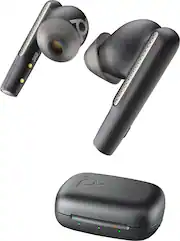
Rating 3.9 out of 5 stars with 77 reviews
3.9- Sound Quality (45)
- Battery Life (15)
- Fit (12)
- ANC (9)
- Comfort (8)
- EQ (3)
Customer Images
The vast majority of our reviews come from verified purchases. Reviews from customers may include My Best Buy members, employees, and Tech Insider Network members (as tagged). Select reviewers may receive discounted products, promotional considerations or entries into drawings for honest, helpful reviews.
- Rated 5 out of 5 stars
This V Free 60 are great!!
[Employee of bestbuy] I like the design even tho it could be a bit smaller for the ear canal to have a better fit but still they feel amazing the look tho is sleek and stylish. For listening to music they are clear and the base is just in point. Now call quality is great too. They only thing is missing is an EQ on the app to make this perfect and the case to be updated has to be with a computer that I dont get it but the earbuds themself can be updated throught the app is weird but ok. Overall a great pair of eardbuds.
Posted by Elinc
- Rated 4 out of 5 stars
Great sound but inconsistent mic
At first I thought these buds were duds. After completing the easy initial setup and familiarizing myself with the button and swipe driven controls (each bud has a button and a swipe strip), my first use was playing music. I played a few hip hop and pop songs to test deep bass and full full sound range. It sounded just okay with the music sounding flat and lifeless. I then made a call and that too sounded bad both ways. The party on the other end advised I sounded distant and that it was obvious I was talking through something other than my phone. On my end, they sounded equally bad like they too were talking far away from their mic. I had other obligations at the time, so I was forced to leave the buds alone for the remainder of the day. The next day I used the buds again with low expectations initially, but the results were surprisingly quite different. Music sounds much richer with nice tight resonating bass and a smooth warm feel overall. Sound is sufficiently loud and I don’t have to jack the volume levels high to get good bass and sound reproduction. I can see myself using these for listening to any genre of music in my off time. I then made some additional phone calls and they too improved drastically from since my initial call. Voices are clear and rich sounding. I was advised that I also sounded natural and clear as well. Afterward, I used the buds for a work related videoconference call and again I had no issues or complaints on either side. The only persistent issue that I noticed is that I occasionally hear my own voice through the mic and remote parties sometimes hear background noise from my environment. ANC works well on my end but the mic ANC is hit or miss. It almost seems like the mic array is a little too sensitive at times and picks up background noise rather than blocking it. I also sneezed while wearing the buds and they made a moderately loud static sound as if the sudden loud burst of noise was overwhelming. I’ve made loud noises, including shouting, while wearing other buds and have never had that happen before. The buds ship with extra tips in different sizes and a carrying/charging case. Each bud can be used independently even with the other bud remaining inside the case. The case that comes with these particular buds is not the touchscreen style depicted in the manual. The case charges the buds and is itself charged via a USB-C port on the rear. I use an old USB-C phone charger and cable which works well. These buds also don’t ship with a USB receiver as shown in the guide. I had to pair them to my PC using Bluetooth. I don’t know whether a receiver can be purchased separately but I plan to check into it. The Poly Lens companion app is available for iOS or Android but it is pretty bare bones. The app does not force users to create an account before use, although doing so is an option. The most noteworthy features include a locator function, firmware updates, and displaying battery status for both buds. The locator feature can track lost buds and show them on a map with precise location within the app. It can pinpoint location down to a specific room of a dwelling. The app can also make the buds play a sound to further aid in finding a wayward bud that may slip between a seat cushion or somewhere else out of view. The locator works even with the buds off inside the case. Battery life is respectable. I get a couple days of moderate on and off use throughout the day per charge. Comfort is good, the buds create a good seal, and they stay reliably positioned in my ears even while moving around. Although things got off to a rough start which I’m still at a loss to explain, they have greatly improved and the buds haven’t sounded bad again since. Unlike some other hybrid business/personal buds I’ve tried, these actually sound good when playing music. Sound is also good during conversations but I am a little disappointed with the inconsistent mic. It’s not terrible, I simply had higher expectations based on prior experience with Polycom phones and a Poly Voyager headset. On the plus side, it’s nice to have a pair of buds that can truly pull double duty for music and work.
Posted by JMan
- Rated 4 out of 5 stars
Impeccable sound with decent ANC
I’ve been able to flawlessly connect the Poly Voyager Free 60 earbuds to my Windows and Android devices, and enjoy listening to music, watching videos, as well as having conferences and calls. The earbuds are very comfortable with remarkable sound quality and decent active noise cancellation (ANC), along excellent battery life, and with multiple customization possibilities (accomplished mostly through the Poly Lens App) that makes it suitable for, I would say, most scenarios at home, work and on the walk. There are some not so great aspects, but overall, they don’t overshadow this otherwise great device. I’d recommend it to anyone looking for solid and versatile earbuds. Pros: crisp and clear sound, great bass, highly customizable, comfortable to wear. Next, I elaborate on a few of the several aspects and details that could be highlighted and discussed. >> Poly Lens App If you’d want to know more about your device and what it can achieve and how to best customize it, you’d need to install the Poly Lens App (it is already recommended to install it in the booklet that comes with the device.) The App allows you to access almost all the device features and information. I say almost all, because I don’t understand why it doesn’t show the percentage of battery left (perhaps it is hidden somewhere.) Anyways, with the App, you can update the device (which I did soon after installing the App), control ringtones and volume, swipe sensor, ANC, voice prompts and tones, and much more. One example where the App was handy for customizing the device was to get rid of the annoying and loud “boop” sound emitted to signal the volume changed when using the earbuds’ Swipe Sensor to bring the volume up/down. I went to the Poly Lens App, chose Ringtones&Volume section, and change the "Volume Level Tones" to be only Minimum and Maximum only (so no more annoying sounds while adjusting the volume.) I think the App could be improved to allow reaching some of the most useful settings faster, for example the ANC settings, by providing some shortcuts directly on the main page, instead of having to navigate through the different options. Also, depending on how your device is configured, you may find the need to use the App to light up some specific feature while using the device, such as the one I elaborate below. >> Custom Swipe Sensor The default configuration of the customizable Swipe Sensor located on the side of the tube section of each earbud allows to: - control volume (swipe up/down) when playing/streaming media - mute/unmute when in a call - setting transparency mode when idle You can change what happens with the Swipe Sensor on those three scenarios (when on a call, streaming, or idle) to whatever suits your needs best. This shows how highly customizable this device is. That being said, I found a couple of times while streaming media, that I wanted to hear a little more closely what others were talking about and given that I had the device Swipe Sensor configured to control volume while streaming, I had to resort to the Poly Lens App to change the current Transparency Mode to allow Speech to come through the earbuds more clearly. As a result, I ended up using the App a little more than desired to change some of the settings while using/wearing the Poly Voyager Free 60 earbuds. >> ANC & Transparency mode This is perhaps one of the most amazing features available in this device: Transparency Mode. You can use Transparency mode to either listen to the ambient more clearly or to get an enhanced audio of people talking. What I’ve noticed is that in this mode, the sound seems somehow coming from the earbuds themselves, perhaps it is time to get my ears checked? Anyways, the way I like using this feature is while at work, I can be listening to music while also listening to what others are chatting about under the “Speech” Transparency Mode setting. The ANC is decent, but it still allows a little more of the background noise than desired, and I guess that could be due to accommodating the Transparency feature. >> Visual indicators The earbuds themselves don’t have any light indicators that would help in identifying whether they are on/off, pairing, or the level of charge (full or depleted). Of course, there are the usual sound indicators for “Battery low”, “Recharge headset” and finally “Power Off” when there is no battery left and, well, when it is already too late, and the earbuds turn off. The Poly Lens Apps doesn’t provide feedback on what is the charge level either, so you must resort to the connected device, phone or PC, to determine what percentage of charge is left on the device. The charging case provides lights indicators, but they are not sufficient to know whether the earbuds are fully charged or not. For example, when charging fully depleted earbuds, the colors displayed are red, then when the earbuds get some charge, they turn into amber, and next after about a couple of minutes, the lights for the earbuds become green. But green doesn’t mean the earbuds are fully charged, they could be charged at 10% and they show as green. I think there is some room for improvement in this area. >> Charging As I mentioned earlier, there is no clear indication on the earbuds or the case itself to whether the earbuds are fully charged or not. The only way I’ve found to know they are 100% is by looking at your phone or connected device. Not even the Poly Lens app has an indication on how much charge the earbuds hold. You can charge the earbuds until the lights become green (about a couple of minutes) if you need to use them urgently, and it will last for several minutes which seem enough to jump on a call or conference. However, if you want to have them fully charged, at least in my experience, it seems to take around an hour or so to fully charge a completely battery charge depleted device.
Posted by Goncho
- Rated 5 out of 5 stars
Sound unexpected
[Employee of bestbuy] There is no one that will not like these. I would say get more then one pair. If anyone gets to use them they will want a pair.
Posted by Nice
- Rated 5 out of 5 stars
Great sound and fit
These are excellent wireless earbuds, with only a few minor quibbles. Sound quality is superb, with rich bass and crisp clear mids and high frequencies. Basic EQ settings are available in the Poly Lens app (flat, bass, bright -- it would've been nice to have a more customizable 5-band EQ). Microphone quality is very good -- voice was clear on the other end, although the mics on the Pixel Buds A are actually a little better. The Polys weren't quite as good as the Pixel Buds at filtering out ambient sound either, but it was still far above average. ANC is decent. I tested it in the bathroom while the fairly loud fan was on, and although I could still hear it, the intensity of the sound was quite muted. There's also a transparency mode that transmits ambient sound, which can be helpful if you have to be more aware of what's going on around you. The buds themselves are a bit bulky, but the fit is very comfortable. Most earbuds start to irritate my ears after an hour or so, but I had no problem with these. Although they do have the kind of design where the bud is inserted into the ear canal, they don't twist in, and rely more on the shape of the main body to rest in the outer ear cavity. This contributes to the comfort, but it also makes it easier for the buds to fall out on their own -- I didn't try running in them, but I'd be cautious if I did. There's a physical button on both earbud stalks for basic pause/play or call answer control. There's also a swipe gesture area higher up on the stalk which doesn't work that well. At times, it was too sensitive and responded when simply trying to adjust the earbud position, while at other times, it didn't seem to respond to an intentional swipe. The Lens app allows the user to customize the swipe or just turn it off -- I turned off the feature to avoid unintentional commands. The case is sturdy and feels premium. It's a little bulky, though -- larger and thicker than a typical Airpods case (I compare it with a knockoff Airpods case in the photo), so it'll cause more of a bulge in the pocket. There are 3 LEDs on the front of the case that indicate the charge level for the case (the center one) and the two earbuds (the LEDs on either side) using color. This doesn't give a whole lot of granularity, and is also problematic for colorblind people (like me). Battery is rated at 5.5 hours of talk time without ANC, and 5 hours with ANC; a fully charged case is supposed to be capable of recharging the earbuds twice. Earbud firmware updates are handled through the Poly Lens app. The charging case also gets updates, but this has to be done using the Poly Lens desktop app on a computer, using a USB connection. My Lens app on the phone informed me that there was an update for the case available, but when I connected to my computer, there was no indication about any updates, so that was a bit puzzling. Despite the minor complaints, I still give these earbuds 5 stars because of how well they work for the most important aspects to me: sound quality, call quality, and fit/comfort.
Posted by William C