PRIMEPLUS - Wireless Keyboard & Mouse Combo, 2.4GHz Rechargeable Quiet Full-Size, Nano USB Receiver for Windows Laptop PC - Black and Blue
Reviews coming soon
About this product
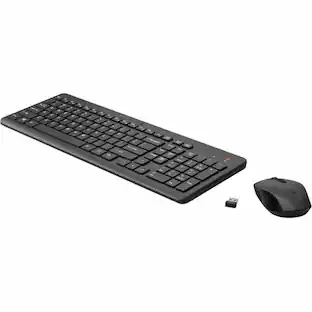
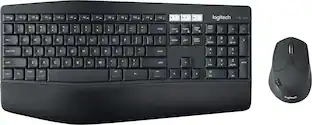
Upgrade your workspace with this ultra‑slim, rechargeable wireless keyboard and mouse combo. Both connect via a single 2.4GHz Nano receiver (stored in the mouse) for a stable, delay‑free connection up to 33 feet. The keyboard measures just 5.5mm thin with a scissor‑switch design – quiet, comfortable typing with a full number pad and hotkeys. The mouse features a contoured shape and 3 adjustable DPI levels (1000/1600/2400) for smooth tracking on any surface. Built‑in rechargeable batteries last over a month on a full charge, with auto‑sleep to save power. Works with Windows PCs, laptops, notebooks. Receiver pairing instructions included. Plug and play – no drivers needed.
Color
Black and BlueFeatures
Stable 2.4GHz Wireless – One Nano Receiver
Powerful, reliable connection up to 33 feet (10m) without delays. The 2โ€‘inโ€‘1 Nano receiver unifies keyboard and mouse into a single USB port โ€“ plug and play. Receiver stores inside the mouse to prevent loss.
Ultra‑Slim (5.5mm) Keyboard with Scissor Switches
Sleek, elegant design with whisper‑quiet typing. Full‑size layout includes number pad and fast‑access hot keys for improved productivity. Comfortable tactile response for long work sessions.
3 DPI Levels & Ergonomic Mouse
Easily adjust cursor sensitivity (1000/1600/2400 DPI) for different tasks and surfaces. Contoured shape fits your hand perfectly, reducing fatigue. Ideal for office work, design, or everyday browsing.
Rechargeable Battery (Month‑Long Life) + Auto‑Sleep
Both keyboard and mouse have built‑in rechargeable batteries – one full charge lasts over a month (depending on usage). Auto‑sleep mode saves energy; press any key or click to wake. No disposable batteries needed. Compatible with Windows XP/Vista/7/8/10/11 and later.
Specifications
- Lighting TypeNoneForm FactorFull-sizeConnection TypeWireless
Reviews
This product doesn't have any reviews yet.

- SteelSeries - Rival 3 Gen 2 Wireless Optical Gaming Mouse with Ultra-fast clicks - Wireless - Black$44.99The price was $59.99




Compare similar products
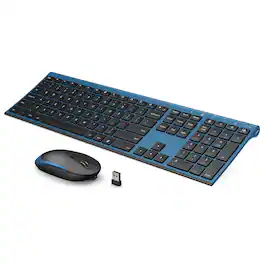
Upgrade your workspace with this ultra‑slim, rechargeable wireless keyboard and mouse combo. Both connect via a single 2.4GHz Nano receiver (stored in the mouse) for a stable, delay‑free connection up to 33 feet. The keyboard measures just 5.5mm thin with a scissor‑switch design – quiet, comfortable typing with a full number pad and hotkeys. The mouse features a contoured shape and 3 adjustable DPI levels (1000/1600/2400) for smooth tracking on any surface. Built‑in rechargeable batteries last over a month on a full charge, with auto‑sleep to save power. Works with Windows PCs, laptops, notebooks. Receiver pairing instructions included. Plug and play – no drivers needed.
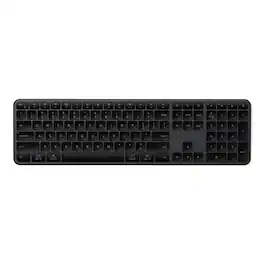
The Satechi Slim EX3 Wireless Keyboard is a full-size professional keyboard built for fluid, cross-platform productivity. Featuring a dedicated numeric keypad, navigation cluster, and quiet low-profile scissor keys, the EX3 delivers clarity, comfort, and complete control. Connect up to 4 devices simultaneously via 3 Bluetooth 5.3 channels plus a 2.4GHz USB dongle for instant switching between Mac, Windows, and Android. The physical OS key remap switch ensures shortcuts feel native on any platform. Powered by a USB-C rechargeable 450mAh battery lasting up to 5 weeks per charge, the EX3 combines a sleek aluminum finish with sustainable design featuring a removable battery that meets EU 2027 replaceability standards. Compatible with: MacBook Pro 14/16-inch (2026 M5/M4/M3/M2/M1), MacBook Air 13/15-inch (2026 M5/M4/M3/M2/M1), MacBook Neo 13-inch (2026), iPad Pro 11/13-inch (2025 M5/M4/M3/M2/M1), iPad Air 11/13-inch (2026 M4/M3/M2/M1), iPad Mini (A17 Pro/6), iPad (A16/10th Gen), iPad Pro 12.9-inch (6th/5th/4th/3rd/2nd/1st gen), Mac Mini (2026 M6, M5 Pro, M4 Pro, M4), iMac (2024 M4/M3/M1), Mac Studio (2026 M5 Max/Ultra, M4 Max, M3 Ultra M2, M1), Thinkpad Series, Surface Series, Windows laptop (Dell, HP), iPhone Duo, iPhone 18 Pro, iPhone 18 Pro Max, iPhone 17, iPhone Air, iPhone 17 Pro, iPhone 17 Pro Max, iPhone 16/15/14/13/12 series, Galaxy S26/S25/S24/Z Fold/Z Flip series, Pixel 10/9/8/7 series.
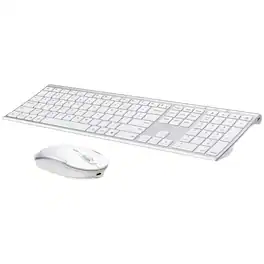
Upgrade your workspace with this ultra‑slim, rechargeable wireless keyboard and mouse combo. Both connect via a single 2.4GHz Nano receiver (stored in the mouse) for a stable, delay‑free connection up to 33 feet. The keyboard measures just 5.5mm thin with a scissor‑switch design – quiet, comfortable typing with a full number pad and hotkeys. The mouse features a contoured shape and 3 adjustable DPI levels (1000/1600/2400) for smooth tracking on any surface. Built‑in rechargeable batteries last over a month on a full charge, with auto‑sleep to save power. Works with Windows PCs, laptops, notebooks. Receiver pairing instructions included. Plug and play – no drivers needed.
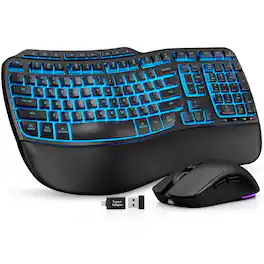
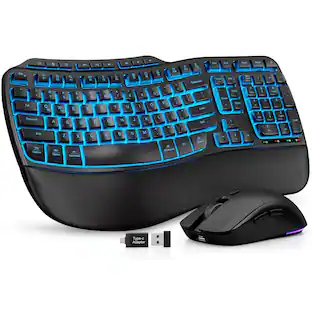
Upgrade your desktop with this premium wireless keyboard and mouse combo. The keyboard features a silky faux lambskin leather palm rest, wave keys for natural typing, and adjustable front/back stands to support healthy wrist posture whether you sit or stand. With a massive 4000mAh battery, it lasts weeks on a single charge – twice the capacity of standard backlit keyboards. Backlighting offers 8 colors (blue, cyan, white, red, green, purple, yellow, etc.) to match your mood. The RGB mouse packs a 700mAh battery, 3 DPI levels (800/1200/1600), and 6 buttons with selectable fixed colors or cycle modes. Both connect via a single 2.4GHz USB receiver (33ft range) – plug and play with nearly any PC, laptop, tablet, or Mac. Built for 10 million keystrokes (double the industry average).
Specs
Be the first to ask a question.
We’ll try to get your question answered within 24 hours by a Best Buy customer or brand representative.
Customers often buy these together
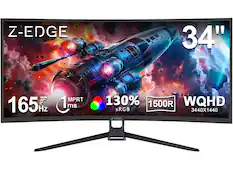
Z Z-Edge - UG34 34" UWQHD 3440 x 1440 Ultra Wide 21:9 165Hz 1ms 2K Curved Gaming Monitor - Black
$209.99The price was $249.99


![logi keyboard:
1. F1
2. F2
3. F3
4. F4
5. F5
6. F6
7. F7
8. F8
9. F9
10. F10
11. F11
12. F12
13. !
14. @
15. #
16. $
17. %
18. ^
19. &
20. *
21. (
22. )
23. -
24. =
25. delete
26. tab
27. Q
28. W
29. E
30. R
31. T
32. Y
33. U
34. I
35. O
36. P
37. {
38. [
39. ]
40. caps lock
41. A
42. S
43. D
44. F
45. G
46. H
47. J
48. K
49. L
50. ;
51. "
52. J
53. return
54. shift
55. Z
56. X
57. C
58. V
59. B
60. N
61. M
62. <
63. >
64. ?
65. /
66. shift fn
67. control
68. option
69. H
70. cmd
71. L
72. option](https://pisces.bbystatic.com/image2/BestBuy_US/images/products/6478/6478158_sd.jpg;maxHeight=232;maxWidth=233?format=webp)
![logi esc 1 F1 ! ~ 1 tab caps lock shift 2 F2 2 A Do 3 F3 # 3 W S Z F4 $ 4 E D X F5 % 5 R F C 2) F6 A 6 T G V F7 & 7 Y H B F8 * 8 U J N F9 ( 9 I K M x HI F11 F10 ) - - 0 O P : L : > < - F alt cmd gr F12 + = { [ " I ? I ctrl opt } ] delete / / return shift A Y fn control option cmd](https://pisces.bbystatic.com/image2/BestBuy_US/images/products/6587/6587870_sd.jpg;maxHeight=232;maxWidth=233?format=webp)
![The text on the image reads:
"esc FI In - ! 1 tab caps lock shift F2 2 Q A F3 # 3 W S Z F4 $ 4 E D X P F5 % 5 R F C F6 A 6 T G V logi ins F12 FM F0 HI F9 FB F7 + ( ) - = * - & 0 8 9 7 { ] P [ ] I O Y U : I K L ; H J ? > < / M 2 B ctrl alt cmd3 opt page page end down home up del 1 * I back clear 8 9 7 I pg up home / + 5 6 4 enter 2 3 1 dn Pg shift end 0 del ins enter ctrl fn start opt alt cmd3t"
The text is a list of keyboard shortcuts for various functions, such as esc, tab, caps lock, shift, and more. The shortcuts are organized in a way that makes it easy for users to remember and use them while typing.](https://pisces.bbystatic.com/image2/BestBuy_US/images/products/01258616-55c7-44c0-8173-e2f6983190ee.jpg;maxHeight=232;maxWidth=233?format=webp)
More to consider
 $94.28The price was $99.99
 $56.58The price was $59.99


Explore tech essentials Sponsored


Keep exploring
 $37.99The price was $40.00
 $129.95The price was $159.95