60th Anniversary SaleEnds Sunday. Exclusions, terms and conditions apply.Shop now

Main Content

Razer - Naga V3 Pro Modular MMO Optical Gaming Mouse with Swappable Side Plates - Wireless - Black

Model: RZ01-05660100-R3U1
SKU: 6677245
Sold byBest Buy

About this product

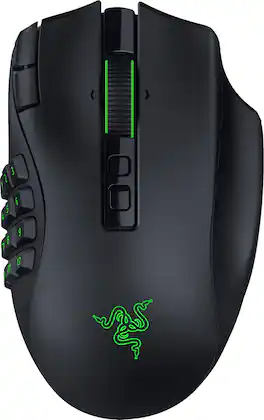
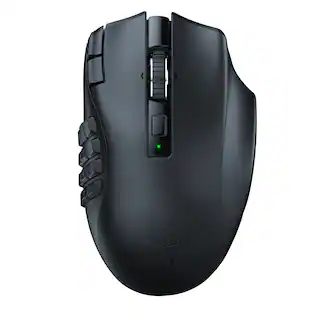
Stay one step ahead—no matter how the game changes. The Razer Naga V3 Pro is a modular wireless gaming mouse built to adapt across genres, upgraded to be more customizable, faster, and more precise than ever for MMO, battle royale, FPS, and more. Swap between 12-, 6-, or 2-button magnetic side plates and command up to 23 programmable buttons, including 2 quick-access edge buttons for on-the-fly DPI changes plus a lockable ring finger button for extra control. Take charge of scrolling with the configurable Razer HyperScroll tilt wheel (4-way) with 3 modes: Tactile Cycling, Free-Spinning, or Smart-Reel that auto-switches based on scroll speed (all adjustable in Synapse). Enjoy crisp, rapid clicks from Razer Optical Mouse Switches Gen-4, rated for 100M+ clicks with improved feel and 12% lighter actuation. Aim with next-level accuracy using the Razer Focus Pro 50K Optical Sensor Gen-3 (50K DPI, 930 IPS, 90 G) powered by Frame Sync for reduced latency. Go cable-free with Razer HyperSpeed Wireless for high-performance, ultra-low-latency play even in noisy tournament environments. Power through up to 155 hours on HyperSpeed or 280 hours on Bluetooth, recharge via USB-C, and unlock wireless charging with HyperFlux V2 or Mouse Dock Pro (sold separately). Get smarter control with AI Prompt Master and advanced macros to surface tailored strategies fast and execute chained actions instantly.

Features
  • Adapt to Any Game Genre

    Customize your setup with 3 swappable magnetic side plates featuring 12-, 6-, or 2-button layouts, plus 2 quick-access edge buttons and a lockable ring finger button for MMO, MOBA, FPS, and battle royale gaming.

  • Command More With Fewer Movements

    Access up to 23 programmable inputs and create advanced macros with Razer Synapse, giving MMO raiders, competitive players, and multitaskers faster execution and streamlined control.

  • Take Control of Every Scroll

    Razer HyperScroll Tilt Wheel Gen‑2 delivers dual tactile modes, free-spin scrolling, and Smart-Reel auto switching, ideal for inventory management, spreadsheet navigation, content creation, and gaming.

  • Play With Next-Level Precision

    Razer Focus Pro 50K Optical Sensor Gen‑3 delivers up to 50,000 DPI, 930 IPS, and 90G acceleration with Frame Sync technology for accurate tracking in FPS, battle royale, and competitive esports titles.

  • Click Faster and Longer

    Razer Optical Mouse Switches Gen‑4 offer crisp tactile feedback, 12% lighter actuation, and over 100 million click durability for responsive gameplay during intense gaming sessions.

  • Versatile Connectivity for Gaming and Everyday Use

    Choose Razer HyperSpeed Wireless for low-latency gameplay, Bluetooth for longer battery life, or USB-C wired mode for charging and connected play.

  • Game for Days on a Single Charge

    Enjoy up to 155 hours on HyperSpeed Wireless or up to 280 hours on Bluetooth, with USB‑C charging and compatibility with Razer HyperFlux V2 and Mouse Dock Pro wireless charging systems sold separately.

See all features
Specifications
  • Lighting Type
    RGB
    Maximum Sensitivity
    50000 dots per inch
    Connection Type
    Wireless, Wired
Sponsored

Reviews

Rating 4.5 out of 5 stars with 6 reviews

5 star rating. 3 reviews4 star rating. 3 reviews
100% would recommend to a friend

Customer Images

The vast majority of our reviews come from verified purchases. Reviews from customers may include My Best Buy members, employees, and Tech Insider Network members (as tagged). Select reviewers may receive discounted products, promotional considerations or entries into drawings for honest, helpful reviews.

  • Rated 4 out of 5 stars

    Built like a tank but competent in pockets

    I play a smattering of games but primarily focused around World of Warcraft and Fallout 76. I used Razer's Viper V3 till I switched to their DeathAdder V3 which is my current favorite mouse, but the idea of being able to program a large array of macro key commands to various keys intrigued me enough to give this a try. The basic question is, are the loss of lighter weight and smaller, quicker formfactor worth the trade off for more functionality and up to 23 programmable keys to automate tasks in games and elsewhere? The short answer is no but the Naga V3 Pro still shines in its own right. We all know Razer has a classic boxing look and design language and the Naga V3 Pro did not disappoint in boxing presentation. Inside the box is your mouse, two additional snap on inner button arrays, cable, dongle receiver base and wireless dongle. Unlike the Viper and DeathAdder, Razer has moved to the same remote receiver that connects to their generously length USB-C to USB-A cable but the actual wireless dongle itself is a standard, small USB-A dongle you find with many other gaming mice and it plugs into the remote receiver. I love this idea because if you want to travel with your mouse and use a laptop, you can just plug the actual small USB-A wireless dongle receiver directly into the laptop instead of needing a length of cable and the receiver dock. The mouse itself looks and feels very well built and sturdy and oozes premium build. Sitting next to my DeathAdder V3 Pro, it looks like a tank. Aesthetically I love the look of it and the return of a touch of Razer RGB adds a bit of elegance to the mouse. Ergonomically, you will immediately feel the extra weight and the added width of the mouse. I have large, wide hands so even in normal gaming usage, I can continue to treat it like my DeathAdder V3 Pro. It really made no difference in my hands but my wife and daughter immediately did not like the weight or especially the width. What I do love though are the added tactile grips on either side of the mouse in every configuration except the 12 button side array. It makes palming, moving and lifting/placing the mouse so much better even though overall build type does not length to quick lifting and placing. I sincerely hope Razer offers something like this in the future as an option with their other gaming mice by default. You will need to use Razer Synapse software to get anything done with the Naga V3 but Synapse web browser support is going to be or is an option. The Naga V3 Pro also retains its programming so if you don't want to keep the software on your primary system, or if you want to use a secondary system for setup, that is an option. Again, a wonderful approach for consumers from Razer. We need more of this. From the three side button options, I decided to use it in a classic fashion first with a standard two button setup and approach my gaming like I would my DeathAdder because if it can't even pass the test as a basic gaming mouse, the added functionality is useless. It was a mixed bag. I loved the grips and overall feel of the mouse but the weight is a deal breaker for very fast paced games when you're used to using a feather light mouse in a better palm/claw style but this is the sacrifice that is made. The extra weight adds resistance to moving the mouse not only by its weight but extra drag it creates between the mouse and mouse pad. Instead of declaring the Naga V3 Pro a lost cause, I decided I wanted to use it in a hybrid fashion and went about setting up many tedious and repetitive tasks I do in WoW (fishing, enchanting, mining, blacksmithing, mining, etc...) and in Fallout 76 (item destruction for parts, vendoring parts to Sunny and some crafting). I actually kept both my DeathAdder and Naga plugged in and did my normal fast pace gaming with the DeathAdder and when it game to repetitive tasks / multikey tasks, I switched to the Naga and it worked perfectly and made having to hit multiple keys for many tasks over and over again so much easier and quicker. I also tried some healer macros (priest / paladin) in raids and again, yes, this worked out well so I'm left with making situational choices going forward in game and keeping both connected lets me switch off between the two quickly depending on what task(s) I have at hand. When all was said and done, I settled on the 6 button with tactile grips on the side as my go to choice for gaming. I plug my mouse devices in every other day by habit and the Naga V3 Pro had no problems being ready to go at all times. Overall, is there a place for the Naga V3 Pro in my setup? Absolutely. It IS competent as a gaming mouse with compromises in regards to its dimensions and weight, but the programmable button functionality is bonkers good and given more time, I can see even automating some coding and desktop macros with it. It is extremely well built, visually pleasing and as mentioned before has a few enhanced features I would love to see Razer port to their Viper and DeathAdder line of mice (removable, small dongle receiver and tactile grips). The ability to just take the USB-A receiver with me for travel means it will also be a better option than the DeathAdder to lessen clutter and I can just keep the receiver plugged in at all times on my laptop or SFF.

    Posted by Electrosoft

  • Rated 5 out of 5 stars

    Why the Razer Naga V3 Pro Became My Daily Driver

    As someone who spends a good portion of my day at a computer for both work and gaming, I'm always looking for peripherals that can pull double duty. I've used plenty of gaming mice over the years, but after spending a couple of weeks with the Razer Naga V3 Pro, it's become one of those devices that quietly works its way into your daily routine until you can't imagine going back. Unboxing & First Impressions: The unboxing experience felt premium without being flashy. Everything was neatly organized, and the mouse, side plates, cable, and wireless receiver were easy to access. The first thing I noticed when I picked it up was how solid it felt. There was no rattling, no loose buttons, and nothing about it felt cheap. The side grips have a nice texture that helps keep your hand planted, especially during longer gaming sessions. I'll admit I spent some time swapping the side panels before I even plugged the mouse in. Being able to customize the button layout is one of the main reasons I wanted to try the Naga V3 Pro, and it immediately made the mouse feel more versatile than a traditional mouse. Getting Started: Setup was quick. After installing Razer Synapse and updating the mouse, I created separate profiles for work and gaming. At first, I probably overcomplicated things by assigning buttons to everything imaginable. Within a few days, I learned which shortcuts I actually used most often and adjusted accordingly. That's something I appreciated throughout testing. The mouse lets you build a setup that works for you instead of forcing you into someone else's idea of the perfect layout. Real-World Gaming Experience: Most of my gaming time is spent in MMOs and RPGs, so the side buttons were the feature I was most excited about. After about a week, muscle memory took over. Instead of looking for abilities on my keyboard, I could quickly access skills, interrupts, cooldowns, and consumables directly from the mouse. During longer raid sessions, I found myself focusing more on gameplay and less on remembering key binds. Outside of MMOs, I was surprised by how much I liked it in other games. I expected to use only a few side buttons, but I ended up assigning inventory shortcuts, map controls, push-to-talk, and other commands that made gameplay smoother. Surprisingly Great for Productivity: While I expected to enjoy the Naga V3 Pro for gaming, I didn't expect it to become part of my workday. I programmed shortcuts for browser navigation, muting meetings, switching applications, and other common tasks. It doesn't sound like much on paper, but those small conveniences add up over the course of a day. In fact, after using the mouse for a couple of weeks, I spent an afternoon working directly from my laptop and caught myself reaching for buttons that weren't there. That's usually a sign that a peripheral has become part of your routine. Comfort During Long Sessions: Thankfully, the Naga V3 Pro felt comfortable from day one. The shape supports my hand well, and the thumb placement feels natural even when using the side buttons frequently. One weekend turned into an unexpectedly long gaming session with friends. Several hours later, the mouse was still comfortable to use, and I wasn't looking for reasons to take a break because of hand fatigue. For anyone who spends extended periods at their desk, that's a big plus. Wireless Performance & Battery Life: After the first day, I honestly stopped thinking about the fact that it was wireless. There were no disconnects, no lag, and no moments where I questioned whether the mouse was keeping up. Battery life was also strong enough that charging rarely crossed my mind. I simply used the mouse, and it was ready whenever I sat down to game or work. Pros: 1. Excellent button customization for MMO players 2. Interchangeable side panels add flexibility 3. Comfortable during extended use 4. Reliable wireless performance 5. Strong battery life 6. Great for both gaming and productivity 7. Easy to create custom profiles 8. Buttons and scroll wheel feel solid and consistent Cons: 1. It definitely can be more expensive than other wireless mice 2. Learning curve for first-time MMO mouse users 3. Synapse can feel overwhelming if you prefer simple setups 4. Larger design may not be ideal for every hand size Final Verdict: After using the Razer Naga V3 Pro every day, it has become one of those peripherals I don't really think about anymore, and that's a good thing. It just works. The extra buttons have made gaming more comfortable, the shortcuts have been useful during work, and the wireless connection has been completely reliable. Would I recommend it? Absolutely. If you play MMOs, use a lot of shortcuts, or simply spend long hours at your PC, the Razer Naga V3 Pro is one of those upgrades that quietly makes everyday gaming and productivity easier.

    Posted by Jaguarone

  • Rated 5 out of 5 stars

    Superior battery and comfort, works for everything

    I’ve always struggled to find a good gaming mouse that isn’t either too basic or too complex. They usually either only have 2-4 buttons or 20+ both of which are not what I prefer for everyday use. The Razer Naga V3 Pro strikes that balance largely due to its very unique modular design. I have 3 options to equip it with which are all comfortable and easy to setup, ranging from a 12 button MMO style, a 6-button shooter, or a simple 2 button layout all of which attach and detach quickly magnetically to the left side. It is fully customizable via the Razer Synapse app for button layouts, gaming presets, and scroll wheel sensitivity. The mouse can sync via the included HyperSpeed wireless dongle, Bluetooth, or be plugged in for a wired connection. It is super lightweight to the point where it is a bit surprising it has such an impressive battery life, particularly with the RGB lighting, and quick response time. It feels just right in my hand, long term comfort is no issue for me. The buttons all feel responsive and quiet which a short quick action that is also very tactile. Having so many options for gaming that also allow ease of use for the day-to-day is fantastic and makes it so I no longer have to swap between the gaming mouse and the “regular” one for tasks. It is super comfortable and easy to use, and I may even consider the optional charging stand in the future to make it that much easier. If you are a gamer that prefers many options this is a great one to consider and I recommend it.

    Posted by Josh

  • Rated 5 out of 5 stars

    Welcome updates to an already excellent mouse.

    This revision to the Razer Naga is terrific. As I've been using a first gen Naga Pro Wireless for several years now as I play a variety of games and getting old, having more things right at my fingertips makes things so much easier. The feel of the mouse is great, it's similar to the Gen 1/2 versions. It does take a little getting used to because of the addition of the dedicated Hypershift button on the right side. I find myself clicking on it quite frequently when I'm just resting my hand on the mouse. You can however using a slider on the bottom, lock this so as to prevent unwanted clicks or if you just don't have need of it for the game you are playing. The humorous saying "more bigger, more better" rings true in a way here. We've got a few more buttons this time around that can be configured. On the previous versions you only had the 2 buttons below the mouse wheel, left/right buttons and then the swappable plates to give you 2-12 additional buttons. We've now got two additional buttons in the top left corner of the Left button that controls the DPI. These can of course be configured as you'd like. So now we've got 17 configurable buttons. Add the Hypershift and you've got up to 34. My fingers are just a little short though so reaching the dpi buttons does require adjusting my grip but that's more an inconvenience. I very much love that they included a hyper-scroll feature to the mouse with the wheel. There's settings in Synapse where you can customize the behavior. Pressing one key to lock/unlock the wheel and be able to infinitely scroll is such a small but awesome addition that I'm sure many will welcome. The Teflon skates on the bottom are also a welcome upgrade. Though it could be age of my Gen 1, I've got several other mice and they don't glide near as nice as the Gen 3 on my glass mouse pad. It's just so effortless. The switches on the mouse are also an immense upgrade, albeit a very audible one. These things click louder that nearly every mechanical keyboard I've owned. They have a very tactile feel to them which is also quite a welcome change over previous versions. The side buttons on the 12 button plate do feel a bit more pronounced to the touch and they don't seem to be as tightly grouped as there looks to be slightly more spacing. One thing that had always frustrated me was that the V1 used custom Micro-USB charger. The V2 started using USB-C which Razer carried over to the V3 so this is seriously welcome change because now if something happens to my cable, I can replace it easily. Overall, there's a bunch of positive changes here and I struggle to find a negative with the mouse itself.

    Posted by Saitzev

  • Rated 4 out of 5 stars

    One Mouse to rule them all

    This is a mouse built for people who have run out of keyboard. Start with the hand. It’s what you notice first and what you're stuck with longest. It's comfortable. Not comfortable-for-a-gaming-mouse, where you're told to accept a weird shape because of what it does. It’s comfortable as an office mouse. It’s comfortable as a travel mouse. It just has a lot of buttons. Then there are the buttons. Many, many, many buttons. If you've come here from a normal two-button-and-a-wheel mouse, the sheer count is the thing you'll have to make peace with. Depending on your usage, the buttons will thrill you or intimidate. Most of the buttons are under your right thumb but a few can be selected with other fingers. Fortunately you don't have to worry about them all the time as you can swap the button plate for more simplified versions You can have up to twelve buttons but you don't have to live with all of them at once The side plates swap out magnetically: the 12-button grid for MMO work, a 6-button plate when you want fewer things under your thumb, and a 2-button plate that turns it back into an ordinary mouse for shooters or for a workday where you're not gaming at all. The plate pops off and back on in seconds, no tools, no fuss. It's extremely customizable with tremendous macro support.This is another area which may be intimidating if you're not a programmer. You can record a macro or key it in directly. You can edit it afterwards. It'll use keystrokes and mouse clicks combined with several launcher options Macros executed as fast as you want with an option to continually repeat a set of keystrokes. When set up correctly this is your opportunity to intimidate your opponents It glows. It's a gaming mouse. It has to. It's not as pretty as some but at least you won't be embarrassed when you show up at a gaming party. When you do travel, you can hide the wireless dongle inside the mouse to keep it from getting lost in your backpack. You can also run it wired or Bluetooth. When wired it will charge the mouse with a standard USB-C port. When connected with the proprietary dongle or a wire, the mouse has amazing resolution and responsiveness. It's a little slower over Bluetooth so I'd only recommend that for work applications Bottom Line: A comfortable, seriously customizable mouse with deep macro support that fires without hesitation with connection options. The swappable plates are what set it apart: twelve buttons when your game wants twelve, two when it doesn't, and a swap quick enough that you'll actually do it. If your library runs from MMOs to shooters to work, you want this mouse.

    Posted by Dan0Sterling

From the Manufacturer

Compare similar products

Razer - Naga V3 Pro Modular MMO Optical Gaming Mouse with Swappable Side Plates - Wireless - Black
4.5(6)

Stay one step ahead—no matter how the game changes. The Razer Naga V3 Pro is a modular wireless gaming mouse built to adapt across genres, upgraded to be more customizable, faster, and more precise than ever for MMO, battle royale, FPS, and more. Swap between 12-, 6-, or 2-button magnetic side plates and command up to 23 programmable buttons, including 2 quick-access edge buttons for on-the-fly DPI changes plus a lockable ring finger button for extra control. Take charge of scrolling with the configurable Razer HyperScroll tilt wheel (4-way) with 3 modes: Tactile Cycling, Free-Spinning, or Smart-Reel that auto-switches based on scroll speed (all adjustable in Synapse). Enjoy crisp, rapid clicks from Razer Optical Mouse Switches Gen-4, rated for 100M+ clicks with improved feel and 12% lighter actuation. Aim with next-level accuracy using the Razer Focus Pro 50K Optical Sensor Gen-3 (50K DPI, 930 IPS, 90 G) powered by Frame Sync for reduced latency. Go cable-free with Razer HyperSpeed Wireless for high-performance, ultra-low-latency play even in noisy tournament environments. Power through up to 155 hours on HyperSpeed or 280 hours on Bluetooth, recharge via USB-C, and unlock wireless charging with HyperFlux V2 or Mouse Dock Pro (sold separately). Get smarter control with AI Prompt Master and advanced macros to surface tailored strategies fast and execute chained actions instantly.
Razer - Pro Click V2 Optical Gaming Mouse with Vertical 6-Button Ergonomic Design - Wireless - Black
4.0(1)

Raise your comfort and performance with our first wireless vertical ergonomic mouse. Go all day for work and play without strain or fatigue, and be at your most productive with AI tool shortcuts, 5-way multi-device connectivity, and more.

Razer - Naga V2 HyperSpeed MMO Optical Gaming Mouse with 19 Programmable Buttons - Wireless - Black

Rise to the top of your guild with the Razer Naga V2 HyperSpeed—a best-in-slot wireless ergonomic MMO mouse. Optimize skill rotations with an arsenal of 19 buttons and a dual mode scroll wheel. Power through raid progression with HyperSpeed Wireless, backed by up to 250 hours of battery life.
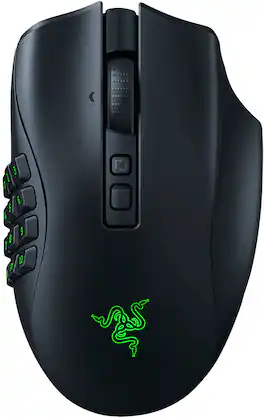
Razer - Naga V2 Pro MMO Optical Gaming Mouse with Interchangeable Side Plates in 2, 6, 12 Button Configurations - Wireless - Black

Designed to dominate in MMO, battle royale, FPS, and more, the multi-genre master returns stronger than ever. With 3 swappable side plates, 19+1 programmable buttons, a Razer HyperScroll Pro Wheel, and Razer HyperSpeed Wireless, the Razer Naga V2 Pro packs the power to rise above every genre.

Pros for Razer - Naga V3 Pro Modular MMO Optical Gaming Mouse with Swappable Side Plates - Wireless - Black
There were no pros for this productThere were no pros for this productOverall Performance, Battery Life, Wireless, Button Layout, ErgonomicsBattery Life, Overall Performance, Wireless, Button Configuration, Comfort
Cons for Razer - Naga V3 Pro Modular MMO Optical Gaming Mouse with Swappable Side Plates - Wireless - Black
There were no cons for this productThere were no cons for this productSizeSize, Weight, Price, Software

Specs

Questions & Answers
  • Are the side swap plates from the Naga Trinity Wired mouse compatible with this one? Would love to go wireless but I really love the circular layout on the swappable plate of the Trinity.

No content

Customers often buy these together

Sponsored
Razer Naga V3 Pro Modular MMO Optical Gaming Mouse with Swappable Side Plates Wireless Black RZ01-05660100-R3U1 - Best Buy

Finance Options

My Best Buy® Credit Card
Choose a benefit:Or
Buy Now, Pay Later

Finance Options

My Best Buy® Credit Card
Choose a benefit:Or
Buy Now, Pay Later

Special Offers

Included with Purchase

Special Offers

Included with Purchase