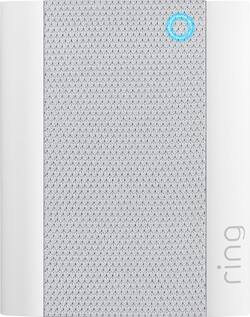
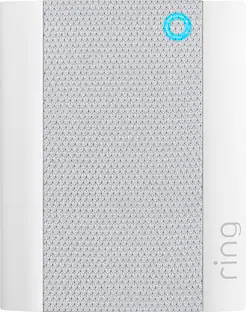
Ring - Chime - White
- General
- Brand: Ring
- Model Number: 8AC1SZ-0EN0
- Product Name: Chime
- Color: White
- Power
- Power Source: Hard wired
- Compatibility
- Works With: Ring, Amazon Alexa (Compatible with or able to be connected to other smart devices or applications.)
- Voice Assistant Built-in: Not Applicable (A digital assistant built into the device that uses voice commands to answer questions and control smart devices.)
- Connectivity
- Wireless: true
- Chime: Included
- Dimensions
- Product Height: 3.06 inches (The out of box height of the item. Height is measured as the vertical distance from the bottom of the item to the top as it would be primarily used or placed.)
- Product Width: 2.44 inches (The out of box width of the item. Width is measured as the horizontal distance from one side of the item to the other as it would be primarily used or placed.)
- Product Depth: 0.98 inches (The out of box depth of the item. Depth is measured as the distance from the front of the item to the back as it would be primarily used or placed.)
- Product Weight: 0.34 pounds (The out of box weight of the item.)
- Warranty
- Warranty - Parts: 1 year
- Warranty - Labor: 1 year
- Other
- UPC: 842861110340
Chime lets you hear notifications anywhere in your home when someone pushes your doorbell or motion is detected. Plug it into standard wall outlets and connect Ring Chime to Ring doorbells and cameras in minutes. Customize the sound you hear with classic and seasonal tones or designate a quiet time by snoozing your alerts. Add Chimes throughout your home and never miss a visitor or alert. Plus, the sleek design blends right into any room.
Whats Included
- Ring Chime
A: You need a “chime”
A: You will need pro version regular chime doesn’t extend WiFi
A: Yes, it absolutely can work in conjunction with your current Ring doorbell that is physically wired to a chime. That is how mine is set up with two extra chimes upstairs and downstairs.
Q: Can i have 2 ring chimes for the same ring door bell
A: Hello MJ, Great question! Yes, you may sync multiple Ring Chime devices to one Ring Doorbell for amplified alerts throughout your home. Here is a helpful article, with step-by-step instructions, for properly linking the devices together within the Ring app: https://support.ring.com/hc/en-us/articles/360034840052-How-to-Link-your-Ring-Devices-to-a-Chime-or-Chime-Pro. We invite you to reach out at https://community.ring.com/ if any additional information is needed regarding the Ring Chime. Ring Community is our first peer-to-peer community forum, giving our customers the ability to help one another and share their feedback/experiences with Ring. Thank you, Alexis with Ring
Q: Can the chime be connected to 2 phones?
A: Hi Chocolate. Yes, you can install the Ring app on multiple smartphones. The Ring app is compatible with iOS devices running 12 or newer, and Android devices running 6.0 or newer. When logged into the Ring app as the owner, you can manage all your Ring devices, including the Ring Chime. The Ring Chime allows you to hear notifications anywhere in your home when someone presses your doorbell or motion is detected. The Ring Chime plugs into standard wall outlets and connects to all your Ring Doorbells and Cameras. For any additional questions, please feel free to reach out on our community forum at https://community.ring.com/. Ring Community launched in March 2019 to help deliver the most current news and educational information to our customers. This peer-to-peer forum allows our neighbors to share their feedback and experiences to assist each other in resolving their concerns. All the Best, Danielle with Ring
A: Hi Sue, This is a great question, as the Chime does not automatically connect itself to the Ring devices upon setup. This can be done within the Ring App by following these simple directions: 1. Open your Ring App and tap on the three lines at the top left. 2. Select Devices, then tap on your Peephole Cam. 3. From the tile menu, select the Linked Chimes option. You will be given two options "Doorbell Ring" and Motion Detection. By tapping on one of these options you are choosing how the chime will react when that specific event is triggered. You can find more information regarding the Ring Chime on our Help Center at Ring.com: https://support.ring.com/hc/en-us/articles/204647994-Ring-Chime-Information I would love to ensure you feel confident in using the Ring App as a reliable tool for your home security. Please feel free to reach out to us anytime to get connected with a trained technician to assist with any additional questions or concerns. https://support.ring.com/hc/en-us/articles/213608406-Contact-Us Thank you, Caitlin with Ring
A: I have three Ring Chimes attached to my Ring Pro doorbell and have no issues.
Q: What accessories go with this
A: A battery
People also viewed
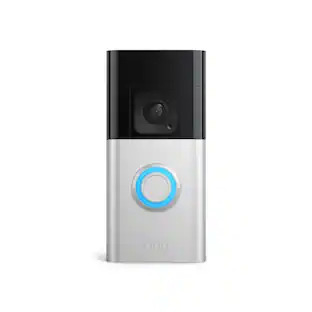 $79.99The price was $149.99
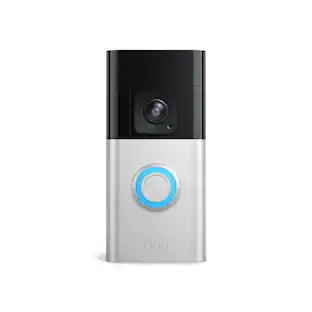 $149.99The price was $199.99


Today's top picks
 $949.00The price was $1,099.00
 $199.99The price was $249.99
 $279.99The price was $399.99
 $599.99The price was $749.99