
ROG Ally X 7" 120Hz FHD 1080p Gaming Handheld - AMD Ryzen Z1 Extreme Processor - 24GB with 2TB SSD - Windows
Storage Capacity
2000GBMore Buying Options
Specifications
- Surround Sound SupportedDolby AtmosMaximum Graphic Quality1080pStorage Capacity2000 gigabytesNumber of USB Port(s)2
- Key Specs
- Surround Sound Supported: Dolby Atmos (Surround sound systems use multiple audio channels and speakers to create an immersive sound experience for the listener. There are also various proprietary technologies that imitate this kind of sound via a device's built-in speakers or soundbar.)
- Maximum Graphic Quality: 1080p (Graphic resolution refers to the maximum number of pixels, both horizontally and vertically, used to display graphics of a video game. The higher the resolution, the higher the graphics quality.)
- Storage Capacity: 2000 gigabytes (Measured in megabytes (MB), gigabytes (GB) and terabytes (TB), this is the amount available for storing files, music, movies, photos and more. The total includes the capacity of the hard disk drive and solid state drive if both are included on the computer.)
- Number of USB Port(s): 2
- General
- Brand: ASUS
- Model Number: RC72LA-ALLYX.Z1X2TB
- Product Name: ROG Ally X 7" 120Hz FHD 1080p Gaming Handheld - AMD Ryzen Z1 Extreme Processor - 24GB with 2TB SSD
- Color: Black
- Compatible Platform(s): Windows
- Console Type: Handheld Video Game Consoles
- Features
- Surround Sound Supported: Dolby Atmos (Surround sound systems use multiple audio channels and speakers to create an immersive sound experience for the listener. There are also various proprietary technologies that imitate this kind of sound via a device's built-in speakers or soundbar.)
- Integrated Speaker(s): true
- Integrated Microphone: true
- Display
- Screen Size: 7 inches (Size of the screen, measured diagonally from corner to corner.)
- Display Type: LED
- Screen Type: IPS
- Touch Screen: true (Touch-screen devices make navigating more intuitive. Using a touch-screen display, you can do things such as tap to select, hold and drag to move items, swipe to scroll, and pinch to zoom.)
- Maximum Graphic Quality: 1080p (Graphic resolution refers to the maximum number of pixels, both horizontally and vertically, used to display graphics of a video game. The higher the resolution, the higher the graphics quality.)
- Maximum Video Resolution (Streaming): 1080p (Maximum resolution refers to the highest number of pixels that the device can display via streaming services. Higher resolution signals produce more detailed video.)
- Storage
- Storage Type: SSD
- Storage Capacity: 2000 gigabytes (Measured in megabytes (MB), gigabytes (GB) and terabytes (TB), this is the amount available for storing files, music, movies, photos and more. The total includes the capacity of the hard disk drive and solid state drive if both are included on the computer.)
- Memory Card Slot: true
- Memory Card Compatibility: microSD (The type of memory card(s) recommended for use with the product.)
- Dimensions
- Product Height: 1.08 inches (The out of box height of the item. Height is measured as the vertical distance from the bottom of the item to the top as it would be primarily used or placed.)
- Product Width: 4.37 inches (The out of box width of the item. Width is measured as the horizontal distance from one side of the item to the other as it would be primarily used or placed.)
- Product Length: 11.02 inches (The out of box length of the item. Length is measured as the longest dimension of the item.)
- Product Weight: 1.49 pounds (The out of box weight of the item.)
- Connectivity
- Wireless Connectivity: Wi-Fi, Bluetooth (The manner in which a device sends data to another device over a short distance without the use of wires or cables.)
- Smart Capable: true (Smart, or smart-capable devices are able to connect directly to your home network in order to stream content from the Internet, run Internet-based apps, or connect to other smart devices.)
- Number of USB Port(s): 2
- Gameplay
- Games Included: false
- Performance
- System Memory (RAM): 24 gigabytes (Random-access memory (RAM) is a computing device's short-term data storage, which allows active information to be accessed quickly. The size and type of RAM determines how efficiently the device can handle large amounts of information at one time. For example, gaming or video editing requires more RAM for optimal performance.)
- Type of Memory (RAM): LPDDR5X (Each type of RAM delivers a different level of speed, bandwidth, energy efficiency and performance.)
- Central Processing Unit: AMD Ryzen Z1 Extreme Processor
- Graphics Processing Unit (GPU): AMD Radeon RDNA 3 Architecture-based Graphics (4GB VRAM, 12 compute units) (Often referred to as a graphics card, a graphics processing unit (GPU) is the electronic circuitry responsible for manipulating and processing computer graphics/images and accelerating video decoding. Ultimately, a powerful GPU will provide a boost for anything involving visuals, including games, graphic design, and video editing.)
- Power
- Power Source: Battery-powered, Plug-in
- Rechargeable Battery: true
- Charging Interface(s): USB-C (The connection for transmitting power to charge the device.)
- Battery Chemistry: Lithium-ion
- Battery Life (up to): 8 hours (Battery life will vary depending on the product configuration, product model, applications loaded on the product, power management setting of the product and the product features used by the customer. As with all batteries, the maximum capacity of this battery will decrease with time and usage.)
- AC Adapter Included: true (An external power adapter is included for operation.)
- Warranty
- Warranty - Parts: 1 year
- Warranty - Labor: 1 year
- Other
- UPC: 197105765412
Play your way with the ROG Ally X, the ultimate Windows gaming handheld. Access all your games as the Ally X is fully compatible with Steam, GOG, Xbox Game Pass, Epic, and more. Powered by the AMD Ryzen Z1 Extreme processor and equipped with 24GB of LPDDR5X RAM and 2TB of storage, the Ally X can handle all your gaming demands. Its 80Wh battery and redesigned ergonomics ensure comfort during long gaming sessions. With ROG Intelligent Cooling, featuring a Zero Gravity thermal system and dual fan design, the Ally X stays cool and quiet in any orientation, letting you game your way. The Full HD 120Hz high refresh rate display with FreeSync Premium provides a crystal-clear view of the action, even in fast-paced games. Experience gaming like never before with the Ally X.
- Easier to play: More games. Better graphics. Higher performance. Wherever the limit is with gaming, you’re closer to it with Windows 11.
- Stunningly beautiful visuals: On the Ally X, games are crisp and clear thanks to its 7" Full HD touchscreen display equipped with a 120Hz refresh rate and AMD FreeSync Premium technology.
- Incredible power: Powered by AMD’s latest Ryzen Z1 Extreme processor on Zen 4 architecture (8-cores, 16 threads) with RDNA 3 graphics at up to 2.7GHz and 8.6TFLOPs, the Ally X makes playing any game on the palm of your hand possible.
- Seamless multitasking with 24GB of LPDDR5X RAM: Equipped with 24GB of 7500MHz LPDDR5X RAM, the Ally X can effortlessly swap through your applications and have multiple tabs running.
- Rapid loading times with 2TB PCIe 4.0 SSD: Store all your favorite games and keep loading times ultra-fast with 2TB PCIe 4.0 SSD. If you have a larger game library, the Ally X includes a dedicated UH-II microSD card slot to add storage to your machine.
- Access your favorite games anywhere: The ROG Ally X is fully compatible with Steam, Xbox Game Pass, Epic, GOG, and more thanks to Windows OS, ensuring that you can play your favorite games no matter where you go
- Always ready to go with a massive 80Wh battery: The massive 80Wh battery allows you to play all your favorite games even when away from a power outlet. Fast charge technology gives you the ability to charge from 0% to 50% in just 30 minutes.
- Game All Day Long with Upgraded Ergonomics: The ROX Ally X boasts a lightweight 1.49lbs chassis and redesigned ergonomics with taller substantial handgrips, refined macro keys, flat surface angles, and upgraded joysticks to make for a comfortable gaming experience.
- Stay cool with ROG Intelligent Cooling: Sustain peak performance with ROG Intelligent Cooling. The Ally X features a Zero Gravity Thermal System with anti-gravity heat pipes, brand new 0.15mm ultra-thin fans for increased airflow, redesigned fan shrouds, and dual heatsinks to keep your device cool and quiet in any orientation.
- Advanced user experience with Armoury Crate SE 1.5: With the latest version of Armoury Crate SE 1.5 pre-installed, the Ally X features a highly customizable game library, seamless software updates, and loads of performance tweaks. Armoury Crate SE is the ultimate tool to customize your Ally X.
- Seamless Play with Cloud: With cloud saves and online game libraries, you can seamlessly transition from your main gaming battlestation to the Ally X so that you can continue your play no matter where you are. Equipped with ultra-fast Wi-Fi 6E networking, the Ally X can stream videos, access cloud gaming servicse and dwonload games effortlessly even on crowded networks.
- Play the way you want: Game anywhere you go on handheld mode or hook it up to your TV with the convenient dual USB Type-C ports and connect multiple controllers to play with friends. With the Ally X, the choices are endless and you never have to settle for one option.
- Xbox Game Pass included: Play Minecraft Legends and hundreds of other PC games on ROG Ally X with 3 months of Game Pass. *Terms apply.
- Modern security: The Windows Hello fingerprint reader allows for secure logins, while Windows Defender provides constantly updated antivirus and malware protection. For younger users, parents can manage device and safety settings with parental controls.
- Immerse yourself with Smart Amp speaker, Dolby Atmos, and Two-Way AI Noise Cancellation: Dual front-firing Smart Amp speakers with Dolby Atmos pumps up the volume without distortion. Two-Way AI Noise Cancellation filters out any background noises from your voice chats so you can focus on your game.
- All the ports you need: Plug in all your favorite accessories and peripherals using the Ally X's versatile USB 4 and USB 3.2 Type-C ports. Both ports support Power Delivery 3.0 and DisplayPort 1.4.
Whats Included
- Handheld device
- Power adapter
- Warranty manual
- Stand in box lid
Disclaimers
- Offer only available in eligible markets for Game Pass. Eligible markets are determined at activation. Game catalog varies by region, device, and time. Please visit https://www.xbox.com/regions for availability.
- *Requires Internet connection to download.
- Requires internet connection to download.
Q: How much RAM does the ROG Ally X have?
A: The ROG Ally X is equipped with 24GB of LPDDR5X RAM.
Q: Can I connect the ROG Ally X to my TV?
A: Yes, you can connect the ROG Ally X to your TV using the dual USB Type-C ports.
Q: Which processor does the ROG Ally X use?
A: The ROG Ally X is powered by the AMD Ryzen Z1 Extreme processor.
Q: Does the ROG Ally X have a touch screen?
A: Yes, the ROG Ally X has a 7-inch Full HD touchscreen display.
Q: What is the battery life of the ROG Ally X?
A: The ROG Ally X has a battery life of up to 8 hours.
Q: Can I use it as a computer?
A: Yes, easier with a docking station and wirelesses keyboard/mouse/bigger screen.
A: Yes. You might need to change settings in your library app (steam, gog whatever). Epic is kind of annoying as it wants you to start online and then you can go off Everything else is fine
Q: would i be able download the steam app so i could play steam games on this gaming unit ?
A: Yes, you can download and use the Steam app on the ROG Ally X to play Steam games. Since the ROG Ally X runs on Windows 11, you can easily download the Steam installer from the official Steam website and install it just like you would on any other Windows PC.
Compare similar products
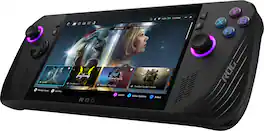
Play your way with the ROG Ally X, the ultimate Windows gaming handheld. Access all your games as the Ally X is fully compatible with Steam, GOG, Xbox Game Pass, Epic, and more. Powered by the AMD Ryzen Z1 Extreme processor and equipped with 24GB of LPDDR5X RAM and 2TB of storage, the Ally X can handle all your gaming demands. Its 80Wh battery and redesigned ergonomics ensure comfort during long gaming sessions. With ROG Intelligent Cooling, featuring a Zero Gravity thermal system and dual fan design, the Ally X stays cool and quiet in any orientation, letting you game your way. The Full HD 120Hz high refresh rate display with FreeSync Premium provides a crystal-clear view of the action, even in fast-paced games. Experience gaming like never before with the Ally X.

Claw 8 AI+ A2VM-001US, a revolutionary handheld gaming device that ushers in a new era of portable gaming. Powered by Intel Core Ultra processors and enhanced with Intel XeSS technology, it delivers smooth, high-performance gameplay, even with demanding AAA titles.
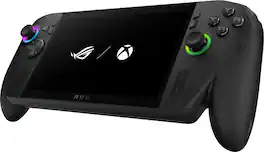
Introducing the ROG Xbox Ally X, a groundbreaking device that brings the freedom of Windows, craftsmanship of ROG, and the power of Xbox into the palm of your hands. Built in partnership with Xbox, the ROG Xbox Ally X delivers a seamless experience across Xbox Game Pass, Steam, Epic Games, and more — all in one versatile system. At its core is the AMD Ryzen AI Z2 Extreme processor, delivering next-gen performance with AI-powered efficiency and responsiveness. With 24GB of ultra-fast LPDDR5X 8000 MHz RAM and 1TB of SSD storage, the ROG Xbox Ally X is engineered to tackle AAA titles. Its 80Wh battery powers extended play sessions, while the redesigned ergonomics and Xbox-inspired grips keep you comfortable through every mission. Dive deeper into your games with precise impulse triggers and enhanced haptic feedback, and enjoy smooth, vibrant visuals on a 7” FHD 120Hz display with FreeSync Premium.

Launching October 16th, 2025. Meet the ROG Xbox Ally, a gaming handheld for everyone, combining the freedom of Windows, the craftsmanship of ROG, and the power of Xbox into the palm of your hands. The ROG Xbox Ally gives you a seamless experience across Xbox Game Pass, Steam, Epic Games, and more in one versatile system. It*s powered by the AMD Ryzen Z2 A processor, delivering smooth, responsive gameplay for both cloud and native titles. With 16GB of LPDDR5 memory and 512GB of SSD storage, the ROG Xbox Ally is engineered to tackle everything from indie gems to AAA titles. Its 60Wh battery power extends sessions, while the redesigned ergonomics and Xbox - inspired grips keep you comfortable all day. Enjoy crisp, fluid visuals on the 7" FHD 120Hz display with FreeSync Premium. Launch straight into the Xbox full-screen experience with just one press of a button. Xbox experience brought to life by ROG The Xbox gaming legacy meets ROG's decades of premium hardware design in the ROG Xbox Ally. Boot straight into the Xbox experience, just like a console. Xbox Game Bar integration Launch Game Bar with a tap of the Xbox button or play your favorite titles natively from platforms like Xbox Game Pass, Steam, Epic Games, or Windows games on the go. All your games, all your progress. Powered by Windows 11, the ROG Xbox Ally gives you access to your full library of PC games from Xbox and other game stores. With Xbox Play Anywhere, you can pick up right where you left off on your PC or Xbox and jump back into the game anytime. Power to play. Ready for the future. Powered by a world-class AMD Ryzen Z2 A processor, the ROG Xbox Ally brings versatility to your game. Featuring the advanced Zen 5 architecture and powerful RDNA 3.5 integrated graphics, ROG Xbox Ally gives you the performance to play your favorite PC games at exhilarating speeds with stunning visuals. Game-ready storage and fast memory Store your full library and multitask seamlessly with 512 GB SSD and 16 GB of LPDDR5 RAM. The ROG Xbox Ally makes playing any game in the palm of your hand possible. Smooth motion. Zero tearing. From fast-paced battles to chill exploration, the Xbox Ally features a 120Hz display with FreeSync Premium variable refresh rate to keep every frame smooth. With 500 nits of brightness and a Gorilla Glass touchscreen, you get a vivid, immersive viewing experience. Ready to go with fast charging The ROG Xbox Ally charges super-fast, just 30 minutes gets you back from 0% to 50%. Whether you*re gaming on the couch, at a coffee shop, or 30,000 feet in the air, it's fast-charging tech and a 60Wh battery keeps you extended in the game. All-day Comfort The ROG Xbox Ally features a redesigned chassis with contoured grips inspired by Xbox Wireless Controllers. With a well-balanced 1.47lbs weight distribution, you can play for hours without fatigue. Play the way you want Game anywhere in handheld mode or hook it up to your TV with the convenient dual USB Type-C ports. Connect multiple controllers to play with friends. You never have to settle with the ROG Xbox Ally.
| Pros for ROG Ally X 7" 120Hz FHD 1080p Gaming Handheld - AMD Ryzen Z1 Extreme Processor - 24GB with 2TB SSD - Windows | |||
|---|---|---|---|
| Overall Performance, Portability, Battery Life, Storage Capacity, Power | Screen Quality, Battery Life, Performance, Ergonomics, Noise Level | Overall Performance, Portability, Battery Life, Screen Quality, Comfort | There were no pros for this product— |
| Cons for ROG Ally X 7" 120Hz FHD 1080p Gaming Handheld - AMD Ryzen Z1 Extreme Processor - 24GB with 2TB SSD - Windows | |||
| Heat Dissipation, Setup Process | There were no cons for this product— | Storage Capacity, Weight, Software | There were no cons for this product— |
Specs
Reviews
This product doesn't have any reviews yet.