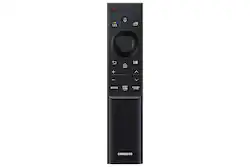
Samsung - SolarCell Remote - Black
- Key Specs
- Remote Control Type: Universal
- General
- Brand: Samsung
- Model Number: VG-TM2180ES/ZA
- Product Name: SolarCell Remote
- Color: Black
- Features
- Remote Control Type: Universal
- Display Type: None
- Body Material: Made From Recycled Materials
- Connectivity
- Wireless: true
- Compatibility
- Brand Compatibility: Samsung
- Compatible Product(s): Television
- Power
- Rechargeable: true
- Dimensions
- Product Weight: 0.15 ounces (The out of box weight of the item.)
- Warranty
- Warranty - Parts: 1 year
- Warranty - Labor: 1 year
- Other
- UPC: 887276728506
Place your remote wherever the light is. Leave the solar panel facing up and let the remote do its job and charge. Plus, the SolarCell Remote is here to make every option more sustainable, saving up to 200 million batteries from the landfill over the next seven years.
- Indoor/outdoor light charging: Place your SolarCell Remote wherever the light is. Leave the solar panel facing up and let the remote do its job and charge. The remote charges through both indoor and outdoor lighting instead of batteries.
- Made of recycled materials: Press play on a greener way with a sustainable remote made from recycled materials. It’s efficiently crafted from the past, so you can feel good about your footprint when you fast forward.
- USB chargeable: Hungry for power? The SolarCell Remote can also be charged with a USB C charging cable, even after sunset and when the lights are off at night just plug it in.
- Sleek and simple design: With a sleek design and a stylish color for the cover, the future has never looked better. The SolarCell Remote keeps it minimal and convenient, with a skin for easy grip control from across the room.
Q: How does the solar charging on this remote work?
A: Place the remote with the solar panel facing up in indoor or outdoor light to charge it.
Q: Why is this remote considered sustainable?
A: It's made with recycled materials and helps reduce battery waste, saving an estimated 200 million batteries from landfills over seven years.
Q: What material is the remote made of?
A: The remote is made of recycled materials.
Q: Does this remote have a display?
A: No, this remote does not have a display.
Q: Is this remote rechargeable?
A: Yes, the remote is rechargeable.
Q: Can this remote be charged with a USB cable?
A: Yes, the remote can be charged with a USB-C cable.
A: we purchased two power cords and neither charged the remote. solar panel would not fix it either and tv is only a year old. the remote is made very well.
Q: How long does it take to charge?
A: undefined
People also viewed

Today's top picks
 $279.99The price was $380.00