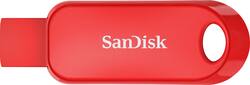
SANDISK - Cruzer 128GB USB 2.0 Flash Drive with Hardware Encryption - Red
- Key Specs
- Storage Capacity: 128 gigabytes (Measured in megabytes (MB), gigabytes (GB) and terabytes (TB), this is the amount available for storing files, music, movies, photos and more. The total includes the capacity of the hard disk drive and solid state drive if both are included on the computer.)
- Connector Type(s): USB-A (Type of interface connection found on the device.)
- USB Generation: USB 2.0 (The specification (generation) of the USB standard. Generations are backwards compatible with previous specifications (provided that those devices have the necessary adapter to accommodate the connection type).)
- General
- Brand: SANDISK
- Model Number: SDCZ62-128G-A4RD
- Product Name: Cruzer 128GB USB 2.0 Flash Drive with Hardware Encryption
- Color: Red
- Capacity
- Storage Capacity: 128 gigabytes (Measured in megabytes (MB), gigabytes (GB) and terabytes (TB), this is the amount available for storing files, music, movies, photos and more. The total includes the capacity of the hard disk drive and solid state drive if both are included on the computer.)
- Connectivity
- Connector Type(s): USB-A (Type of interface connection found on the device.)
- USB Generation: USB 2.0 (The specification (generation) of the USB standard. Generations are backwards compatible with previous specifications (provided that those devices have the necessary adapter to accommodate the connection type).)
- Features
- Retractable: true
- Dimensions
- Product Height: 0.4 inches (The out of box height of the item. Height is measured as the vertical distance from the bottom of the item to the top as it would be primarily used or placed.)
- Product Width: 0.8 inches (The out of box width of the item. Width is measured as the horizontal distance from one side of the item to the other as it would be primarily used or placed.)
- Product Depth: 2 inches (The out of box depth of the item. Depth is measured as the distance from the front of the item to the back as it would be primarily used or placed.)
- Product Weight: 0.22 ounces (The out of box weight of the item.)
- Compatibility
- Lanyard Attachment: true
- Warranty
- Warranty - Parts: 2 years
- Warranty - Labor: 2 years
- Other
- UPC: 619659175955
Transfer files across devices and backup data with this SanDisk Cruzer Snap USB flash drive. The retractable design hides the connector for protection against damage and dirt, while the 128GB capacity holds many videos, photos and other files. This SanDisk Cruzer Snap USB flash drive features SecureAccess software, providing 128-bit AES encryption for added security.
- 128GB storage capacity: Offers ample space for photos, videos and more.
- High-speed USB 2.0 interface: For a fast connection. Backward compatible with USB 1.1.
- High performance and fast sustained data transfer rates: Up to 480 Mbps (using USB 2.0) for quick and efficient file backup.
- Lightweight design: For easy portability.
- SanDisk SecureAccess software: Helps keep your files protected.
- Retractable design: Helps guard against damage.
- Hot swappable: Allows easy connection without having to reboot.
Whats Included
- SanDisk Cruzer 128GB USB 2.0 Flash Drive with Hardware Encryption
Product Manuals
Q: I know this sounds stupid, but: How do you open one of these to get the info?
A: I don't know what you have already tried. If you are using a PC, you should be able to find an icon that looks like a file folder. After you have put the flash drive in the usb slot on your PC, you should be able to click on the folder icon and then look for Drive E (usually), or maybe F. If you have Mac, someone else may have to help you, but I don't think the steps are much different. Another possibility is if you are looking for Microsoft Word document, for example, open Microsoft Word, click on File, then look for Drive E. If it does not show up immediately as an option, then you should see an option to look in other places. If you have done any of that and cannot retrieve your file, the file might be corrupted or your E or F drive needs some clean-up. Then you need more expert help than I can provide. I hope this doesn't insult because it was hard to tell what steps you may have already tried.
Q: How fast is this drive in MB/S for a 128gb model?
A: Please allow us to inform you that the SanDisk® Cruzer Snap 128GB USB Drive comes with transfer speed of upto 130MB/s.
Q: can I download a game to this flash drive?
A: I don’t know. I don’t do computer games. I imagine it depends on the file size(s) of the game. One thing to be careful of, don’t expect that there is actually 128 Gb on the the thumb drive...there might be a little more but most likely a little less.
People also viewed
 $57.99The price was $82.99
 $94.99The price was $129.99
 $88.99The price was $120.99
 $45.99The price was $66.99
Today's top picks
 $449.99The price was $829.99
 $2,449.99The price was $3,199.99
 $999.98The price was $1,639.98
 $199.99The price was $249.99
 $1,099.99The price was $1,499.99
 $549.99The price was $749.99








