Rating 4.8 out of 5 stars with 7625 reviews
4.8- Storage (2576)
- Performance (1073)
- Speed (772)
- Capacity (727)
- Price (533)
- Size (6)
- Battery Life (5)
Customer Images
The vast majority of our reviews come from verified purchases. Reviews from customers may include My Best Buy members, employees, and Tech Insider Network members (as tagged). Select reviewers may receive discounted products, promotional considerations or entries into drawings for honest, helpful reviews.
- Rated 5 out of 5 stars
Works just as well as the more expensive one
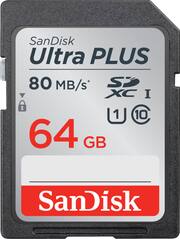
I was looking for a fast 64GB SDXC memory card for a new camcorder I had bought. I narrowed my selection to either this chip or one considerably more expensive. I could discern no difference between the two so I asked for help from an employee. He told me the more expensive one is faster. "No", I said, and pointed out that they had the same rating. After a few more false starts, he said that the more expensive one was a "premium chip". I said, "Thanks, you've convinced me that they are the same so I'll take the cheaper one." I've used it on all the settings on my camcorder and it works perfectly. Max frame rate and max resolution - no problem. I'm glad I bought this one.
Posted by Medrod
- Rated 5 out of 5 stars
Nice card holds enough pics
The disk is great has enough room for all my pics easy to download. I have not reached limit on disk yet.
Posted by BJ710nuc
- Rated 5 out of 5 stars
Great Memory Card
My Sandisk Ultra Plus 64 gig memory card is everything I needed and more. The SDXC card is fast and has lots of storage space for my DSLR camera pictures. If you need fast reliable storage then Sandisk Ultra Plus 64 gig SDXC can deliver for you too.
Posted by RobyWils
- Rated 5 out of 5 stars
Memory Card
Its an awesome memory card because I am not able to just use it on my camera, I use it on my TV, PS3, Laptop and other items that support this card.
Posted by IPino915
- Rated 5 out of 5 stars
Sandisk Memory Card has ample storage space
This product was recommended by Best Buy and it is certainly fulfilling my needs!
Posted by anna2ksmiles