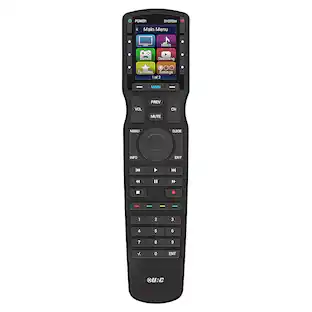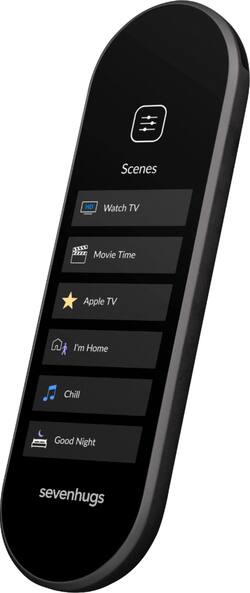
I bought it to get rid of my numerous remotes, with a piece of home automation and it works well for that! The packaging feels premium, as the remote and the heavy base. The screen if well defined, not too bright at night and readable during day. I heard the battery is not that big, I hadn’t any problems with it but I left the remote on the base every time I’m not using it (mainly to find it easily the next time). You can’t point and click with this version U, it is reserved to the X. The configuration is dead simple using the application. Keep in mind that you must have an iOS or Android smartphone to use it, you can’t configure anything on the remote except the Wifi network. The remote is detected quite quickly by the phone. You must be on the same Wifi obviously, double check that your phone is not on 3G/LTE if it doesn’t work. You must keep the remote on during the whole configuration otherwise it seems to loose Wifi! Touch the screen when it dim and everything will be fine. Not ideal but, yeah. If Sevenhugs reads me, please keep the remote on when in configuration mode. I configured my infrared devices in less than 5 minutes (Denon amplifier, Samsung TV, Sony projector and DirectTV receiver) You just have to click “Add a device or service” > choose the kind of device “Infrared” > the category of device “Audio/Projector/TV…” > your region > the device brand and there you can switch to the remote to identify the model automatically or fill it manually. Once done, it setup everything on the remote and you find your new panels dedicated to this device. If the default screen layout doesn’t fit your needs, you can customize it. There is 4 pages you can play with, and even add a button with recorded infrared from your old remote if a command is unknown. I took a few more minutes to link it to my Hue lights (in the “Wifi & bluetooth devices” category) and Spotify account (in the “service” category). Here, the flow is more specific to each device, but the steps are well explained, with pictures, and very simple to follow. It is compatible with a variety of devices, like Apple TV, Roku, TP-Link, Wemo, … and more to come. (And if you do like DIY electronic, I noticed it can run HTTP commands so possibilities are almost endless) The interface is simple, you have a carousel on top of the screen that you can swipe to access all your devices, and a panel related to the current device on the rest of the screen. You can have multiple pages per device, 1 for the light, 2 for Spotify (playlist, controls), and up to 4 for complex devices. You can hide devices you don’t want to see in the carrousel, or group some lights. A must for those lights with multiple bulbs. Once devices are added, you can create scenes. There is 2 types, “Home scenes” and “TV scenes” The first one is “Home scenes”, which is very flexible. You can register actions from different devices, directly on the remote, and replay them later on. For example I created one to shutdown everything in the house and another one to dim the lights in the living room. And the other one is “TV scenes”, which is for me the best feature. It links devices together for a specific usage. As I did buy my devices from different brands I had to use multiple remotes for any basic task. To create to “TV scene” you have to choose an “icon and a name”, the “content source”, the “display”, the “AV receiver”, the “device used for volume”, the “Home scene” to activate when it start and stop Once created, you can - Start the scene, it turns on everything you configured, with the correct inputs source and runs the defined “Home scene” - Then you have a dedicated panel where the volume button acts with the amplifier and the channels with the receiver. Once again you can customize this panel with the button you commonly use. - Stop the scene, it turns down everything and runs the defined “Home scene” If you have a lot of smart devices you could maybe create scenes like - Starts the projector, the amplifier, the speaker and the Xbox to play a game - Dim the lights, open the projector screen, close curtains, starts the projector, the amplifier, the speaker and the blu ray player to watch a film The cons here is that most of my devices are using infrared communication. It means I have to point the remote on TV when I run the scene, otherwise it don’t work. It’s not a problem as most of the time everything is in a cabinet under the TV, but it is something to think about. I use this remote everyday and highly recommend it if you have multiple devices in a room!
Posted by David
I’m honestly surprised by the bad reviews! Setup was so easy, customization was a breeze, and the ability to teach the remote to add new buttons was so intuitive. I know the remote is smaller than most, but it’s honestly nice to have everything easily in reach. I’ve been so frustrated for so long by having 4 remotes, especially since 3 of them were for Samsung devices yet I still needed all of them, but now I can put them all the way and just use this one remote! I definitely recommend buying this!
Posted by stephensandrewlee
This product rocks!! I had no problem setting up all of my devices into the control. Samsung TV and PlayStation were set using the combination of the app/remote, the rest of the TV’s were set up using Wi-Fi as they have Roku built in. The texture on the back of the remote is subtle and provides a good grip without being annoying. Aside from the seemingly endless functionality, it is well built, has good weight, does not feel cheap, with a bright responsive touch display, not once ounce of lag breezing through the menus. In summary, this is an excellent remote that should last for years.
Posted by VictorHH
Customers have good things to say about the Smart Remote U's ease of use, compatibility with various devices, and straightforward setup process. Many appreciate its customizable interface and touchscreen functionality. However, some users find the remote's size too small and express concerns about its battery life and occasional software glitches. A few also mention the price point as a potential drawback.
The vast majority of our reviews come from verified purchases. Reviews from customers may include My Best Buy members, employees, and Tech Insider Network members (as tagged). Select reviewers may receive discounted products, promotional considerations or entries into drawings for honest, helpful reviews.