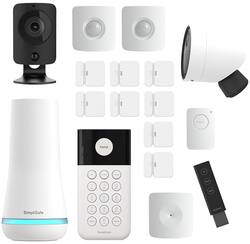
Customers express satisfaction with the ease of use, camera quality, and battery life of this 17-piece home security system. Many also praise the straightforward app and easy installation process. However, some users experienced issues with the motion detection sensitivity, reporting false alarms. Overall, the system receives positive feedback for its comprehensive features and user-friendly design.
The vast majority of our reviews come from verified purchases. Reviews from customers may include My Best Buy members, employees, and Tech Insider Network members (as tagged). Select reviewers may receive discounted products, promotional considerations or entries into drawings for honest, helpful reviews.
I can’t say enough good things about SimpliSafe’s professionally monitored system. Recently, a would-be intruder tried to break into my home, but thanks to SimpliSafe, they didn’t get far! As soon as the alarm went off, their monitoring team contacted the police immediately. Within minutes, the intruder was caught and arrested. The system worked flawlessly, and I felt completely secure knowing I had real professionals watching over my home. From the easy setup to the peace of mind it gives me daily, I’d recommend SimpliSafe to anyone looking for true home security. This system really does what it promises!
Posted by Realtyvet
Having been a 6-year owner of the first generation SimpliSafe Home Security suite-- which included a handful of door, motion and glass break sensors, and the original keypad for arming and unarming your system; I was excited to install the most current iteration of their lineup. Upgrading from the first gen system was fairly simple. And the features I’d grown to love and expect from SimpliSafe seemed to only improve with the updated system. To put it “Simpli”: This kit rocks. *General Installation*: The installation process was a breeze. I was able to login to the SimpliSafe app, select “Replace Base Station”, and from there I then paired up the new one. It took about 10 minutes for the sim card in the new unit to be activated. It uses a sim card, similar to a cell phone, because the base station uses cell phone towers for police dispatch services in the event of a triggered alarm. Next, I powered up the new keypad and set a master pin (which is used to arm and disarm the system). The keypad then guided me through adding all the other sensors. What’s cool is the ability to add custom names to each of the sensors if the pre-named options don’t fit what you’re looking for. You do have to enter in the names using old-school T9 text entry on the keypad, but it works. I used this option to name some of my window entry sensors. The entry sensors were a breeze to install. Once you pull the tabs to activate the batteries, you press a button on each unit which pairs it to the keypad and base station. You can then either mount the sensors with the included screws or the attached M3 adhesive strips. I chose to use the adhesive strips because they had proved sound over the last 6-years with the OG system, and were even easy to remove when I was ready to install this updated system. The motion and glass break sensors are activated and installed in the same way. After installation of all seven entry sensors, and misc. motion and glass break sensors, it was time to install the keypad. This was again as simple as peeling off the wax paper from the M3 adhesive strips and plastering it to the wall, with a level to keep it even of course. *Cameras*: Adding the cameras was a little bit of a different process. There’s a dedicated option in the SimpliSafe app instead of using the keypad. The indoor camera required me to scan a QR code from the SimpliSafe app, which the camera identified and used to connect to my Wi-Fi and from there the Base Station. The outdoor cam, which I decided to place in my garage, required me to charge up a removable and rechargeable internal battery pack. Once that was fully charged and plugged into the camera, the app was loaded up once again. This time instead of scanning a QR code, pressing the sync button on the camera connected it to the base station which then made it recognizable in the app. The cameras both support 1080p resolution, however, they can be limited to lower resolutions such as 480p and 720p. Interestingly, the indoor cam defaulted to 720p while the outdoor cam defaulted to the higher 1080p resolution. I felt fine using these settings given I had placed the indoor cam slightly further form the base station and wireless router, so I figured keeping it at 720p would place less strain on my wireless network and potentially prevent any streaming issues. More on latency later. The indoor cam is an interesting little device. It has an option which I’m glad is on by default, and that is a physical camera shutter that’s activated when your alarm system is disarmed. What’s quirky though is that the motion detection sensor seems to still be active while the shutter is closed, and the system is disarmed/off. I can’t tell for certain, but it makes a clicking noise that I recognize from other motion sensors. I didn’t see a way to limit this feature in the app settings. These devices use Event Base Recording, meaning they aren’t recording 24/7, rather only when motion is detected. What I was happy to learn is that the cameras don’t automatically trigger an alarm when motion is detected. Instead, alerts are sent to your phone for review when the cameras are triggered. This was a concern of mine, but I’m happy knowing that the sirens won’t go off as soon as I pull into the garage after work. Video resolution on the cameras is good. However, I did notice a small bit of latency which seemed to be slightly more than I’ve experienced with similar devices by competitors. But it wasn’t unbearable by any means. Depending on which plan you choose, the cameras will either send you trigger alerts so you can check out the motion they detect, or will record trigger activity which will then be uploaded to SimpliSafe’s cloud storage for 30-days. With the latter option you can go back and view all motion trigger activity from the app. The recording quality was solid, so no complaints there. *Differences Between the Old and New System* Let’s start with the keypad, which is more modern looking with the update. I’ll take that as a positive. Its footprint is slightly smaller than the original, though I never thought that was of much concern. Of note, the new unit doesn’t appear as flush on the wall compared to the old one, but no big deal. The difference between the screens on the two is definitely noticeable. The OG system had a fairly rudimentary always on LCD display. The new one has a nicer screen, but it times out after about 15-30 seconds and goes completely black. It’s motion sensitive though, so just walk by it and the screen turns back on again. I’ll say, having gotten so used to the old version I miss being able to peek my head inside the garage door and see the alarm countdown timer at a glance without having to trigger the screen to turn on. The entry sensors on the new system are significantly smaller than the original version and are much less of an eye sore. The first gen sensors housed some 123 sized batteries, which are pretty large in and of themselves. The new sensors use some CR2032 coin cell batteries to get the size down to where they are. Given the change in batteries used between the old and new systems, it’ll be interesting to see the battery life disparity between the two over the long term. For reference, I only had to change the batteries in the old sensors once in six years. Moving on to the base station: my previous unit was so old, SimpliSafe had to send me a new sim card and antenna so that it would still be functionally capable of connecting to cell towers for dispatch services. The new one should be more future proof. Other than being newer, the updated base station is slightly smaller in size. The unit’s entry sensor alert tones have been updated, and the system voice is new and more modern as well. I do feel like the entry sensor alert volume is slightly more finicky than the previous version. You can adjust the volume levels in the app, but the medium volume setting seemed too quiet whereas the high-volume setting seemed slightly too loud in comparison to the old base station. It’s a small complaint because overall these are nice updates. Final notes: - The old system wasn’t capable of connecting to WiFi networks as another option in addition to cellular dispatch. I’m happy to report that here in the new system there is the option to connect to WiFi that’s presented in the setup process. (This is also needed to install the new cameras.) - Both the old and new base station feature battery backup so you can rest assured that your alarm will still be active should you experience a power outage. If I could rate this 4.5 starts, I would, given some of my very minor complaints mentioned. But since I can’t, I’m rounding up to 5. You can’t go wrong with SimpliSafe’s monitoring. As a longtime customer, I’ve never had an issue with arming or disarming my system, receiving false alarms, or had any problems with the app. So, I expect the new system will hold up just as well as the old one.
Posted by CactusMan
Simpli Safe is really a pleasant surprise. I was on the fence with buying Simpli Safe a while ago when it first came out but now I am a believer..... My friend installed the first generation of their system and he gave mixed comments. His major complaint revolved round sensors not being recognized or having issues. Despite that after my installation I am a believer. I think his issue was that his Wifi was not that great through his house. Setup..... Setup took some time. I had to put on the mind of a thief and ask where were my vulnerable locations in my house and build my system installation from there... With that in mind, deployment of the entry sensors was super easy.... The motion sensors was super easy, the glass break sensor was super easy, both indoor and outdoor cameras were super easy...... I used the Android app to set almost everything up and it was a snap. So bottom line super easy. I suggest that you install the keypad LAST..... As it causes a wrinkle if you install it sooner. This is where it had some conflicts with the app. It bounced back and forth between the app and the pad a few times. After all said and done, the system is easy to use. Keypad and remote FOB. Cameras are pretty clear. Day vision is better than night. Also aperture distance is not that far. So keep that in mind. The key pad was easy to use. Also the app is easy to use. Overall experience was good. Back in the day only a few brick and mortar firms had their tight grip on home security systems. Not anymore. Base also works off of battery and hard wired. I have my base tied to a UPS so I am all set. Anyway, I would highly recommend this system for those who are in the Market. Also adding additional sensors and devices makes this system have endless possibilities. Good job Simpli Safe. I would definitely recommend this product.
Posted by PhillipB