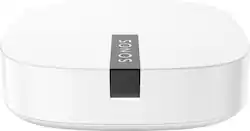
Sonos - Boost Wireless Speaker Transmitter - White
- General
- Brand: Sonos
- Model Number: Sonos BOOST
- Product Name: Boost Wireless Speaker Transmitter
- Color: White
- Warranty
- Warranty - Parts: 1 year
- Warranty - Labor: 1 year limited
- Other
- Product Width: 4.5 inches (The out of box width of the item. Width is measured as the horizontal distance from one side of the item to the other as it would be primarily used or placed.)
- Product Length: 4.5 inches (The out of box length of the item. Length is measured as the longest dimension of the item.)
- Product Weight: 0.425 pounds (The out of box weight of the item.)
- Batteries Included: false (Indicates whether the product comes with the required batteries for its operation.)
- Battery Size: Not Applicable (The battery size required for operation.)
- Number of Batteries Required: 0
- Maximum Wireless Range: 150 feet
- UPC: 878269000853
Enjoy reliable streaming performance with your SONOS speakers using this Sonos Boost wireless transmitter, which features 3 antennas that broadcast 360° signals through walls and ceilings for efficient long-range coverage to most rooms.
- Compatible with most Sonos speakers: To establish a wireless network for your existing speakers.
- Dedicated wireless network: Helps deliver reliable streaming performance.
- Compatible with Apple Music: Gain access to over 30 million songs and let experts handpick music you'll love based on what you listen to.
- Surround-sound capability: Lets you connect PLAYBAR to SUB and rear speakers via the wireless network for an immersive, easy-to-setup system (speakers not included).
- 3 antennas: Broadcast 360° signals through walls and ceilings for efficient long-range coverage to most rooms in your house.
Whats Included
- Boost Wireless Speaker Transmitter
- Owner's manual
A: I have two different Sonos systems. The system with the boost has never experienced a loss of control, the second system has. I cannot confirm the boost is the reason for not losing control. However, it seems to be. Hope this helps.
Q: Can this be the component that connects directly with Ethernet to our internet?
A: The Boost is the only thing that needs to hook up to the Ethernet cable. The speakers hook up to the boost. It is Awesome... I have the boost, the playbar, play1 and play 3
A: You should program your Boost on the 5GHz access point. Your entire Sonos System will live within your boost Port, so wherever your sonos is setup (5GHz or 2.4Ghz) is where it will live.
Q: Can this be used to connect sonos speaker from inside the house to a patio?
A: My understanding is that Boost serves as a modem which places the music source information onto its own frequency. What it can accomplish with regard to your other Sonos components depends on distance and obstacles. Sonos tech support is very helpful and i can usually speak to them without an endless wait.
A: No, you can't. There is no way to input sound to the Boost.
A: Yes, you need an audio source. What I would recommend is getting a SONOS Connect that way you plug into that and then the rest of the speakers would receive the audio signal from the Connect. The Connect is very small and easy to hide, you might even be able to figure out a way to hide it behind the tv. The only way you could get Zero wired would be for Sony to have a Bluetooth connection option and SONOS would have to set it up to where the speakers could connect through Bluetooth, but I do not think that will happen.
People also viewed
 $99.99The price was $119.99
 $59.99The price was $69.99
Today's top picks
 $913.35The price was $1,099.00
 $509.99The price was $699.99