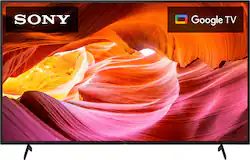
Step into the 4K HDR TV experience with a TV that has four times the resolution of Full HD. Sony’s 4K Processor X1 works behind the scenes to enhance color, contrast, and details in everything you watch. Google TV with Google Assistant makes it easy to browse content from your favorite streaming apps and control your smart home.
Q: What's the difference between this (X75K) vs the X80K?
A: Hi u, Thank you for the inquiry! The X80K have a color enhancement of TRILUMINOS PRO and live color technology while the X75K only have live color technology. The X80K also support dolby vision while the X75K does not. The X80K also supports bravia cam where you can use camera apps using your TV while the X75K does not support camera function. Regards, David
Q: I don't see mounting holes on the back of this TV...is it wall mountable?
A: Yes, and it’s the industry standard with the mounting holes.
A: Hi MBH, Thank you for the inquiry and we do apologize for the confusion. Yes, the TV stand is included. DIMENSION OF TV WITH STAND (STANDARD POSITION) (W X H X D) 49 x 31.13 x 11.5" (1,243 x 790 x 291 mm) STAND WIDTH (STANDARD POSITION) 38" (963 mm) Hope this helps! David
A: Yes. I tried without it (antenna) and no local channels were picked up. I bought antenna (RCA Amplified indoor flat HDTV) and it’s awesome!
Q: Does this tv support You Tube TV and or Fubo TV apps?
A: Hi Dmander, Thanks for the inquiry! Yes, Youtube TV and Fubo TV app are both available on the Google Play store. Hope this helps! Please note: During the initial setup you will have an option to install basic apps such as Youtube TV, Disney+, Apple TV, Hulu, etc. and it will all be listed on the apps section of the Home Menu of the TV. Our powerful processor on this Sony BRAVIA 4K TV uses advanced algorithms to cut noise and boost detail. With an even clearer 4K signal, everything you watch is closer to 4K quality, full of life-like colour and contrast. Images filmed in 2K and even HD are upscaled close to 4K levels of detail by 4K X-Reality™ PRO using a unique 4K database. Google TV with Google Assistant makes it easy to browse content from your favorite streaming apps and control your smart home. Regards, Sam
Q: Where can I find recommended calibration or picture settings?
A: Hi JATRIPPE, Thank you for the inquiry! This link introduces various settings for the features you can configure in picture mode and advanced for the TV. https://helpguide.sony.net/tv/jusltnr3/v1/en-003/07-01_08-01.html If you need further assistance, you can also contact us through our website, please find Sony Electronic’s Support information: Go to sony.com > click on “Support” > scroll down click on “Contact Support” > click on "TV & Projectors" > click on “Chat Now” or you can call us directly in the phone number under “Phone Support” Regards, David
Q: What model year is this TV?
A: Hi Customer, Thank you for the inquiry! The KD55X75K is a 2022 model. Regards, David