Outlet EventEnds Oct. 26. Limited quantities. No rainchecks.Shop now

Main Content
product image

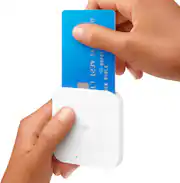
Square - Reader for contactless and chip (1st generation) - White

Model: A-SKU-0485
SKU: 5028800
This item is no longer available in new condition. See similar items below
  • General
    • Brand: Square
    • Model Number: A-SKU-0485
    • Product Name: Reader for contactless and chip (1st generation)
    • Color: White
  • Warranty
    • Warranty - Parts: 1 year
    • Warranty - Labor: 1 year
  • Other
    • Product Weight: 1 pounds (The out of box weight of the item.)
    • Additional Accessories Included: micro USB to USB cable; Square magstripe reader
    • UPC: 855658003848

Accept every way your customers want to pay with the new Square Reader for contactless and chip—EMV chip cards, Apple Pay, Android Pay, other NFC payments, and magstripe cards. The reader connects wirelessly to iOS or Android devices with Bluetooth LE or with USB if you sell with the optional Square Stand. It works exclusively with the free Square Point of Sale app to take care of payments, tipping, inventory, reports, and more. Square Reader for contactless and chip comes with a free Square Reader for magstripe so you can swipe cards the old-fashioned way, too. Pay just 2.6% + 10¢ per swipe, dip, or tap for Visa, Mastercard, Discover, and American Express, with no surprise fees. Square sends deposits directly to your bank account in one to two business days—or you can enable Instant Deposit for 1% per deposit to get your money in seconds. Get a Dock for Square Reader to anchor the reader on your countertop and keep it charged all day.

  • Compatible with iOS devices: Accept EMV chip cards, contactless NFC cards, Apple Pay, and Google Pay from anywhere.
  • Tap and go: Contactless (NFC) payments take just seconds - customers simply hold their device near the reader to trigger payment.
  • Versatile Connectivity: Connect wirelessly to your phone or tablet with Bluetooth LE to take payments on the go or at your counter.
  • Credit card payments: Pay just 2.6% + $0.10 for every tap, dip, or swipe. No long-term commitments or contracts, no monthly fees.
  • Manage inventory, reporting and more: Use with the Square Point of Sale app to manage items, inventory, reporting, and more—all in one free app.
  • Tap or Dip: Customers hold their device near the reader to trigger payment. Or insert chip cards into the reader and leave in place for the duration of the sale.
  • LED indicators: Indicate payment status, pairing readiness, battery charge, and other.
  • Quickly get funds in your account: Get funds in your bank account in one to two business days, or spend the money you earn instantly with Square Card.
  • Compatible with iOS devices: Accept EMV chip cards, contactless NFC cards, Apple Pay, and Google Pay from anywhere.
  • Tap and go: Contactless (NFC) payments take just seconds - customers simply hold their device near the reader to trigger payment.
  • Versatile Connectivity: Connect wirelessly to your phone or tablet with Bluetooth LE to take payments on the go or at your counter.
  • Credit card payments: Pay just 2.6% + $0.10 for every tap, dip, or swipe. No long-term commitments or contracts, no monthly fees.
  • Manage inventory, reporting and more: Use with the Square Point of Sale app to manage items, inventory, reporting, and more—all in one free app.
  • Tap or Dip: Customers hold their device near the reader to trigger payment. Or insert chip cards into the reader and leave in place for the duration of the sale.
  • LED indicators: Indicate payment status, pairing readiness, battery charge, and other.
  • Quickly get funds in your account: Get funds in your bank account in one to two business days, or spend the money you earn instantly with Square Card.
Whats Included
  • Square contactless and chip reader
  • Micro USB to USB cable
  • Square magstripe reader
  • Square contactless and chip reader
  • Micro USB to USB cable
  • Square magstripe reader

Q: If a card has no chip are able to swipe?

A: Yes, as per Square's website, if a card is not chip enabled, you can swipe the card with the mag stripe reader that is included in the box. Furthermore, you are protected as long as you are swiping a card without a chip, whereas, if you swiped a card that IS chip enabled, you would be liable.

Q: How long with the battery last after a full charge?

A: I did a five day trade show convention and charged it once in the beginning before the show and maybe one more time to be on the safe side and had no issues. I had three 10hr days and two 8hr days. If the gives a better idea of usage.

Q: Can you have the mag stripe reader plugged in when using the chip reader? Just so you don't have to keep plugging in and out?

A: Yes you can. We use this for craft fairs and shows and it will take input from either reader. The chip reader is connected by bluetooth so they can both be connected at the same time.

Q: Can I use gift cards with this

A: Yes, you can accept gift cards with a Visa, MasterCard, American Express, or Discover logo as long as the transaction price does not exceed the balance of the gift card.

Q: Do you have to have internet with this device?

A: You have to have internet to process the transaction, but this device uses blue tooth or a direct connect to the device. You can set it to offline processing and then batch them when you have internet, but may get stiffed if you do it that way

Q: Can the chip card reader be charged by using an adapter plugged in to household current that provides a USB outlet port ?

A: Yes - the reader comes with a charging cable that will plug into USB port on computer, AC powered USB power source, or external phone battery charger. We have had the reader run for at least a full day of pretty constant use on one charge.

Q: if you are using the square with your iPhone now what do you need to use the chip reader with your phone now.

A: The chip reader is supposedly safer and some cards won’t allow you to swipe it when they have a chip on their card.

Q: Can you use the Square - Reader with multiple phones?

A: Hey Eboni. The Square reader can be used with multiple devices, but it only connects with one device at a time. To connect your reader to another device, make sure to disconnect it from its current device. To do so, visit your in-app Settings > tap Square Reader > select your reader from the list > tap Forget this Reader twice to confirm.