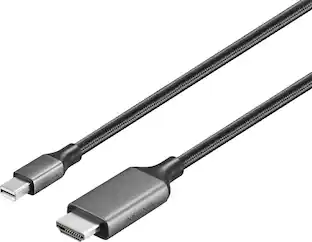
StarTech.com - Mini DisplayPort to HDMI Adapter - 1080p - Thunderbolt Compatible - Mini DP Converter for HDMI Display or Monitor - Black
About this product
Connect an HDMI enabled display to a Mini DisplayPort equipped PC or MAC - Works with any of the Microsoft Surface Pro devices equipped with mDP & Surface docking stations - Works with HDMI TVs monitors & projectors - Resolutions up to 1920x1200 - Mini DisplayPort to HDMI converter / Mini DisplayPort to HDMI adapter / mDP to HDMI adapter / Mini DP to HDMI converter / mDP to HDMI dongle - Thunderbolt 1 & 2 compatible - No software or drivers required - Lightweight design
CREATE A HIGH DEFINITION WORKSTATION
Connect an HDMI enabled display or monitor to a Mini DisplayPort equipped PC or Mac with this Mini DisplayPort to HDMI adapter
ULTIMATE COMPATIBILITY
Not only does this HDMI video converter work with your Mini DP port, it’s also compatible with your Thunderbolt 1 and Thunderbolt 2 supported devices
PLUG AND PLAY
Enjoy hassle-free connectivity with plug-and-play support for this Mini DisplayPort to HDMI monitor adapter
- Connector Type (End 1)Mini DisplayPortConnector Type (End 2)HDMI Type A
Reviews
Rating 3.8 out of 5 stars with 12 reviews
The vast majority of our reviews come from verified purchases. Reviews from customers may include My Best Buy members, employees, and Tech Insider Network members (as tagged). Select reviewers may receive discounted products, promotional considerations or entries into drawings for honest, helpful reviews.

Compare similar products

Connect an HDMI enabled display to a Mini DisplayPort equipped PC or MAC - Works with any of the Microsoft Surface Pro devices equipped with mDP & Surface docking stations - Works with HDMI TVs monitors & projectors - Resolutions up to 1920x1200 - Mini DisplayPort to HDMI converter / Mini DisplayPort to HDMI adapter / mDP to HDMI adapter / Mini DP to HDMI converter / mDP to HDMI dongle - Thunderbolt 1 & 2 compatible - No software or drivers required - Lightweight design

This Best Buy Essentials Mini DisplayPort to HDMI Adapter can mirror or extend the display from your Mini DisplayPort device to an HDMI-supported monitor. It supports resolutions up to 1920 × 1080 for high-quality video (and audio is supported when provided by the source). It has 24K gold plating to help guard against corrosion and loss of quality.

Improve your workstation by connecting your laptop to an external monitor with this Insignia Mini DisplayPort to HDMI Adapter. The adapter supports 4K Ultra HD to prevent loss in quality when transferring between screens. It features a sleek braided cable jacket that flexes and bends to easily connect, and the plug-and-play design makes setup a breeze.
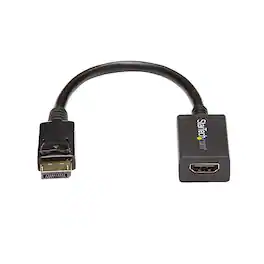
The DisplayPort to HDMI Adapter DP2HDMI2 lets you connect an HDMI-enabled display, monitor or projector to a DisplayPort out port from a computer, desktop or laptop, eliminating the expense of having to upgrade your display for DisplayPort compatibility. Crystal-Clear Picture Quality - The DP to HDMI adapter DP2HDMI2 supports display resolutions of up to 1920x1200, allowing you to take full advantage of HDMI video capability making it ideal for digital entertainment centers, and conference and tradeshow applications. Maximize Your Productivity - Intended for outputting user generated content such as presentations, and work documents, the HDMI video adapter is a passive dongle cable that requires a DP++ port (DisplayPort++), meaning that DVI and HDMI signals can also be passed through the port. This adapter allows for audio pass-through if supported by the video source. The DisplayPort to HDMI Converter is backed by a StarTech.com 3-year warranty and free lifetime technical support.
| Pros for StarTech.com - Mini DisplayPort to HDMI Adapter - 1080p - Thunderbolt Compatible - Mini DP Converter for HDMI Display or Monitor - Black | |||
|---|---|---|---|
| There were no pros for this product— | Ease of use, Price, Compatibility, Performance, HDMI | Functionality, Overall Performance | There were no pros for this product— |
| Cons for StarTech.com - Mini DisplayPort to HDMI Adapter - 1080p - Thunderbolt Compatible - Mini DP Converter for HDMI Display or Monitor - Black | |||
| There were no cons for this product— | Resolution | There were no cons for this product— | There were no cons for this product— |
Specs
Find more like this






Customers ultimately bought
 $29.99The price was $36.99
Explore tech essentials Sponsored
 Labor Day Deal$174.99The price was $229.99
- $29.99The price was $36.99



Discover related products
 $30.99The price was $32.99
 $24.99The price was $27.99
 $59.99The price was $69.99
 $21.99The price was $40.66









Keep exploring
 $11.99The price was $12.99
 $10.99The price was $12.99
 $13.99The price was $19.99