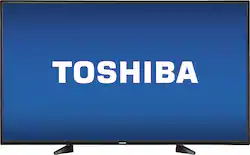
Toshiba - 49" Class - (48.5" Diag.) - LED - 1080p - HDTV
- Key Specs
- Display Type: LED
- Screen Size Class: 49 inches (The group size measurement of a screen. This differs from a screen size measured diagonally from corner to corner.)
- High Dynamic Range (HDR): false (An HDR-compatible 4K TV or other HDR-compatible product displays HDR video content when it's available from sources like 4K Ultra HD Blu-ray Discs and 4K streaming services.)
- Refresh Rate: 60Hz (The number of frames per second the device can produce natively without enhancement. Higher rates help produce smooth, seamless pictures.)
- General
- Brand: Toshiba
- Model Number: 49L420U
- Product Name: 49" Class - (48.5" Diag.) - LED - 1080p - HDTV
- Color: Black
- Model Year: 2016
- Dimensions
- Product Height With Stand: 27 inches
- Product Width: 43.7 inches (The out of box width of the item. Width is measured as the horizontal distance from one side of the item to the other as it would be primarily used or placed.)
- Product Depth With Stand: 10 inches
- Product Height Without Stand: 25.4 inches
- Product Depth Without Stand: 3.7 inches
- Product Weight With Stand: 24 pounds
- Product Weight Without Stand: 23.4 pounds
- Display
- Display Type: LED
- Screen Size: 48.5 inches (Size of the screen, measured diagonally from corner to corner.)
- Screen Size Class: 49 inches (The group size measurement of a screen. This differs from a screen size measured diagonally from corner to corner.)
- High Dynamic Range (HDR): false (An HDR-compatible 4K TV or other HDR-compatible product displays HDR video content when it's available from sources like 4K Ultra HD Blu-ray Discs and 4K streaming services.)
- Curved Screen: false
- Refresh Rate: 60Hz (The number of frames per second the device can produce natively without enhancement. Higher rates help produce smooth, seamless pictures.)
- Brightness: 250 nits (A measure of the total light output.)
- Maximum Contrast Ratio (Native): 1200:01 (The difference between the brightest and the dimmest a screen panel can be. A higher contrast produces more in-depth images.)
- Closed Captioning: true (The text version of spoken audio displayed on the screen. Devices that can display closed captioning typically have the option to toggle the feature on or off.)
- Language(s) Displayed: English, French, Spanish (The available language options for displayed text or captions.)
- Features
- Remote Control Type: Standard
- Smart Capable: false (Smart, or smart-capable devices are able to connect directly to your home network in order to stream content from the Internet, run Internet-based apps, or connect to other smart devices.)
- Indoor Or Outdoor Use: Indoor (Indicates the appropriate environment product was designed to be used in.)
- Text-To-Speech: true (A system that converts language text into speech.)
- V-Chip: true (Feature that blocks television programming if it has a content rating outside of the acceptable rating(s) configured by the user.)
- TV Tuner: Digital (The ATSC TV Tuner is a component built into conventional TV sets or other devices for receiving over-the-air broadcast TV without a cable/satellite box. Digital tuners may be purchased separately and connected to a device if it does not have one built in.)
- Connectivity
- HDBaseT Receiver: false (An input that receives uncompressed HDMI signals over a category cable point-to-point, up to 100 meters, from a transmitter.)
- RF Antenna Input: true (This input is used to connect devices such as antennas or cable boxes to a TV via a coaxial cable.)
- Number Of USB Port(s) (Total): 1 (The total number of USB ports including all generations and versions.)
- Headphone Jack: true (The device features an interface that allows for the connection of headphones.)
- Compatibility
- VESA Wall Mount Standard: 200mm x 100mm (VESA wall mount standards refer to the spacing of screw holes built into a TV in order to fit with standard TV wall mounts. These standards are implemented into most TVs and monitors.)
- Audio
- Built-In Speakers: true
- Surround Sound Supported: DTS TruSurround (Surround sound systems use multiple audio channels and speakers to create an immersive sound experience for the listener. There are also various proprietary technologies that imitate this kind of sound via a device's built-in speakers or soundbar.)
- Speaker Output: 20 watts
- Power
- ENERGY STAR Certified: false (Devices carrying the ENERGY STAR service mark, such as computer products and peripherals, kitchen appliances, and other products, generally use 20% to 30% less energy than required by federal standards.)
- EPEAT Qualified: false (The Electronic Product Environmental Assessment Tool (EPEAT) was designed to provide an environmental assessment tool for purchasers. In order to qualify for EPEAT, a product must meet all 23 required criteria.)
- Estimated Annual Operating Cost: 18 United States dollars (Predicted cost of operating the product under average conditions for one year.)
- Estimated Annual Electricity Use: 150 kilowatt hours (Predicted amount of electricity needed to operate the product under average conditions for one year.)
- Rechargeable Battery (Remote Control): false
- Battery Size (Remote Control): AAA (The battery size required for operation.)
- Number Of Batteries Required (Remote Control): 2
- Number of Batteries Included (Remote Control): 2
- Included
- Stand Included: true
- Box Dimension
- Height: 31.5 inches
- Width: 46.5 inches
- Depth: 6 inches
- CubicDimension: 8789 inches
- Other
- UPC: 600603198229
Discover the brilliance of this Toshiba LED TV. Its Full HD 1080p resolution provides sharp, vivid videos for a richer viewing experience, while its 8W speakers deliver superior sound quality. With its 60Hz refresh rate and rapid response time, this Toshiba LED TV shows fast-moving scenes smoothly and in detailed clarity.
- 48.5" screen (measured diagonally from corner to corner): A great size for a living room or mid-sized home theater space.
- LED TVs perform well in all lighting conditions: They also deliver plasma-like deep blacks and rich colors.
- 1080p resolution for stunning HD images: Watch Blu-ray movies and 1080p HD content at their highest level of detail.
- 60Hz refresh rate: Images refresh 60 times per second for basic performance during fast-motion scenes.
- Enjoy a crisp, detailed picture: The 250 cd/m² brightness and 9 ms response time promote sharp, highly visible images.
- Manage the viewing experience for your kids: The built-in V-chip lets you block content based on program ratings and check ratings of unfamiliar programs.
- Advanced TV sound: Two 10W speakers and DTS TruSurround
- 3 HDMI inputs for the best home theater connection: High-speed HDMI delivers up to 1080p picture and digital surround sound in one convenient cable. HDMI cable not included.
- 1 USB input: Easily connect your digital camera, camcorder or other USB device.
Whats Included
- Toshiba 49L420U; Remote control; Stand; 2 AAA batteries
Product Manuals
A: U can make any tv a smart tv, all u have tondo is get any type of streaming device, such as a smart DVD player, google chrome, Roku stic, etc, such as life. Smart to are a little easier cause it's built in but setting a wifi DVD player is not that hard. I have 4 tvs in my house and only one is smart, it's a lot better of an option than paying for a smart tv. There's a lot of other parameters I would base my tv buying choices on.
Q: How far are the feet on the stand separated by?
A: 27 inches end to end 21 inches closest length
Q: Can this tv be wall mounted?
A: Short answer - Yes with the right wall mount. The Toshiba 49" has a VESA 200X300 wall mount pattern (rare) - Check out the VESA Pattern your mount will support. 200x200 and 300x300 will not necessarily support 200x300. Eyeball the specifications and call the mounts makers tech support number before buying the mount - do your homework DETAILS Yes, but with some potential difficulty. I bought it (49" Toshiba LED) and a Kanto PS300 Full Motion Wall Mount. I got the TV (open box/geek squad certified) and the mount and I am trying to see how things line up when I discovered they don't! For some ungodly reason, Toshiba opted to go with the rarer 200x300 Vesa pattern rather than 300x300 or 400x400, and my super solid heavy duty mount was not compatible. I called Kanto and spoke with tech support. I was told that 200x300 wasn't supported. I asked if I could make it work, and the guy looked up Vesa wall mount adapters, and came up with Arrowmounts AM-201D Vesa 400 x 200 (looks like a mask). The adapter plate had the 200x300 holes and would mate to the Kanto PS300. To my amazement, tech support guy says, what's your address I'll ship you one...whaaaaaaat?. He said, I got you. Part got to me in a week and mated right up using the screws and bolts that came with the adapter for mating and the shorter M6 screw from the mount to the TV. The mount (mounted in concrete w/ lag shields) held my weight (250 lbs) .. super strong and heavy duty. --Long story short-- Check the Vesa pattern the mount supports and make sure it supports 200x300 OR be prepared to get an adapter plate. Try finding a PDF for both TV and Mount and try figuring out if mount is compatible. I'd rather get a heavy duty mount and adapt it than get a weaker mount that happened to support 200x300. Thank You to Jason at Kanto, due to your high quality product and your taking care of your customer (me!), you have created a loyal customer, and I couldn't recommend you more! TV and mount worked out beautifully in the end.
A: I don't know if there is a "number". But I will tell you is that I currently have a 40-inch LCD Toshiba that I purchased 11 years ago. No problems with the TV and the picture is great.
Q: Can I get Netflix with this tv?
A: Yes with a Roku stick, etc. This is not a SmartTV.
Q: Cable ready?
A: Absolutely Cable ready.
Q: My 49" has tiny base mount screws that do not reach. Am I missing something?
A: My grandsons and I had a really hard time figuring this out too. We finally laid it facedown on the bed and I turned the feet every which way when all of a sudden it clicked, slid into place easily and the screws fit perfectly. This is one for an old grandma.
Q: Can you play movies from a hardrive on this TV?
A: You can't play movies from a hard drive directly on this TV. However, you can play video from a computer that has an HDMI port on this TV. (If you own a laptop computer that's less than 5 years old, it probably has an HDMI port.) If you connect that computer to your TV set with an HDMI cable, and then plug the hard drive into one of the computer's USB ports, then you can use the computer to play video from the hard drive on the TV.
People also viewed
 $579.99The price was $1,299.99
 $1,469.99The price was $2,499.99



Today's top picks
 $499.99The price was $749.99
 $199.99The price was $249.99
 $789.99The price was $1,049.99